
Renderosity Forums
Search Results: Threads
1 threads found!
| Thread | Author | Replies | Views | Last Reply |
|---|---|---|---|---|
| Tecknophyle | 24 | 1034 |
Search Results: Comments
9 comments found!

Quote - 3) Please Please Please take a look at the Poser galleries here and stop listening solely to the Poser forums. How many "I want total photorealism" renders do you see in the galleries? THOSE are the people in the gallery are actually buying stuff.
That's a lousy metric, if for nothing else than this isn't the only place people post images. In the last two years and a bit, and I just did a count from the gallery on my computer, I've posted over 2700 images online, none of them here. There's maybe a hundred images that haven't been posted publicly (they've been done for someone). And a few I did for commission (under another name). And they use subsurface scattering, and indirect lighting, and all the other "photorealism" tools you apparently are insisting are a waste of time.
Thread: Has anyone seen this issue regarding bump maps? | Forum: Poser - OFFICIAL
First things that came to mind, and yes, I checked.
I'm at work so I don't have the images, but last night I rendered once, getting the same results as shown above, and then did one thing: I moved the character down the hall. Didn't change a thing at all except for the position of the character and camera. And zero problems with the resulting render even though, as I said, absolutely nothing else changed.
I was mostly posting this to see if anyone else had seen the same sort of issue, or if anyone had any idea what I might have been doing wrong. Now it's looking like it's one of those weird results that can emerge from the overall rendering math in a certain specific situations.
Thread: Has anyone seen this issue regarding bump maps? | Forum: Poser - OFFICIAL
Quote - As bumps usually are relative to the object, turbulence is not a good idea when the object moves around. Turbulence is meant for scene-wide effects like atmosphere, and to drive dirt-distributions on walls to avoid repetitive patterns from tiling maps.
Turbulence is used in EZSkin2 for bump, so, yeah. And the particular shader I was using for the character was one (except for the actual texture map) that was pretty much an exact copy of the one BagginsBill came up with when subsurface scattering was introduced in Poser, and which I've been using ever since PP2012 came out, so years. This particular thing, as I pointed out, has never happened before.
Also: turbulence produces a grayscale map which, in this case, gets fed into the math functions which go into the bump. If it's just a matter of the bump details on the skin being slightly different, that's not an issue: the bump is supposed to be a random thing anyway, so one random that looks slightly different from another random isn't a problem. But if you look at the image, the problem is that the bump is magnified (aside from symmetrical), which shouldn't be possible because even if the grayscale data the turbulence is feeding into the equation is different in its final result, it should still all be within the same range given that nothing else in the equation or the turbulence node settings has changed.
The fact that I rendered the exact same thing in PP2012 and didn't get the effect, having changed nothing in the shader whatsoever, suggests something else is wrong.
Thread: Has anyone seen this issue regarding bump maps? | Forum: Poser - OFFICIAL
...and even weirder, it's due to part of the set. I move the character to another part of the scene and render, there's no issue.
My first thought would be something due to the lights in that part of the set, but they're identical to the lights in the part of the set where there's no problem.
Thread: Has anyone seen this issue regarding bump maps? | Forum: Poser - OFFICIAL
Okay, now this is freaking weird. I've narrowed the problem down to the set. I just loaded another scene which used the same settings and again the same contoured look. But that same model in another set doesn't show the contouring. This is a bit freaking weird.
Thread: Has anyone seen this issue regarding bump maps? | Forum: Poser - OFFICIAL
There is no bump map (sorry for the sloppy language): it's a procedural using turbulence. And absolutely nothing changed in the settings except the installation of SR2. And, as I pointed out, even were it a bump map, it's the exact same shader, model and render setting shown in the other two images that don't show the effect.
Thread: Has anyone seen this issue regarding bump maps? | Forum: Poser - OFFICIAL
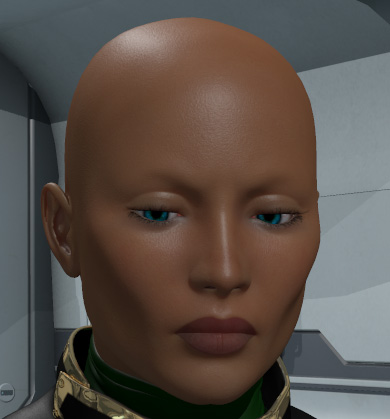
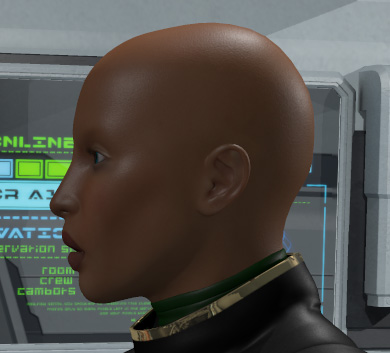
Does anyone have any idea what is going on here?
Thread: Has anyone seen this issue regarding bump maps? | Forum: Poser - OFFICIAL
Thread: I know this effect can be done in Poser... | Forum: Poser - OFFICIAL


Privacy Notice
This site uses cookies to deliver the best experience. Our own cookies make user accounts and other features possible. Third-party cookies are used to display relevant ads and to analyze how Renderosity is used. By using our site, you acknowledge that you have read and understood our Terms of Service, including our Cookie Policy and our Privacy Policy.
Thread: How Poser Pro 2016 could make a ton of new buyers | Forum: Poser - OFFICIAL