
Renderosity Forums / Poser Python Scripting
Welcome to the Poser Python Scripting Forum
Forum Moderators: Lobo3433, Staff Forum Coordinators: Anim8dtoon
Poser Python Scripting F.A.Q (Last Updated: 2026 Mar 06 2:31 pm)
Check out the new Poser Python Wish List thread. If you have an idea for a script, jot it down and maybe someone can write it. If you're looking to write a script, check out this thread for useful suggestions.
Also, check out the official Python site for interpreters, sample code, applications, cool links and debuggers. This is THE central site for Python.
You can now attach text files to your posts to pass around scripts. Just attach the script as a txt file like you would a jpg or gif. Since the forum will use a random name for the file in the link, you should give instructions on what the file name should be and where to install it. Its a good idea to usually put that info right in the script file as well.
Checkout the Renderosity MarketPlace - Your source for digital art content!

Subject: Moving morphs between different figures


Cinema4D Plugins (Home of Riptide, Riptide Pro, Undertow, Morph Mill, KyamaSlide and I/Ogre plugins) Poser products Freelance Modelling, Poser Rigging, UV-mapping work for hire.

I'd be interested to see any results from things like v1/v3.
Cinema4D Plugins (Home of Riptide, Riptide Pro, Undertow, Morph Mill, KyamaSlide and I/Ogre plugins) Poser products Freelance Modelling, Poser Rigging, UV-mapping work for hire.
Wahoo! It works. Great news.
What is the timing like for the actual delta transfer?
===========================sigline======================================================
Cage can be an opinionated jerk who posts without thinking. He apologizes for this. He's honestly not trying to be a turkeyhead.
Cage had some freebies, compatible with Poser 11 and below. His Python scripts were saved at archive.org, along with the rest of the Morphography site, where they were hosted.
*"And here's the script.. note that I didn't write the file-reading code yet."
*Er, I'm confused, then... how'd you transfer the morphs for the pictured examples? Did you just pass the results without saving to the file and reading from it?
Hey - do you remember the bit about Ockham's Rosie and Paris? He seemed quite certain that meshes with different shapes would require his normalization method (or an equivalent), and my experience with the vert-to-vert script seems to have borne this out....
===========================sigline======================================================
Cage can be an opinionated jerk who posts without thinking. He apologizes for this. He's honestly not trying to be a turkeyhead.
Cage had some freebies, compatible with Poser 11 and below. His Python scripts were saved at archive.org, along with the rest of the Morphography site, where they were hosted.
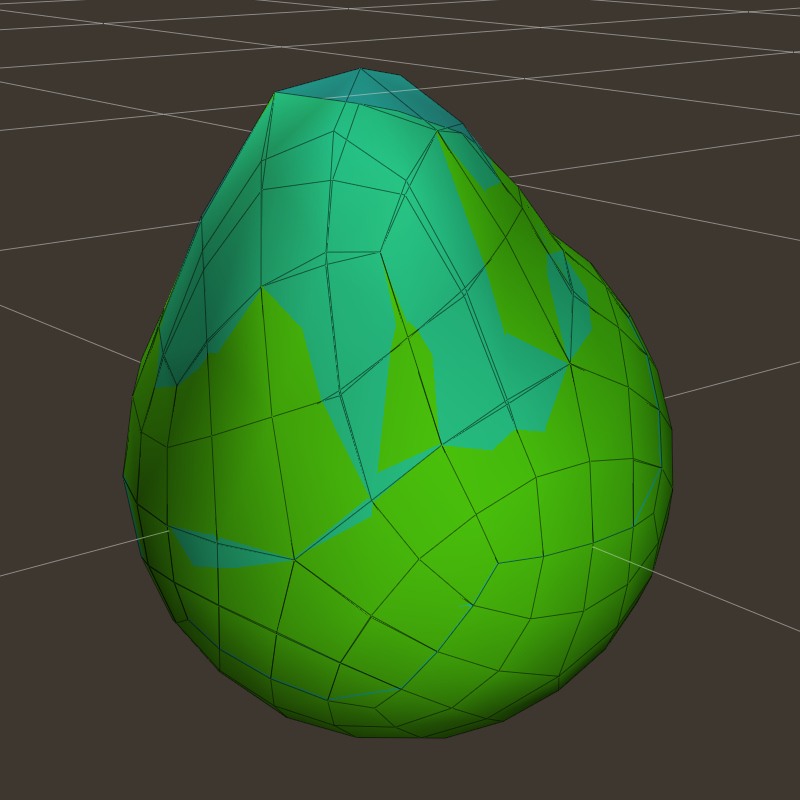
cyan - original hi-res prop, bulge morph created with magnet. morph was then transfered to lo-res mesh
green - hi-res prop that had the morph transfered to it from the lo-res mesh (as seen in the previous image)
...note the 'peak' at the top of the original transparent cyan mesh... this is the area that the lo-res mesh didn't have the resolution needed to replicate the morph in fine detail.
Cinema4D Plugins (Home of Riptide, Riptide Pro, Undertow, Morph Mill, KyamaSlide and I/Ogre plugins) Poser products Freelance Modelling, Poser Rigging, UV-mapping work for hire.
I didn't put any timing check around the transfer code yet... with this few vertices, it wasn't more than like a second anyway.
And yes.. I just called the transfer routine after calling the weight calculation routine (take a look at the code).
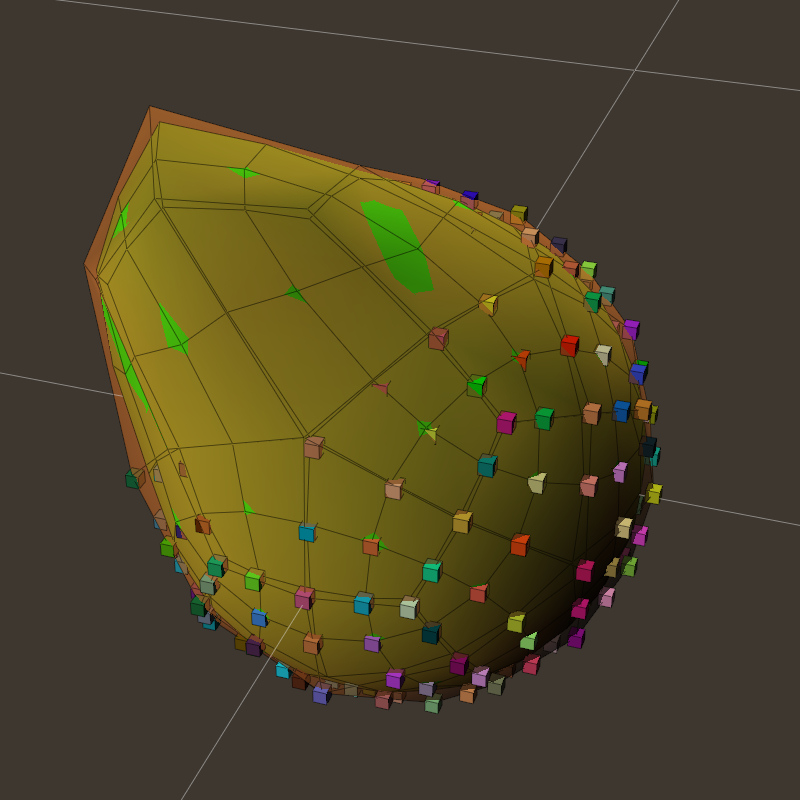
I recall (vaguely) the Rosie/Paris discussion, but I'd have to go back and refresh my memory. Just keep in mind (looking at the first 2 images):
-
the vertices lined up exactly in the first image, so those vertices (on the lo-res mesh) moved exactly as far as the matching ones on the hi-res mesh. Poke-through is expected (this is morph-matching, not shape-matching or no-poking).
-
In image 2 (lo-res morph transfered to hi-res mesh), 'some' of the vertices lined up exactly and so those moved exactly as far a the lo-res verts. The verts in-between didn't "flatten out" or piggy-back on the lo-res verts... they moved a proportionate amount and achieved a 'smoother' overall shape than the lo-res mesh (due to the higher resolution of the mesh).
...so all in all, I'm pretty satisfied (so far) that it's doing what it's supposed to do. Whether or not it's ultimately better or worse than the earlier methods remains to be seen, but I think it'll hold up well.
Cinema4D Plugins (Home of Riptide, Riptide Pro, Undertow, Morph Mill, KyamaSlide and I/Ogre plugins) Poser products Freelance Modelling, Poser Rigging, UV-mapping work for hire.
...related to the last image... this is not exactly in scale, but analogous to taking a 16-bit color image, reducing the resolution to 256 colors, then increasing it back to 16-bit color... you loose some detail in the process  .
.
Cinema4D Plugins (Home of Riptide, Riptide Pro, Undertow, Morph Mill, KyamaSlide and I/Ogre plugins) Poser products Freelance Modelling, Poser Rigging, UV-mapping work for hire.
It looks like it conquers the basic uphill/downhill problem. Rosie and Paris (I like the goofy name :-P) should be needed if and when the meshes don't correspond as well as in this example (as with V1 and V3, in my experience). So I wouldn't expect V1-V3 to work as well until we normalize... assuming the basic issues of the previous script still pertain to this one (and the delta transfer is not really that different, just more refined in this case).
These are very encouraging results, indeed. :)
I've glanced at the code, but I need to sleep before I'll make much sense of anything I read, at all.
This is where Angelouscuitry should pop in and be excited. :) I think we've chased everyone away from the thread, though, with all our technical blather.
Excellent work! I never would have gotten this far, I fear. I'm still struggling with some of the ideas you've mastered, here.
===========================sigline======================================================
Cage can be an opinionated jerk who posts without thinking. He apologizes for this. He's honestly not trying to be a turkeyhead.
Cage had some freebies, compatible with Poser 11 and below. His Python scripts were saved at archive.org, along with the rest of the Morphography site, where they were hosted.
Quote - It looks like it conquers the basic uphill/downhill problem. Rosie and Paris (I like the goofy name :-P) should be needed if and when the meshes don't correspond as well as in this example (as with V1 and V3, in my experience). So I wouldn't expect V1-V3 to work as well until we normalize... assuming the basic issues of the previous script still pertain to this one (and the delta transfer is not really that different, just more refined in this case).
I need to go re-read that discussion before I comment on whether or not it's needed or applies.
Quote - I've glanced at the code, but I need to sleep before I'll make much sense of anything I read, at all.
No need to read/understand it for now... just make a morph named 'bulge' on the source mesh and run the script if you want to test it.
Quote - This is where Angelouscuitry should pop in and be excited. :) I think we've chased everyone away from the thread, though, with all our technical blather.
Hehe.. I was thinking the same thing.
Quote - Excellent work! I never would have gotten this far, I fear. I'm still struggling with some of the ideas you've mastered, here.
I've thought about this process from time to time in the past, but your working on it made me sit down and think about it, so the reverse is true as well!
Cinema4D Plugins (Home of Riptide, Riptide Pro, Undertow, Morph Mill, KyamaSlide and I/Ogre plugins) Poser products Freelance Modelling, Poser Rigging, UV-mapping work for hire.
Computing weight table...
Bad Edge Data!
Bad Edge Data!
Bad Edge Data!
Bad Edge Data!
Done in 0.000266667207082 minutes.
Writing weight table [ cube_1_to_cube_3.vwt ]...
Found 54 matches from 54 verts to 6 poly
Here's something. I just tested with the two cubes which have split edges, and received these warnings after all verts were matched. No morph was generated.
No, hold on a second... I used the wrong version for this test. I ran the one I posted earlier. But the errors still seem to show that split "hard" edges are somehow proving a problem for the weighting code....
Testing my spheres with the current version now....
===========================sigline======================================================
Cage can be an opinionated jerk who posts without thinking. He apologizes for this. He's honestly not trying to be a turkeyhead.
Cage had some freebies, compatible with Poser 11 and below. His Python scripts were saved at archive.org, along with the rest of the Morphography site, where they were hosted.
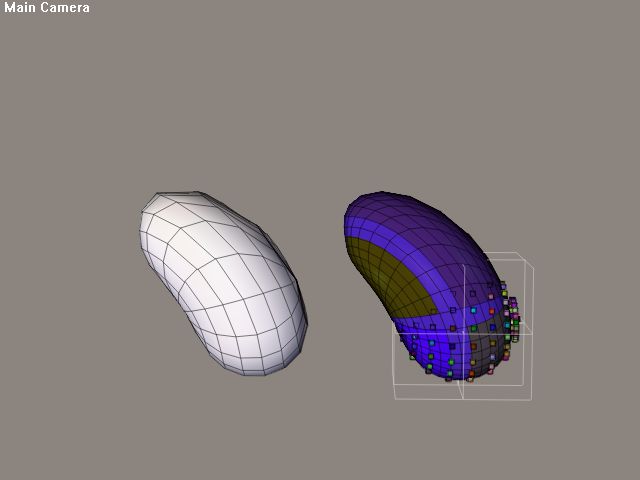
It works!
Edit:
Your most recent script still generates the bad edge data error with the split cubes, however....
But the above image makes me very happy. :woot:
===========================sigline======================================================
Cage can be an opinionated jerk who posts without thinking. He apologizes for this. He's honestly not trying to be a turkeyhead.
Cage had some freebies, compatible with Poser 11 and below. His Python scripts were saved at archive.org, along with the rest of the Morphography site, where they were hosted.
Cool! Just out of curiousity, how well does the old vertex method do that morph?
Hmmm.. I hadn't checked (or thought about) any split-edge meshes yet, I'll look into that.
Cinema4D Plugins (Home of Riptide, Riptide Pro, Undertow, Morph Mill, KyamaSlide and I/Ogre plugins) Poser products Freelance Modelling, Poser Rigging, UV-mapping work for hire.
Ok, I finally found my way back through to the Rosie and Paris discussion and...
As best I can understand that, what it tries to account for is relative sizes of meshes. I'm not sure in what context he was doing that, but let's say you have a tiny-headed pixie figure and a huge-headed ogre figure that had a 'really long nose tip' morph that you wanted to transfer to the pixie. If the morph moved the tip of the nose outward say 13 Native Poser Units (or whatever), that might be 4-5 times too far on the pixie to get a similar look.
I'm not sure that would help a great deal, relative to the implementation details vs just not setting the dial to 1.0 where it's an issue .
Cinema4D Plugins (Home of Riptide, Riptide Pro, Undertow, Morph Mill, KyamaSlide and I/Ogre plugins) Poser products Freelance Modelling, Poser Rigging, UV-mapping work for hire.

*"The Python Console is an interactive command prompt that allows you to type Python commands and see the output immediately." (According to Google. My Python book never uses the term....) *
Right, "Python Console" means - with a stand alone installation - just type Python on a command prompt. Python will come up with a command prompt where you can type Python instructions, load libraries or source code to "inspect" (a special modul to analyse python code) or even debug.
For GUI driven installations IDE has a Python Console, too (Python Shell).
*table = alterarray( table )
...(and have alterarray() return the passed in value) could potentially cause broken references for the garbage collector.*
**
Yes Yes Yes!**
Returning a pointer from a function that is used later (result stored in another var) is the only chance to get "memory leaks" under special conditions. "Memory leak" may be the wrong term because Python doesn't loose memory. Not really. Quite the contrary: Python tries to keep and protect all pointers your script is using :)
To the script you are working on:
Perhaps it is a good idea to wrap things into classes soon.
I'm sure you remember: Classes are datapackages carrying private functions to manipulate this data (may help to avoid alien pointers :) ).
Using classes can speed up things and (mostly) the logic keeps clean.
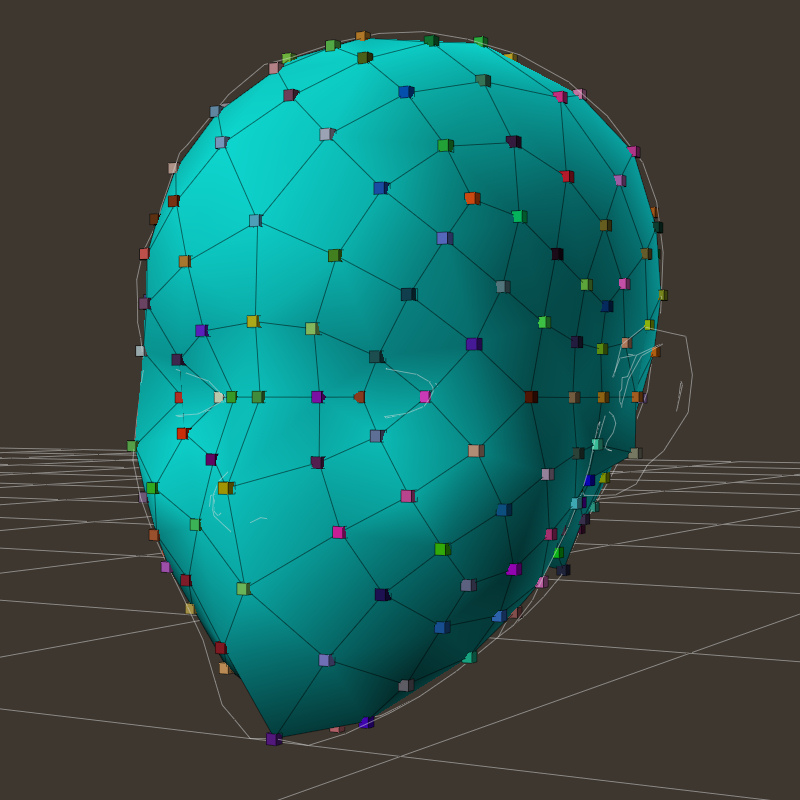
Just for fun, I added a crude shape-matching routine based on the intersection points that the script generates to do the weighting (simply projects the points out until they hit something). This image is the hi-res (relatively speaking) sphere I was using in the earlier images, shape-shifted into the head I used in earlier images.
Cinema4D Plugins (Home of Riptide, Riptide Pro, Undertow, Morph Mill, KyamaSlide and I/Ogre plugins) Poser products Freelance Modelling, Poser Rigging, UV-mapping work for hire.
Cage, on the Bad Edge Data! <--> Split-edged Cube problem... just off-hand, that's not going to work. The various vertex-distance-check optimizations rely on the fact the there's only one vertex at that spot, connecting all the faces at that spot (and therefore it's normal is the average of those face normals). With the edges split, can easily get a false-hit on a face that's pointing in an entirely bad direction (I know that we're testing directions up in the linecast_loop() code, but the compute_weighting() routine is trying to 'second guess' what happened up there in some cases).
There may be other issues involved as well. I'm not sure that we need to worry about split-edged meshes (vs the amount of trouble it might be to account for them). I'll give it some more cycles when I have a few free ones
Cinema4D Plugins (Home of Riptide, Riptide Pro, Undertow, Morph Mill, KyamaSlide and I/Ogre plugins) Poser products Freelance Modelling, Poser Rigging, UV-mapping work for hire.
I know that Cage had a Class version of this earlier, but ran into some sort of memory leak problem at the time, but we could look into that again.
Just moving functions into classes dosn't help mutch. If you have wrong behaviour in one of your function this missbehavier is still present after moving/wrapping all the functions to a class.
Found this in your source:
for j in range(len(pe)):
e = pe[j]
if worldspace:
v1 = geom.WorldVertex(e[0])
v2 = geom.WorldVertex(e[1])
else:
v1 = geom.Vertex(e[0])
v2 = geom.Vertex(e[1])
If things like this are exceuted often, you can do it this way:
if worldspace : vertfunc = geom.WorldVertex<br></br>else : vertfunc = geom.Vertex<br></br><br></br>for j in range(len(pe)) :<br></br> v1 = vertfunc(e[0])<br></br> v2 = vertfunc(e[1])<br></br>
vertfunc is a pointer to one of the both functions. So it needs not more time to call the function but you save the time if ... then ... else... needs.
Function pointer assignments - cool, thanks. BTW, does map() have anything to do with that? I couldn't really tell exactly what it does from the description you posted above, or the samples I found.
Cinema4D Plugins (Home of Riptide, Riptide Pro, Undertow, Morph Mill, KyamaSlide and I/Ogre plugins) Poser products Freelance Modelling, Poser Rigging, UV-mapping work for hire.
ar.append() needs mutch time with larger arrays. Before Python is able to append data to an array it has to make sure there is enough space available. If not, the whole array is moved to another, bigger, fresh allocated memoryblock (using standard malloc C-functions).
So, better use more Numeric arrays to speed things up :)
*"ar.append() needs mutch time with larger arrays. Before Python is able to append data to an array it has to make sure there is enough space available. If not, the whole array is moved to another, bigger, fresh allocated memoryblock (using standard malloc C-functions)."
*I couldn't find an append method for the version of Numeric used by Poser. Are you referring to the standard list.append() method?
Any organizational pointers would be just fine with me. (Classes, handling memory, implementing Numeric, etc.) Thank you for complimenting both of us, but Spanki deserves it and I really don't. :-P I've just bumbled into something and I'm trying to go as far with it as possible. A lot of it's way over my head, now.... (I still fail to fully grasp the reference handling and how it can be rearranged to avoid leaks....)
Spanki - I found the way Ockham spoke of "fat" and "skinny" to be misleading, too, in that thread. What I found was that transferring deltas downhill required that the deltas be normalized; otherwise, the mesh exploded. Unless the weighting somehow helps us avoid that here, I still assume we may need Ockham's process. But you are now the expert. :)
Also, on the split mesh issue. Wouldn't the same problem obtain in a head mesh? We can't assume there won't be overlapped vertices. The innermouth and teeth of both V1 and V3, for instance, seem to contain overlapping vertices (part of the trouble I had with x-symmetry). I guess I should go ahead and test V1 and V3....
The old vertex method couldn't be tested on the prop morphs without re-tooling the script to test it. It was set up only to use figure actors - body parts. When constructing the GUI for this one, I plan to leave that open, so one can compare actors of any sort.
===========================sigline======================================================
Cage can be an opinionated jerk who posts without thinking. He apologizes for this. He's honestly not trying to be a turkeyhead.
Cage had some freebies, compatible with Poser 11 and below. His Python scripts were saved at archive.org, along with the rest of the Morphography site, where they were hosted.

Attached Link: http://numpy.scipy.org/numpydoc/numdoc.htm
> Quote - Do you have a link for docs for Numeric? I should go read up on it.See attached link.
Link to Sourceforge page is -> http://sourceforge.net/projects/numpy
Oh, sorry, I forgot you are a C++ programmer. Function pointers are available in Python and very usefull.
Forget map() for a while. It's not really usefull here. It's not possible to manipulate a list handed over to map directly. map() is usefull to handle data contained in large lists. Basically:
for data in array:
call_function(data)
map(call_function, data) is faster.
Nice is this:
mylist = (1,2,3,4,5,6,7,8,9)
myarray = []
map(myarray.append, mylist)
print myarray
I found a numeric-manual.pdf last night, but I can't seem to find the URL for it with Google....
Still looking....
Edit:
This looks like a slightly earlier version of the document I found:
===========================sigline======================================================
Cage can be an opinionated jerk who posts without thinking. He apologizes for this. He's honestly not trying to be a turkeyhead.
Cage had some freebies, compatible with Poser 11 and below. His Python scripts were saved at archive.org, along with the rest of the Morphography site, where they were hosted.
Quote - I found a numeric-manual.pdf last night, but I can't seem to find the URL for it with Google....
Still looking....
Edit:
This looks like a slightly earlier version of the document I found:
[
http://numpy.scipy.org/numpy.pdf](http://numpy.scipy.org/numpy.pdf)
Isn't numpy a later extension/replacement for Numeric? That does not exist in Poser Pythin? or am I mis-remembering the discussion on that?
Cinema4D Plugins (Home of Riptide, Riptide Pro, Undertow, Morph Mill, KyamaSlide and I/Ogre plugins) Poser products Freelance Modelling, Poser Rigging, UV-mapping work for hire.
Ahh. Anyway, I don;t even have stand-alone Pythin installed here yet (~duck~)... but I'm reading through some of the Python-newbie-docs now (hey, cool - it tells how to write C-extensions...).
I'll probably go ahead and set up the stand-alone here, just to have the examples, console and various reference materials that come with it, if nothing else. It might be fun at some point to just move some of this mess over to a C module.
Cinema4D Plugins (Home of Riptide, Riptide Pro, Undertow, Morph Mill, KyamaSlide and I/Ogre plugins) Poser products Freelance Modelling, Poser Rigging, UV-mapping work for hire.
Quote - Isn't numpy a later extension/replacement for Numeric?
Yes, but the SF site has the Numeric code going back several versions (but 21.0 is now only available from the CVS).
numpy has also been superceded by scipy (http://sourceforge.net/projects/scipy)
Quote - That does not exist in Poser Pythin?
Correct, numpy isn't installed in Poser. You might be able to install it without conflict (don't know for sure without checking).
Quote - It might be fun at some point to just move some of this mess over to a C module.
To avoid a lot of hand coding use SWIG -> http://sourceforge.net/projects/swig
Anything important to know about Python itself and how writing extensions for Python in C is included in the standard Python distribution (from a programmers point of view).
Very easy to have: Downloading, installing, clicking "Yes" three or for times (don't remenber exactly) - works. No hussel. Just a few minutes of your time.
Spanki - I just noticed your shape-matching results. That, alone, is fantastic! Wow! No more kludgy efforts with the clothroom to try to fit clothing to a figure (presumably?).
*"Cage, on the Bad Edge Data! <--> Split-edged Cube problem... just off-hand, that's not going to work. The various vertex-distance-check optimizations rely on the fact the there's only one vertex at that spot, connecting all the faces at that spot (and therefore it's normal is the average of those face normals). With the edges split, can easily get a false-hit on a face that's pointing in an entirely bad direction (I know that we're testing directions up in the linecast_loop() code, but the compute_weighting() routine is trying to 'second guess' what happened up there in some cases)."
*I'm still concerned about how the above might relate to split mesh vertices in a figure. The meshes are often split at some materials zones, such as teeth, inner mouth, eyelashes, or finger- and toenails. There could be overlapping vertices at these zone edges in such cases. I would assume we'd need to be able to contend with that....
Or have I misunderstood your comments?
A C extension! Yes! Right on! Go with it! Except there you wander into areas where I simply can't follow.... Which is not a big deal; you've gone to such places already. :-P
===========================sigline======================================================
Cage can be an opinionated jerk who posts without thinking. He apologizes for this. He's honestly not trying to be a turkeyhead.
Cage had some freebies, compatible with Poser 11 and below. His Python scripts were saved at archive.org, along with the rest of the Morphography site, where they were hosted.
The shape-matching thing is just an extension of what we were already producing (the intersection points - in addition to placing test box props there, it just calls a routine to make a morph out of those values).
On the split vertices issue... for the most part, the vertices are not split at material zone boundries (there's no reason forcing a split there), but you are correct that there may be cases where there happen to be multiple vertices in a confined area. This is why I've been leary of leaving any of those vertex-matching optimizations in the code, but the one in check_bounds() is there to work around a math issue, so it's not really an optimization.
At some point, I want to go back and try to track down exactly what the issue is and whether or not we've already addressed it (it might be the multiple-axis-at-zero thing in the polyplanes() routine, for example).
Cinema4D Plugins (Home of Riptide, Riptide Pro, Undertow, Morph Mill, KyamaSlide and I/Ogre plugins) Poser products Freelance Modelling, Poser Rigging, UV-mapping work for hire.
Here you go...
<pre style="border-right:#000000 1px solid;padding-right:2mm;border-top:#000000 1px solid;padding-left:2mm;padding-bottom:2mm;margin:2mm;border-left:#000000 1px solid;padding-top:2mm;border-bottom:#000000 1px solid;background-color:#aefe50;">

###====================================================================================###
# transfer_shape() - [NOTE: This is for testing (curiosity) purposes and may not ultimately
#                           be useful... if it is, then we'd need to store some different
#                           data.
#
#                    [NOTE 2: This only transfers the shape - it's not a NoPoke routine.
#
# Transfers the shape of the source actor to the destination actor, as a morph based on the
# vertex-->surface intersection points computed in linecast_loop().
###====================================================================================###
def transfer_shape(actDst, morphName, xpolys, xpoints):

        actDst.SpawnTarget(morphName)
        parm = actDst.Parameter(morphName)

        geomDst = actDst.Geometry()
        for vi in range(len(xpolys)):
                if xpolys[vi] != -1:
                        vm = coord_list(geomDst,vi)     # get mesh vertex
                        vx = xpoints[vi]                        # get intersection point
                        vd = vecsub(vx,vm)                      # get delta
                        parm.SetMorphTargetDelta(vi, vd[0], vd[1], vd[2])

        return
...you can call that after comming back from linecast_loop()
Cinema4D Plugins (Home of Riptide, Riptide Pro, Undertow, Morph Mill, KyamaSlide and I/Ogre plugins) Poser products Freelance Modelling, Poser Rigging, UV-mapping work for hire.
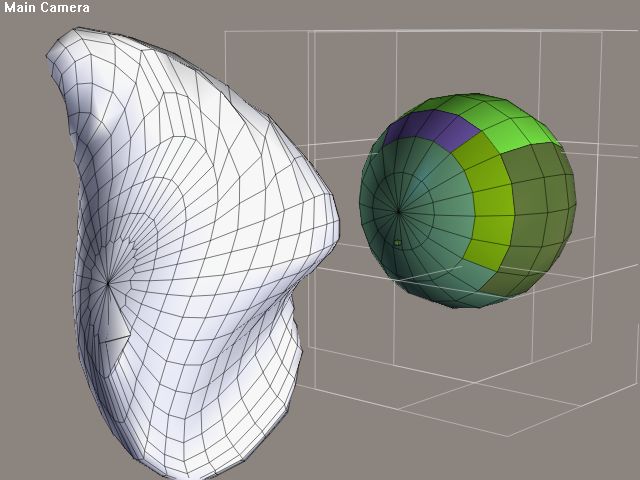
I'm encountering a testing situation in which a vertex is failing to find a match at an apparent edge intersection.
The attached image shows the "miss" box for the failed vertex. The predominant zone coloration is for polygon region 2, which is the region into which th efailed vertex falls. As you can see, the regions match up and there should be a correlation - but there isn't. This problem exists going uphill with the two spheres. The coordinates for the problem vertex are:
Vert 230 [-0.04824100062251091, 0.036967001855373383, 0.0] Region: 2
The target mesh has the resulting morph applied in reverse, to highlight the position of the dropped vertex.
The problem doesn't seem to be the ndota: continue code, nor does this seem to be the same problem with polyplanes (as with the split meshes). Both the first and second passes are missing this. The second pass should catch it.
This vertex was being caught successfully in one of the earlier versions of the script, however.
I'm not really sure what to make of this.
I do wonder if situations like this might be fixed on the morph end, by looking at skipped vertices and doing something with the average deltas values of neighbor verts. This would lack precision, but would presumably be better than having a totally dropped vertex like this....
===========================sigline======================================================
Cage can be an opinionated jerk who posts without thinking. He apologizes for this. He's honestly not trying to be a turkeyhead.
Cage had some freebies, compatible with Poser 11 and below. His Python scripts were saved at archive.org, along with the rest of the Morphography site, where they were hosted.
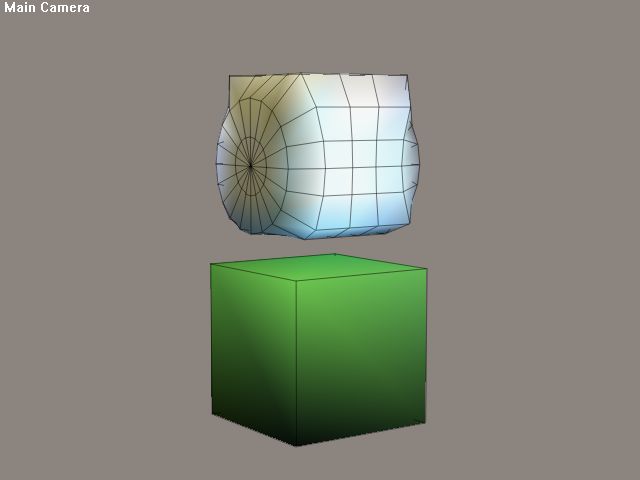
Interesting....
===========================sigline======================================================
Cage can be an opinionated jerk who posts without thinking. He apologizes for this. He's honestly not trying to be a turkeyhead.
Cage had some freebies, compatible with Poser 11 and below. His Python scripts were saved at archive.org, along with the rest of the Morphography site, where they were hosted.
I think it would be worth saving the xpoints array to the data file to be able to use the transfer_shape() potential in the final script. Then the transfer_morph() and transfer_shape() routines would simply read different parts of the data file. The final data files should be compressed anyway, so the extra file size isn't such a problem....
===========================sigline======================================================
Cage can be an opinionated jerk who posts without thinking. He apologizes for this. He's honestly not trying to be a turkeyhead.
Cage had some freebies, compatible with Poser 11 and below. His Python scripts were saved at archive.org, along with the rest of the Morphography site, where they were hosted.

===========================sigline======================================================
Cage can be an opinionated jerk who posts without thinking. He apologizes for this. He's honestly not trying to be a turkeyhead.
Cage had some freebies, compatible with Poser 11 and below. His Python scripts were saved at archive.org, along with the rest of the Morphography site, where they were hosted.
Quote - I do wonder if situations like this might be fixed on the morph end, by looking at skipped vertices and doing something with the average deltas values of neighbor verts. This would lack precision, but would presumably be better than having a totally dropped vertex like this....
If we exhaust all other avenues, yes. I'm always cautious about (but not above) adding band-aids unless/until I fully understand why it's not working and can't come up with a proper fix. Otherwise, it's just one more 'special-case' thing to keep in mind and sometimes dominos into other code (like the vertex-distance test is, already).
Cinema4D Plugins (Home of Riptide, Riptide Pro, Undertow, Morph Mill, KyamaSlide and I/Ogre plugins) Poser products Freelance Modelling, Poser Rigging, UV-mapping work for hire.
Quote - I think it would be worth saving the xpoints array to the data file to be able to use the transfer_shape() potential in the final script. Then the transfer_morph() and transfer_shape() routines would simply read different parts of the data file. The final data files should be compressed anyway, so the extra file size isn't such a problem....
I agree - no harm in saving that data as well.
Cinema4D Plugins (Home of Riptide, Riptide Pro, Undertow, Morph Mill, KyamaSlide and I/Ogre plugins) Poser products Freelance Modelling, Poser Rigging, UV-mapping work for hire.
Quote - This update adds a GUI and should set us up to use both figures and props. As usual, I've made change notes at the bottom of the script.
Cool - there's actually several fixes/changes I wanted to get integrated, so I may have an update later on.
Cinema4D Plugins (Home of Riptide, Riptide Pro, Undertow, Morph Mill, KyamaSlide and I/Ogre plugins) Poser products Freelance Modelling, Poser Rigging, UV-mapping work for hire.
"I agree - no harm in saving that data as well."
I'm glad to hear that, because I built the foundations for integrating transfer_shape() when I added the GUI. (Nervous grin.)
===========================sigline======================================================
Cage can be an opinionated jerk who posts without thinking. He apologizes for this. He's honestly not trying to be a turkeyhead.
Cage had some freebies, compatible with Poser 11 and below. His Python scripts were saved at archive.org, along with the rest of the Morphography site, where they were hosted.

Privacy Notice
This site uses cookies to deliver the best experience. Our own cookies make user accounts and other features possible. Third-party cookies are used to display relevant ads and to analyze how Renderosity is used. By using our site, you acknowledge that you have read and understood our Terms of Service, including our Cookie Policy and our Privacy Policy.
Interesting. (And, after you said you weren't sure what to make of things, I start asking questions... about what you make of things. LOL) How much of the difference in shape at the end of the "bulge" results from the difference in resolution? It looks like there's some marked failure of the deltas to line up the vertices. I'm not sure what to make of it, either. I hope it's good. It certainly caught the basics, by the look of things....
Jeepers. We used up a whole page in one evening. A long thread.... :-P
===========================sigline======================================================
Cage can be an opinionated jerk who posts without thinking. He apologizes for this. He's honestly not trying to be a turkeyhead.
Cage had some freebies, compatible with Poser 11 and below. His Python scripts were saved at archive.org, along with the rest of the Morphography site, where they were hosted.