
Renderosity Forums / Vue
Welcome to the Vue Forum
Forum Moderators: wheatpenny Forum Coordinators: bwsupport
Vue F.A.Q (Last Updated: 2026 Feb 27 3:10 pm)

Subject: How to delete the Cornucopia3D models....


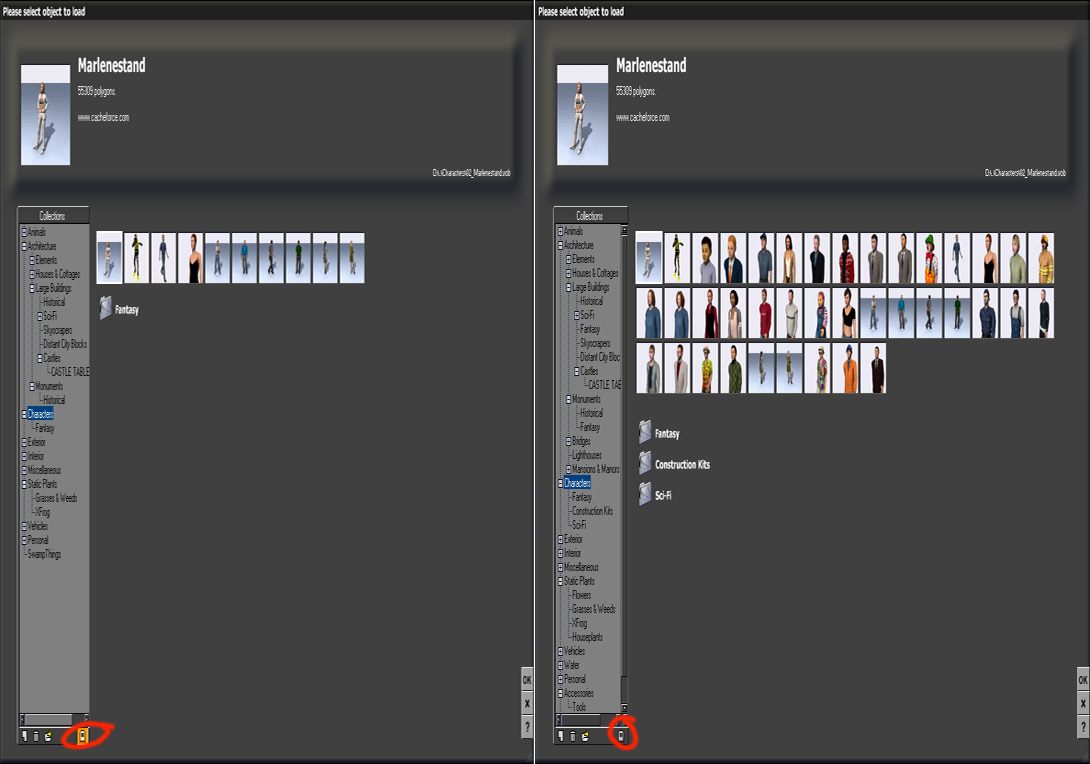
just tick the little ghost icon bottom right and they will vanish. I did that and don't even think about them any more unless I want to look for something in particular. Or look for any files with ~~ on the end and remove them. Vue will complain if you do though
My Freebies
Buy stuff on RedBubble


Sometimes, your corn content will only showif you enable the online content to show.
If you delete the ~~ files, you shouldn't have any problems, I did and Vue didn't complain, but you also need to disable the "check for new content" option in the preferences menu, otherwise they will come back as soon as your internet connection is open while working in Vue.
If you do so, everyonce in a while you'll get a popup message telling uyou you are missing out on the new items avalable at the store. Just ignore the message.
PS: Who is this jona_vark who's always complaining in other people's threads without helping anyone? If you want to be seen and heard, get yourself a page at myspace. This forum is about constructive comments, critics and helping each others.
Quote - just tick the little ghost icon bottom right and they will vanish. I did that and don't even think about them any more unless I want to look for something in particular. Or look for any files with ~~ on the end and remove them. Vue will complain if you do though
Just tried clicking the ghost and does nothing....
I really dislike E-On including this junk.... IF they feel they must include it they should give either prompt us - asking if we want this junk installed OR give us an easy way to uninstall....

kenmo - the usual question - did you install the latest update ? PC or Mac ?
Also - make sure you close Vue gracefully after you click on the ghost. If Vue crashes, it may not save your change correctly.
The ghost icon was broken in early versions but it has been fixed since.
(unless the latest version broke it again... I will have to check that when I get my desktop PC back).
- agiel - www.linfa.net
it doesn't remove the files, just stops them appearing in the browser - just in case we are getting our wires crossed here
My Freebies
Buy stuff on RedBubble
My Freebies
Buy stuff on RedBubble

That ghost! Thank you, A thousand times. My Internet access is wireless. Slow. Thank you again.
MyCat owes FrankT a next time FrankT is in Ottawa, Canada. We have Guinness. India Stale Ale. :) (Actually Canadian beer isn't all that bad. Often it's better than the imports because it's fresher. (The Japanese company Sapporo was using a Canadian brewer Sleeman's to make their products locally - either they liked the results or hated them, but they ended up buying the company.)
Max is free ? where ????? (not that I can use it mind you - the interface scares the living daylights out of me)
@MyCat - you are very welcome, glad it made sense. There are a few ghost icons in Vue which do different things :)
My Freebies
Buy stuff on RedBubble

Privacy Notice
This site uses cookies to deliver the best experience. Our own cookies make user accounts and other features possible. Third-party cookies are used to display relevant ads and to analyze how Renderosity is used. By using our site, you acknowledge that you have read and understood our Terms of Service, including our Cookie Policy and our Privacy Policy.
I'm quite annoyed with the Cornucopia links which are installed in my Vue 6 Pro.... These are the links which appear in the model, atmosphere and material collections....
Most of the time when I browsing through my model collections I'll mistakenly click on a link for a Cornucopia model which launches Firefox, which results in a good 5 to 10 minute delay.... This is quite annoying and really bothers me....
Anyone else experiencing this annoyance? How do I remove these links? IMHO these links are no better then unwanted spam....