
Renderosity Forums / Vue
Welcome to the Vue Forum
Forum Moderators: wheatpenny Forum Coordinators: bwsupport
Vue F.A.Q (Last Updated: 2026 Feb 27 3:10 pm)

Subject: Vue Displacement Problems!



you can also take the bump/displacement map and blur it slightly to help with the sudden jagged edges.
"Force Ext: 5.00
Show Bumps on Saturating Displacements"
try either lowering or removing the force ext. and removing the show bumps, as well, and as Gill said... try the displace outwards only box... it helps sometimes =D
hope to see what your end result is...
Rarer than a hairy egg and madder than a box of frogs....
< o > < o > You've been
VUED! < o > < o >
>
>
O
O
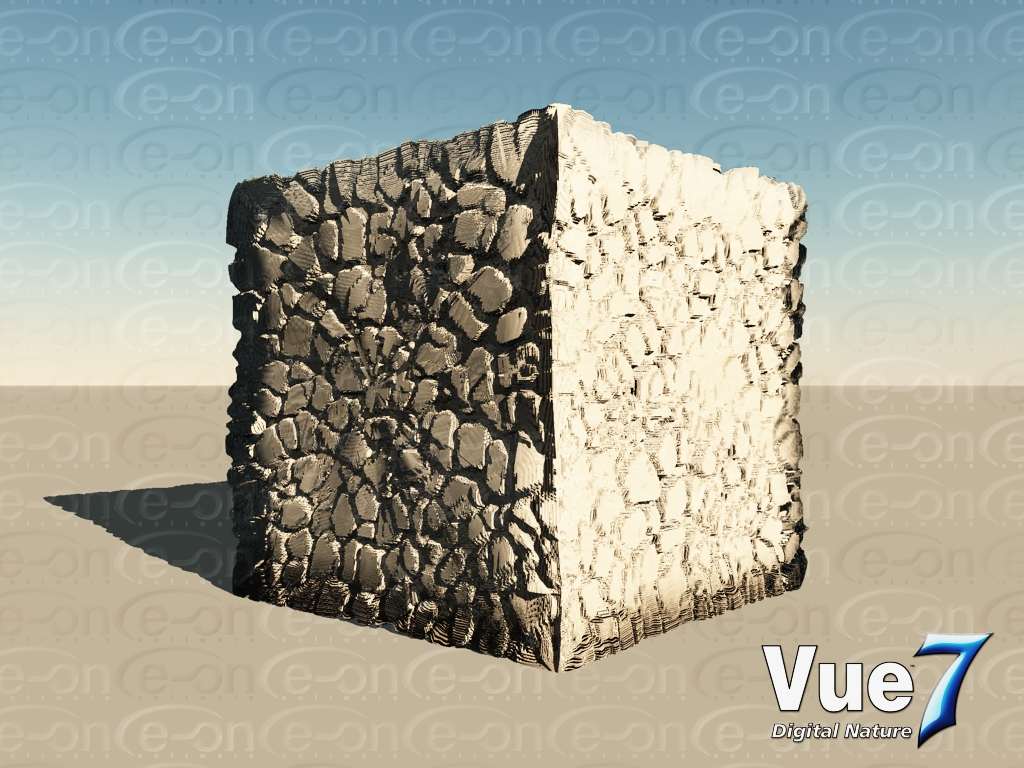
Quote - What are you trying to (re-)create? If it's a stone wall, the Vue version is mighty good :)
Thanks. It might look good, but it is supposed to look like the C4D example so I am not happy.
**
**> Quote - Try checking Displace Outwards Only box. May help
Tried that too and the results were not good, but I will try and post the example too.
**
**> **Quote - you can also take the bump/displacement map and blur it slightly to help with the sudden jagged edges.
"Force Ext: 5.00
Show Bumps on Saturating Displacements"
try either lowering or removing the force ext. and removing the show bumps, as well, and as Gill said... try the displace outwards only box... it helps sometimes =D
hope to see what your end result is...**
I will try blurring the displacement map a little. In most apps with Displacement you have a check box for "Round Corners". Vue needs this setting so you can smooth out the jagged edges.
The Vue 7 image has "Show Saturating on Saturating Displacements" on.

The force extension parameter is for fractal functions, shouldn't make any difference with a map.
Bump strengh must be too strong, did you try lowering it? And Melikia's tip for blurring might help too. You can aslo render with texture filtering, which is on by default in Cinema, but in Vue, you need to add it yourself by using user defined render settings.


If you're baking your maps in Cinema4D and re-applying them to the model in Vue, the quality will be degraded some if your object is a cube rather than just a plane or terrain object.
You can get a better displacement if you procedurally generate it inside of Vue. I do not know how well Vue bakes though. Never tried it.
www.youtube.com/user/ShawnDriscollCG
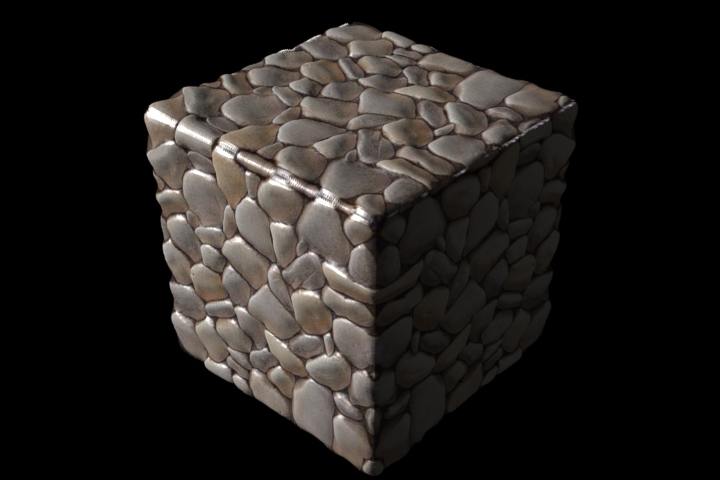
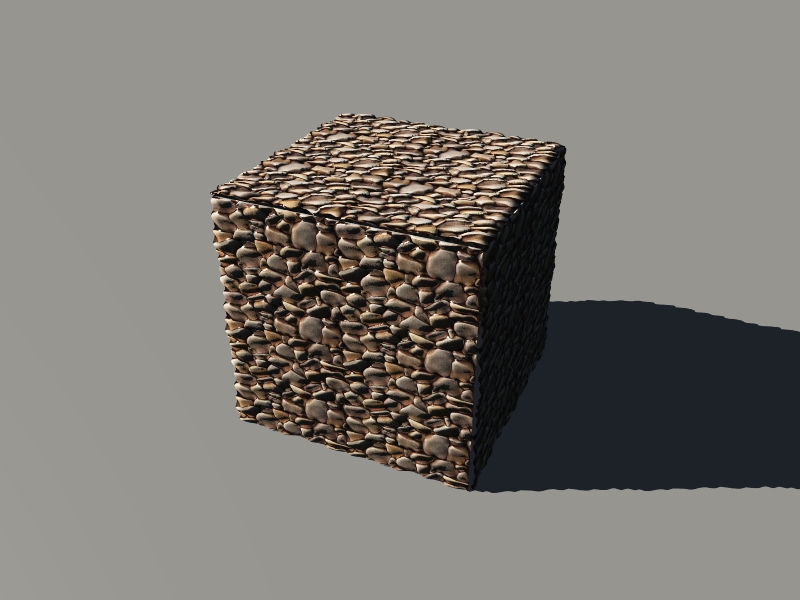
The harsh edges are the result of UV mapping (needed for baking until better technology comes along and UV's go bye bye) which would prefer normal maps instead of displacement maps for sure. But no such animal yet in Vue.
www.youtube.com/user/ShawnDriscollCG
Thanks everyone. I have created UV's and Disp. Map in ZBrush so the displacement map is wrapping correctly but the problem is the quality of the displacement. I have tried lowering the height of the bump map and that didn't help.
I am a to a loss as to what to try next. I tried blurring the map but that made it worse. I also tried different bump settings and sizes and using the filter node too with no success. My suspicion is that Vue doesnt bot have an option to select "Round Corners" which other 3D apps have, but this is only a suspicion.
Shawn you last example looks pretty good. Could you tell me what settings you use in Vue and was that displacement map created in Modo?
Any more suggestions are welcome.
I loaded a photo into CrazyBump and created the diffuse, displacement, and spec maps from that. modo 401 cubic-mapped the images to a cube object just fine.
For Vue Infinite 7.5, I needed a the object to be UV mapped. Otherwise, the dispacement wouldn't line up right with the bump image. If I don't UV map the object, Vue only uses the top left corner of the image (and that has only a few rocks in it). If I do UV map, then I'm stuck with the sharp edges. In theory, a cube object could be broken up into six faces. And each planar face could then have the diffuse, displacement, and spec maps applied to them. All done with no UV mapping. The result may be better. This is how video games that use displacement also approach this problem.
The settings I used in Vue were .8 depth for displacement, outward displacement only, I did not add bumps to saturated displacement. No tiling of the image. Automatic Bilinear texturing was a must. The other settings were the defaults.
www.youtube.com/user/ShawnDriscollCG
I don't agree. I'll try it anyway.
ADDED:
No change. I'm giving image scaling a try though instead of tiling the image so that it will fit on each face.
www.youtube.com/user/ShawnDriscollCG
Quote - Now there's a person with an open mind =D
"I don't agree. I'll try it anyway."Kudos to you =D
One never knows because of the many interations of Vue out there.
ADDED:
No difference. Bilinear produced better texturing.
www.youtube.com/user/ShawnDriscollCG
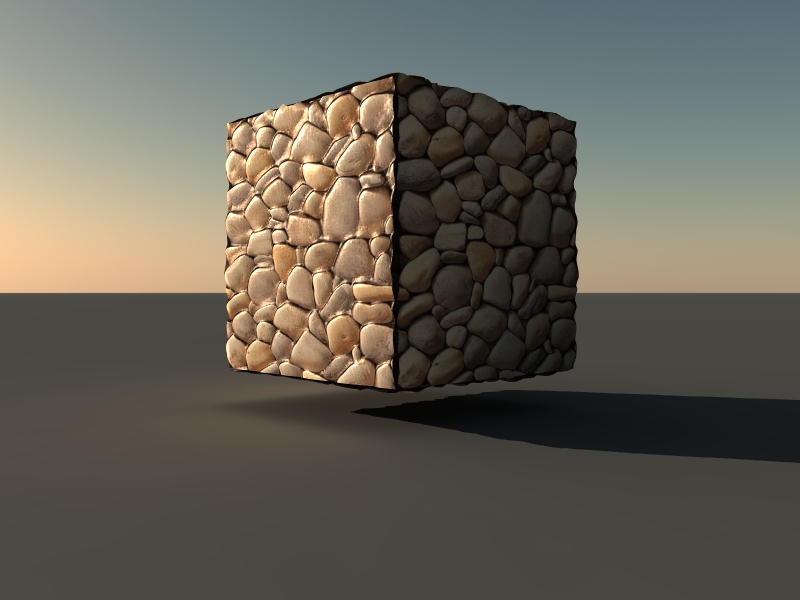
There is no magic bullet in Vue yet for displacement on a cube using texture maps without edge/corner problems. It looks like use Vue's procedural rock color/displacement is the better way.
www.youtube.com/user/ShawnDriscollCG
Shawn, thanks for the settings. I will check mine again.
Quote - Shawn, in Vue cubic=faces.
LMcLean, did you export a16bit map out of ZB?
Also in the function editor, did you choose "bicubic interpolation" for the map? This is needed.
Bruno,
I don't think it was 16 bit. I'll check. Why does it need to be 16 bit? Just Curious. : )
I did try bicubic, bilinear, none and normalized and bilinear does work the best. Thanks.
I'm still getting a lot of jaggies and sharp corners. I will try and post an update tomorrow.
16-bit is 65536 shades of grey.
8-bit is 256 shades of gray.
The trick is to get rid of the UV map. Vue will implode/explode along the object's UV edges otherwise. I'm finding out right now that chamfering the edges does wonders for Vue. Rendering something now.
www.youtube.com/user/ShawnDriscollCG
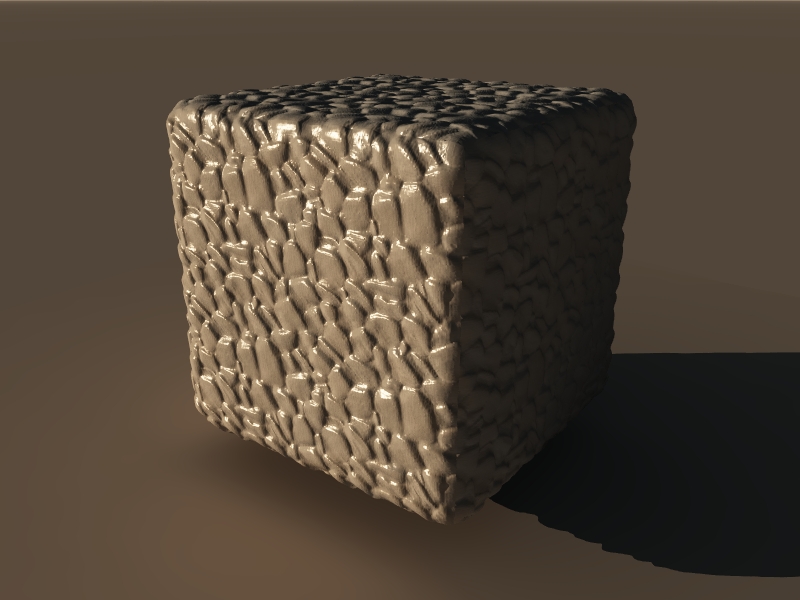
"Displace outwards only" is the only thing I have selected. And a Quality boost of +1.4.
www.youtube.com/user/ShawnDriscollCG
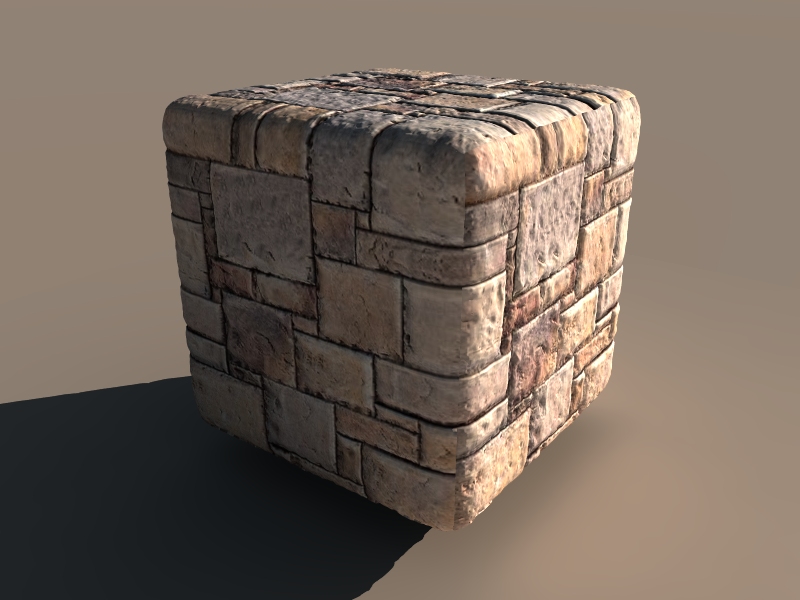
I better way to do this is to displace your object's mesh in another application first and then UV map the results and bake its diffuse map before importing the deformed object into Vue and appling the baked diffuse (color) map to it. Then you'll know that what Vue is rendering is what you indeed modeled. 3DCoat will auto-UV map any OBJ model you throw at it so you can then bake your color texture map. Note that this method will eat up more RAM. But it will render faster than having Vue generate displacement while rendering.
www.youtube.com/user/ShawnDriscollCG
I've always used hi-res meshes for doing displacement on in apps. I learned that from using Carrara.
www.youtube.com/user/ShawnDriscollCG
Carrara and Hexagon require hi-res meshes for displacement sculpting to look any good on them. So does modo. And it looks like Vue does, too.
The "purpose" of displacement in better applications (better as in non-hobby software) is to convert a lo-res model to a hi-res one at render time. The object is still lo-res while working with it in your scene. This is to save RAM and not slow down your computer while you are creating a scene.
Video games use normal mapping because they can't afford a render hit doing displacement rendering.
You can import a lo-res model from ZBrush into Vue and apply its displacement map so that it renders in hi-res. Displacement maps are never as good as the original hi-res mesh they come from. Displacement maps have seams that need hiding. A cube has twelve seams. And they are sharp edge seams. So it is hard to hide them.
The more polygons your model has, the better the displacement map can sculpt it.
You can take a CPU hit moving around a huge poly-count model around in your scene. But the CPU won't take a hit doing a render pre-processing to create a hi-res mesh. So that is good.
A lo-res mesh won't do much to the CPU while it's dragged around in a scene, but the CPU does take a hit during displacement rendering the moment the render bucket contacts a polygon on the object.
So it's a trade-off in CPU speed in both situations.
I personally wouldn't bother with displacement or sculpting in Vue unless I had a camera up close to show its detail. It's good for a tree trunk. But not for every tree trunk behind it. Precise displacement requires UV mapping. And that is when unwanted seams show up.
www.youtube.com/user/ShawnDriscollCG
Real-time displacement is where the lo-res/hi-res issue comes into play. Since the higher the resolution is, the better the displacement is. So if you want to see how the displacement looks before rendering, you have to increase the mesh of your model to see better displacement. Or it could be worse displacement if you have the wrong values entered.
The faster CPU's are, the more displacement we naturally want in real-time. Then we don't have to wait until after a render to check the displacement.
Greebles are another kind of displacement. And the higher resoluction a mesh is, the better an ecosystem can redistribute itself on your terrain after displacing it.
www.youtube.com/user/ShawnDriscollCG
I forgot to mention that all that is just for the receiving end of displacement usage. Someone has to create the displacement map. And that requires a very hi-res mesh for sculpting with, from which a displacement BMP or TGA image is extracted that can later be applied to a lo-res mesh.
Downloading sculpted content is much quicker when the models are lo-res and a simple BMP/TGA image is included in the ZIP file.
Seven years from now, this will all be ancient tech that no one uses anymore hopefully. Just go back every seven years and look at what could be done on computers at that time.
www.youtube.com/user/ShawnDriscollCG

I note that the issue seems to be on the edges of cubic objects, like the dispalcement is pushing out form it, an'd can't?
so if you take a VUe cbe, or a mesh one, then apply a dispalcement thatis NOT direclty taken form a sculpt FOR that mesh, it will bulge against the corners?
:)
"I'd rather be a
Fool who believes in Dragons, Than a King who believes in
Nothing!" www.silverblades-suitcase.com
Free tutorials, Vue & Bryce materials, Bryce Skies, models,
D&D items, stories.
Tutorials on Poser imports
to Vue/Bryce, Postwork, Vue rendering/lighting, etc etc!
I forgot how slow Hexagon is with 1.5 million polys. I'm doing a sculpt now for Vue. Crossing fingers.
www.youtube.com/user/ShawnDriscollCG
Well... nothing to report in Vue, except that the lower the resolution of an OBJ cube is, the more its edges explode apart when a displacement map (made from the cube) is re-applied. The seams/edges are where the UV's lie. But UV's are needed for this kind of displacement.
www.youtube.com/user/ShawnDriscollCG
Quote - You can't take a Vue primitive and add texture based displacement to it, just 6 faces won't be enough
If will work if the cube is hi-res.
Quote - and a primitive isn't UV mapped. Procedural displacement will work though.
Again, if the cube is hi-res. Otherwise there is not enough mesh for the depth value -1 to 1 to work with. Because there is no displacement along the edges using just a primitive cube.
Yes, we're doing something that Vue may not have been programmed for. But what the heck.
www.youtube.com/user/ShawnDriscollCG
Quote - so if you take a VUe cbe, or a mesh one, then apply a dispalcement thatis NOT direclty taken form a sculpt FOR that mesh, it will bulge against the corners?
:)
Yes. The displacement could just be a constant value (one shade of gray) and it would cause all the edges to separate evenly.
www.youtube.com/user/ShawnDriscollCG
sorry for typos :)
(rough few weeks, long story)
I noticed this problem whjen I tried applying the bump map of a castle wall as the displacement and the corners got an effect as if they were concave and being shadowed from the edges in.
really need to be able ot set displacement to "0" at the corners of objects somehow...but then you'd lose one of the most important parts of displacement, stopping meshes looking fake with perfect edges.
.
"I'd rather be a
Fool who believes in Dragons, Than a King who believes in
Nothing!" www.silverblades-suitcase.com
Free tutorials, Vue & Bryce materials, Bryce Skies, models,
D&D items, stories.
Tutorials on Poser imports
to Vue/Bryce, Postwork, Vue rendering/lighting, etc etc!

Privacy Notice
This site uses cookies to deliver the best experience. Our own cookies make user accounts and other features possible. Third-party cookies are used to display relevant ads and to analyze how Renderosity is used. By using our site, you acknowledge that you have read and understood our Terms of Service, including our Cookie Policy and our Privacy Policy.
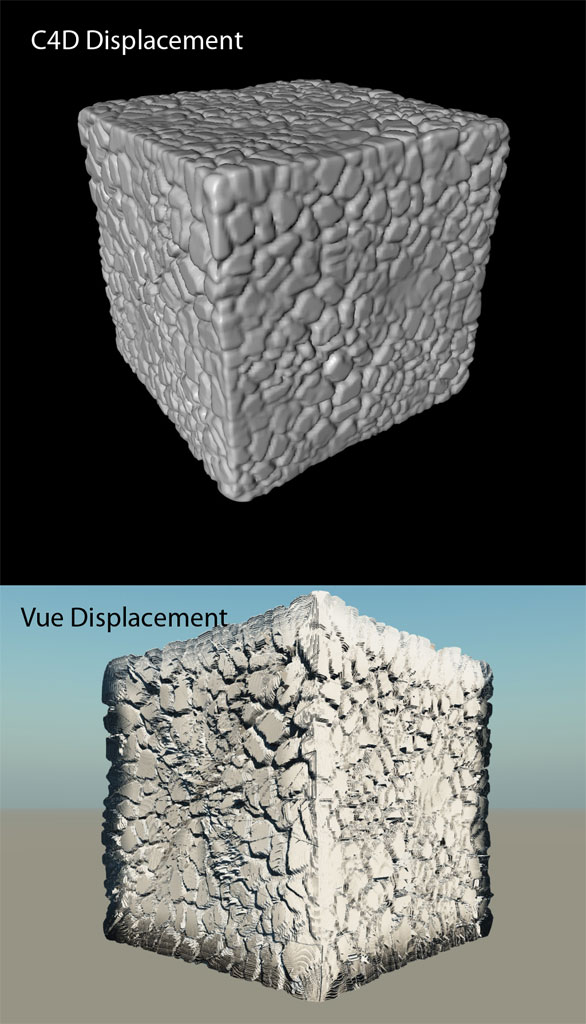
I am having difficulties getting the displacement to work properly in Vue. I have used these settings but as you can see the displacement is awful. Is this the best Vue can do for displacement. What settings (if any) can I adjust to improve this?Thanks
Bump Depth: 1.000
Bump Scale: 1.000, 1.000, 1.000
Quality Boost: 2.00
Force Ext: 5.00
Show Bumps on Saturating Displacements
Move Ecosystem Instances