
Renderosity Forums / Poser - OFFICIAL
Welcome to the Poser - OFFICIAL Forum
Forum Moderators: RedPhantom Forum Coordinators: Anim8dtoon
Poser - OFFICIAL F.A.Q (Last Updated: 2026 Mar 02 11:12 pm)

Subject: Morph Cleanup Script

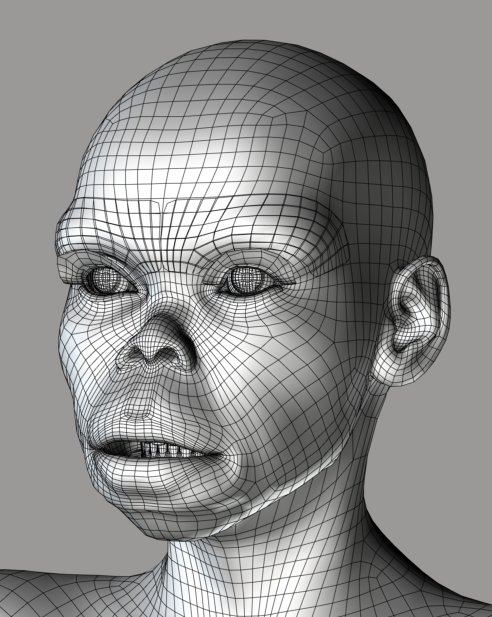
The attached image is Antonia wearing the Vicky Monkey full face morph, without any cleanup. It looks like a good transfer. No cleanup! No mess from screening materials or having verts correlate incorrectly. The only problem I can really see is the eyelashes, which took influence from the brow.
It helped a great deal to compare the heads with both mouths open. Luckily Antonia's "Mouth Open" morph cooperates well with Vicky's "Yell".
I'll keep testing, but it looks like this could be the foundation of much more effective morph transfer than is used by TDMT.
===========================sigline======================================================
Cage can be an opinionated jerk who posts without thinking. He apologizes for this. He's honestly not trying to be a turkeyhead.
Cage had some freebies, compatible with Poser 11 and below. His Python scripts were saved at archive.org, along with the rest of the Morphography site, where they were hosted.
lkendall: I hadn't really thought about it that way. I guess I'm thinking about the matter largely in terms of programming challenges.
And you are right, about the "definition" files. (I've been calling them correlation files, but they're the same basic idea.) These can be created and shared using TDMT.
Edit: Sorry for the short response. I'm lost in the programming process right now. I'm a bit giddy at possible success....
===========================sigline======================================================
Cage can be an opinionated jerk who posts without thinking. He apologizes for this. He's honestly not trying to be a turkeyhead.
Cage had some freebies, compatible with Poser 11 and below. His Python scripts were saved at archive.org, along with the rest of the Morphography site, where they were hosted.
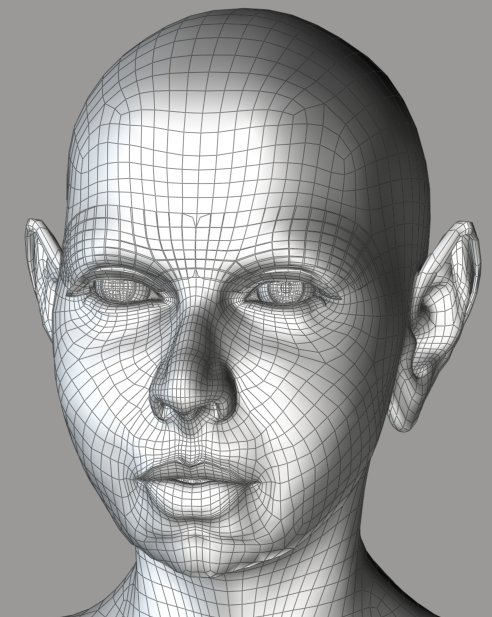
I'll try to trim down the current script to just the transfer portion. Then I'll post that along with the correlation data file so folks can try porting morphs themselves using it. Hopefully I can post that tonight.
===========================sigline======================================================
Cage can be an opinionated jerk who posts without thinking. He apologizes for this. He's honestly not trying to be a turkeyhead.
Cage had some freebies, compatible with Poser 11 and below. His Python scripts were saved at archive.org, along with the rest of the Morphography site, where they were hosted.

Wow! That's really neat. Easy access to loads of morphs for any new figure! If you can make the transfer script easy to use and make sure the correlation data files don't contain any copyrighted material, every Poser user on the planet will want to smooch you. :laugh:
-- I'm not mad at you, just Westphalian.
Quote - Wow! That's really neat. Easy access to loads of morphs for any new figure! If you can make the transfer script easy to use and make sure the correlation data files don't contain any copyrighted material, every Poser user on the planet will want to smooch you. :laugh:
The transfer script should hopefully be fairly straightforward. I'll use the template of the one I posted yesterday for TDMT.
I don't see how the correlation files could contain anything even vaguely corresponding to restricted material. They only contain information about what vertices are correlated and how much weighted influence they should have in the final mixed deltas:
w 0 5 7325 7322 7783 7319 7786 0.5521 0.3008 0.0683 0.0632 0.0155
w 1 5 7783 7325 7786 7621 7624 0.2894 0.2561 0.2456 0.1574 0.0515
w 2 5 7354 7353 7325 7621 7624 0.4666 0.3229 0.1710 0.0352 0.0043
w 3 5 7322 7325 7321 7353 7785 0.5936 0.2238 0.1655 0.0139 0.0032
w 4 5 7166 7165 7181 7805 7182 0.4819 0.3511 0.1629 0.0020 0.0020
w 5 5 7165 7166 7163 7164 7162 0.3629 0.3399 0.1353 0.0955 0.0664
w 6 5 7166 7165 7164 7163 7168 0.3537 0.2507 0.2312 0.1471 0.0172
No positional data at all, nothing that could even be used to reconstruct a point cloud of vertex positions - and we can share point clouds, even, as "squished" morphs.
The question about legal sharing is whether a ported morph on a new mesh is still the intellectual property of the creator of the shape on the original mesh. I have no idea how to even address the question, so I'm betting it's safest not to share the ported morphs. Perhaps they could be encoded somehow. Hmm.
Dunno if I can handle very many smooches. :lol: I'll just be happy with increased possibilities for Poser. :D
===========================sigline======================================================
Cage can be an opinionated jerk who posts without thinking. He apologizes for this. He's honestly not trying to be a turkeyhead.
Cage had some freebies, compatible with Poser 11 and below. His Python scripts were saved at archive.org, along with the rest of the Morphography site, where they were hosted.


Quote - No positional data at all, nothing that could even be used to reconstruct a point cloud of vertex positions - and we can share point clouds, even, as "squished" morphs.
Excellent! That means I could make a correlation file for, say, Miki and Antonia, and distribute it freely without committing any copyright violations.
Quote - The question about legal sharing is whether a ported morph on a new mesh is still the intellectual property of the creator of the shape on the original mesh. I have no idea how to even address the question, so I'm betting it's safest not to share the ported morphs. Perhaps they could be encoded somehow. Hmm.
That's why I thought it would be awesome if the script was easy to use. Because then anyone who wanted to use a Miki morph on Antonia would just transfer and use it, and there'd be no need for anyone to distribute the transferred morphs separately.
-- I'm not mad at you, just Westphalian.
http://www.the.cage.page.phantom3d.net/TDMT/TDMT_Match_transfer.zip
Okay! Here's a first release (link) of the new transfer script, including the best V1 (or V2) to Antonia-121 correlation that I could work out. I managed to get the mouth, ears, and lashes to work amazingly well, by the standards under consideration only 24 hours ago. Heh. But the correlation could use a bit of improvement. There's some distortion in the eyebrow and eyelash morphs.
I'm having trouble working out a clean shape transfer (I think this is ending up very messy for me because both of my actors were morphed for the correlation process). So anyone who wants to port over full-face character morphs, particularly those involving precise nose shaping, will have to tweak their results a bit to get what they want.
I'm pretty sure this script is fairly straightforward. Anyone who tries it, please let me know if anything can be explained better or presented more accessibly. I've had no feedback so far about the interface for this. It does try to make itself fairly obvious, though, and I've included instructions in the readme.
I'll respond to recent posts shortly. I've been rushing to get this posted. :lol:
===========================sigline======================================================
Cage can be an opinionated jerk who posts without thinking. He apologizes for this. He's honestly not trying to be a turkeyhead.
Cage had some freebies, compatible with Poser 11 and below. His Python scripts were saved at archive.org, along with the rest of the Morphography site, where they were hosted.
Quote - I'll go first ;o)...lol
Laurie
Okay, but if I transform into a handsome prince, somebody's going to have to buy me some new clothes. :lol:
Quote - Excellent! That means I could make a correlation file for, say, Miki and Antonia, and distribute it freely without committing any copyright violations.
That's why I thought it would be awesome if the script was easy to use. Because then anyone who wanted to use a Miki morph on Antonia would just transfer and use it, and there'd be no need for anyone to distribute the transferred morphs separately.
Yes, the correlation files should be absolutely safe to distribute.
Please let me know what you think about the accessibility and ease-of-use of the script. If the correlation data file is properly placed, the script should locate the data file folder and list any contents so the user can select the desired correlation file. If things work properly, it should be pretty simple - assuming correct data file placement.
Important note: The data files must go in the Runtime for the version of Poser in which you're using the script. It's in the readme, but it should probably be emphasized here, too. If you switch versions of Poser, you'll need to copy the correlation files and their folder structure over to the new Poser Runtime.
I also want to note here that Spanki deserves an immense amount of credit for any success of TDMT-derived scripts. He wrote functions which are still central to the current version, and the whole project would never have gotten very far without his help.
Also, on the very OT side: I just turned 40, 40 minutes ago. So far it isn't bad. :lol:
I hope the newly-posted script works for you. :D
===========================sigline======================================================
Cage can be an opinionated jerk who posts without thinking. He apologizes for this. He's honestly not trying to be a turkeyhead.
Cage had some freebies, compatible with Poser 11 and below. His Python scripts were saved at archive.org, along with the rest of the Morphography site, where they were hosted.
(For anyone checking in on just this third page, the final post on page two has the link for the Vicky 2 to Antonia-121 morph transfer script.)
===========================sigline======================================================
Cage can be an opinionated jerk who posts without thinking. He apologizes for this. He's honestly not trying to be a turkeyhead.
Cage had some freebies, compatible with Poser 11 and below. His Python scripts were saved at archive.org, along with the rest of the Morphography site, where they were hosted.
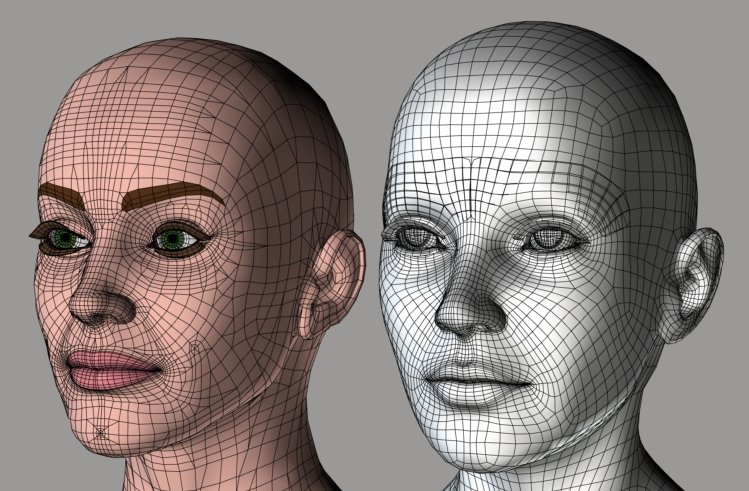
Thank you. :biggrin: Sorry about the lawn. I do get carried away. :laugh:
I think the .vmf correlation file I've included in the recent upload may be able to create fairly decent shape transfers, as well as morph transfers. I had to reduce the shape transfer morph to 0.7, then run Restore Detail at default settings and dial that morph down to 0.5, but the results aren't too bad. They should be able to be mixed in with transferred morphs to get something fairly close to the original shape, and I think the process is probably something people will be able to recreate fairly easily.
Unfortunately, I didn't activate the shape transfer features in the script I uploaded. So I have a first project for tomorrow.
===========================sigline======================================================
Cage can be an opinionated jerk who posts without thinking. He apologizes for this. He's honestly not trying to be a turkeyhead.
Cage had some freebies, compatible with Poser 11 and below. His Python scripts were saved at archive.org, along with the rest of the Morphography site, where they were hosted.
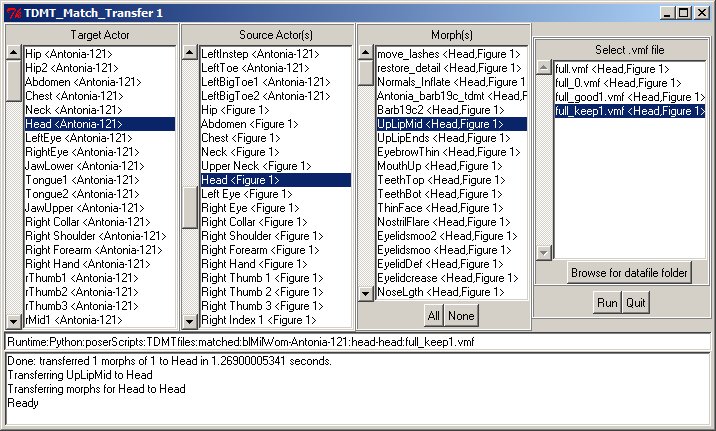
-
Select a Target actor, then the Source actor listbox fills.
-
Select the Source, then its morphs are listed.
-
Select the desired morphs.
-
Once both Target and Source actors are selected, correlation files for that combination of actors will be displayed in the last listbox, assuming they exist and have been properly placed.
-
Select the desired correlation file for the selected actors.
-
Cick Run.
The status box at the bottom will let you know what the script is doing, and the Runtime path to your correlation file is listed in the path field.
The Browse button allows the user to manually select a correlation file if it isn't in the location expected by the script.
Hopefully it's fairly accessible.
===========================sigline======================================================
Cage can be an opinionated jerk who posts without thinking. He apologizes for this. He's honestly not trying to be a turkeyhead.
Cage had some freebies, compatible with Poser 11 and below. His Python scripts were saved at archive.org, along with the rest of the Morphography site, where they were hosted.


Cage--Do you have a "latest release" for your script? This some of the most impressive stuff I've seen around here for poser in years! Dude, you really outdid yourself on this! :laugh:
I'm not sure what I'd do with it......BUT I WANT IT! :lol:
I cannot save the world. Only my little piece of it. If we all act
together, we can save the world.--Nelson Mandela
An inconsistent hobgoblin is
the fool of little minds
Taking "Just do it" to a whole new level!

Cage:
Happy 40th Birthday!
Does your script use a donator CR2? I guess I am asking about what contains the facial, expression/phoneme/FullFace morphs that will be transferred?
I the case of using WW2/CrossDresser and Morphing cloths to borrow morphs from a figure, one injects the morphs one wants to transfer into a CR2, then saves the CR2, processes it, and then transfers the morphs. I generally interactively try them out on the target figure, and keep only those that look good. I have never had a script that I could use to smooth the morph, and then save it. So, if your process can do that, it may be that morphs that would not turn out usable with the clothing applications may transfer and be usable with your application.
Most borrowed body morphs are not usable at full strength (1.0) on the dials. They were made for a different mesh. But, they supplement what is available for an under-supported figure. This process is especially useful for those of us who cannot model morphs for ourselves. For those of us who are do-it-yourself types, transfer processes are not menacing. For those who are click and load types, I think it is safe to encode borrowed morphs on the original figure with RTE. The question would be, do you distribute a one click loads all, or individual moprh injections. I like adding only those morphs I want to use, but some would like to add everything. If I had a good morph delete program, I would add everything, and then delete what I do not want.
The really neat thing about an application like TDMT is that once a figure has a usable definition file, it should be able to donate or borrow from any other figure that has a usable definition file. If Antonia, Vicky1/2 and Miki have definition files then Miki can also borrow V1/2 morphs. This makes TDMT an enormous contribution to the community. Thanks to you and Sparki!
LMK
Probably edited for spelling, grammer, punctuation, or typos.
Hi Cage, with Zbrush I am able to "shrink wrap" V4's face and head to the same shape as Antonia's face and head, even the ears. So I would be able to start out with a vicky that has the same shape face and head as Antonia. This might make transfering expression morphs from V4 to Antonia more accurate. I will try and see what happens. This is great, I agree with lkendall, A definite boon to figures that do not have the support of the big houses.
mike1950:
Can Zbrush "shrinkwrap" V4's face, with morphs loaded into it, or can the mrophs be loaded to the face after it is altered to the shape of Antonia's face?
Being able to alter a CR2 that has the morphs injected into it with WW2 so that it is the shape of the target figure, also reshapes the morphs so that they are more likely to look good with the traget figure. Then Morphing Cloths is used to tranfer the morpsh or make injectable morphs.
Thanks for contributing to the effort.
LMK
Probably edited for spelling, grammer, punctuation, or typos.
Quote - What would happen if you were to create an V4 that was shrink wraped to the Antonia shape would that make the porting easier?
That might make the comparison highly effective. It would depend on the quality of the shrink-wrapping. The Shrinkwrap script developed by Spanki for his tdmt.pyd works well, but can lead to some distortion in the shrunken mesh (which could perhaps be cleaned up by Restore Detail). If the shrinking is clean and you haven't, for instance, ended up with cheekbones wrapped onto the wrong part of the target head, this could be very useful, indeed! A very good idea, and definitely worth testing! :woot:
Quote - Hi Cage, with Zbrush I am able to "shrink wrap" V4's face and head to the same shape as Antonia's face and head, even the ears. So I would be able to start out with a vicky that has the same shape face and head as Antonia. This might make transfering expression morphs from V4 to Antonia more accurate. I will try and see what happens. This is great, I agree with lkendall, A definite boon to figures that do not have the support of the big houses.
Same answer as above, with a shrunken Antonia. Can you post an image of the two head meshes together? I'd like to see what's happening!
BTW, the transfer script for the new "closest-vertices" process has been posted, but the correlation script hasn't yet. I need to clean up the process, add some options, and create a GUI for it which isn't too confusing. I'm hoping I can manage that this weekend.
I'm excited about this idea. I hadn't really considered it. :D
===========================sigline======================================================
Cage can be an opinionated jerk who posts without thinking. He apologizes for this. He's honestly not trying to be a turkeyhead.
Cage had some freebies, compatible with Poser 11 and below. His Python scripts were saved at archive.org, along with the rest of the Morphography site, where they were hosted.
Quote - Cage--Do you have a "latest release" for your script? This some of the most impressive stuff I've seen around here for poser in years! Dude, you really outdid yourself on this!
I'm not sure what I'd do with it......BUT I WANT IT!

I have to make some changes and improvements and create a GUI. What I have now needs a lot of optimization. The correlation process currently uses Spanki's tdmt.pyd (link provided earlier in the thread) for speed, but not everyone can use that. I need to try to make the process adequately fast using straight PoserPython. I think using squared distances might help. Skipping all the square roots in the point distance calculations could speed things up, if it doesn't lead to loss of precision.
I'm hoping to get this together some time this weekend.
And thank you very much for the comments. :D As I said above, Spanki deserves a huge amount of credit for any success of the TDMT-derived scripts. Spanki was the brains of the outfit. He very patiently taught me enough for me to be able to muddle through things as well as I can now. And his code in the TDMT scripts is eloquent and efficient, whereas mine is merely haphazard. :lol:
===========================sigline======================================================
Cage can be an opinionated jerk who posts without thinking. He apologizes for this. He's honestly not trying to be a turkeyhead.
Cage had some freebies, compatible with Poser 11 and below. His Python scripts were saved at archive.org, along with the rest of the Morphography site, where they were hosted.
Quote - Cage:
Happy 40th Birthday!
Does your script use a donator CR2? I guess I am asking about what contains the facial, expression/phoneme/FullFace morphs that will be transferred?
Thank you! So far, forty is okay by me. I'm waiting for the bad things others have told me to expect. Maybe they were making things up. :lol:
The script runs within Poser, pretty much out of necessity. Faces need to be carefully shaped and the figures often need to be moved using Body, in order to line up the features well. So this doesn't work from the .cr2 files or the base geometries, like Morphing Clothes or Wardrobe Wizard presumably do.
This current script comes in two parts. The correlation script is used to compare the figures. This then generates a correlation (definition, if you prefer) file. The transfer script - the one which is currently posted - only reads back the correlation file and allows the user to port over any desired morphs between the actors. So, yes. This can transfer phonemes, expressions, character morphs, face-shaping morphs. Anything. Although the quality will depend on the effectiveness of the correlation file. Also, this is porting over deltas, not shapes. So for some faces you'll need to be able to port over the original base shape of the actor to try to approach an accurate morph. This is most evident, in the Vicky 1 to Antonia process, in the nose area. The two figures have very different noses.
===========================sigline======================================================
Cage can be an opinionated jerk who posts without thinking. He apologizes for this. He's honestly not trying to be a turkeyhead.
Cage had some freebies, compatible with Poser 11 and below. His Python scripts were saved at archive.org, along with the rest of the Morphography site, where they were hosted.
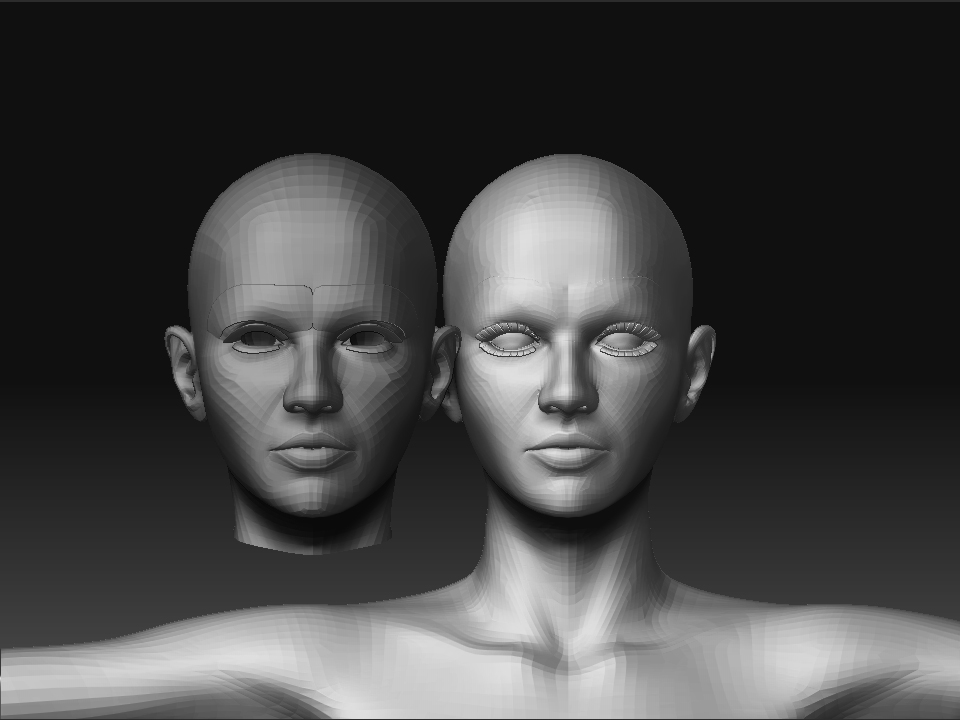
I am using the base geometry from the geometry folder, so I will be able to just load v4 bones into this geometry and save a new figure that I can load all of V4's morphs into.
Basically I am using the transpose in zbrush to shrink wrap V4 face and head to the Antonia face and head. While I do this I am able also to shift the geometry around so that it fits. So lip geometry will fit lip geometry, ears to ears and so on. Antonia face on the left and V4 to Antonia on the right.
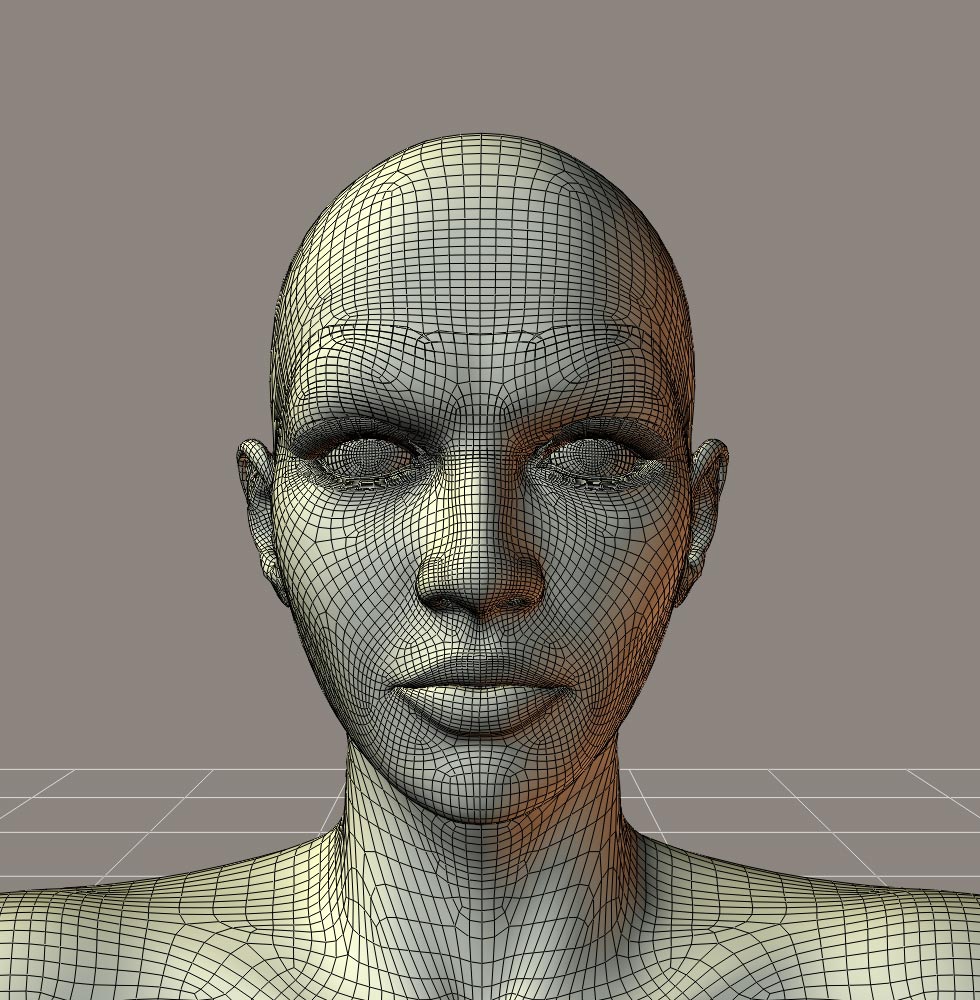
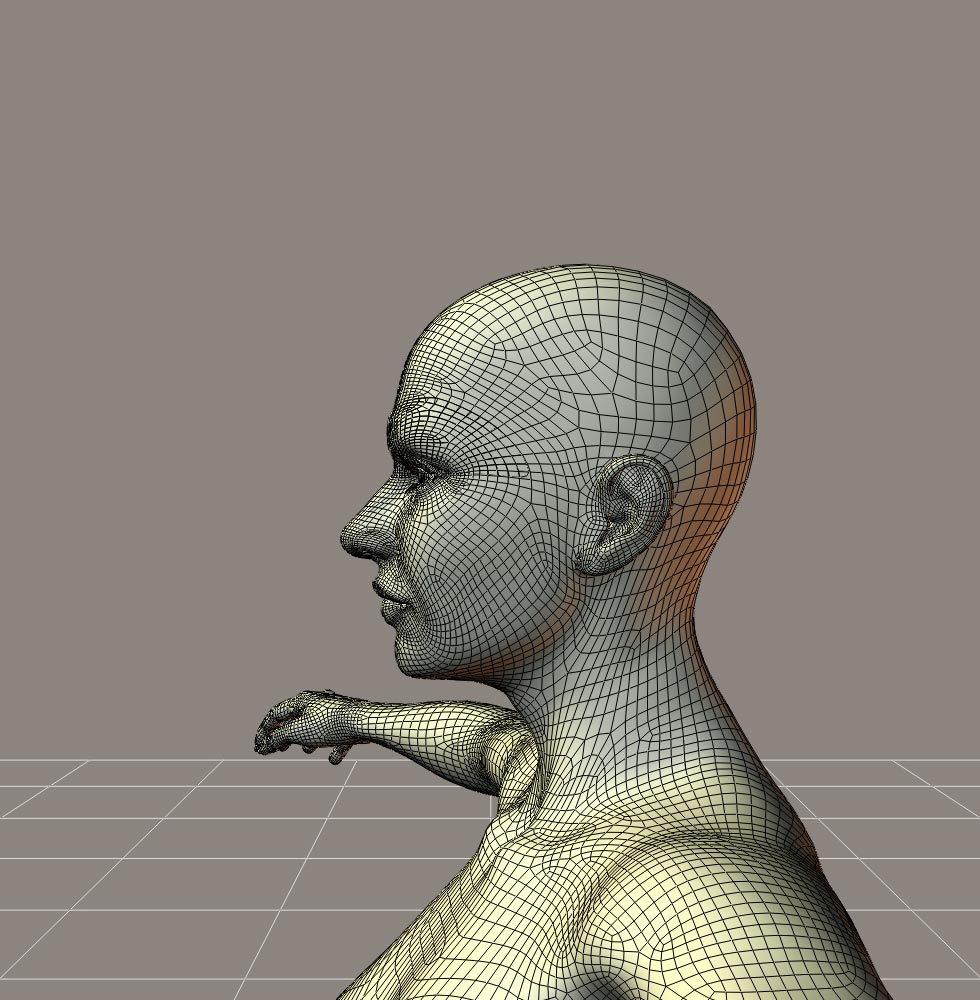
Quote - Cage, lkendall:
I am using the base geometry from the geometry folder, so I will be able to just load v4 bones into this geometry and save a new figure that I can load all of V4's morphs into.
Basically I am using the transpose in zbrush to shrink wrap V4 face and head to the Antonia face and head. While I do this I am able also to shift the geometry around so that it fits. So lip geometry will fit lip geometry, ears to ears and so on. Antonia face on the left and V4 to Antonia on the right.
Wow! It looks like that might work quite well for a comparison. I never realized how high the vertex count was on V4. Holy cow!
What does the transpose tool do?
Quote - I will also try to line up the teeth and inner mouth, I dont know if this is important but cant hurt. The results could be saved as an INJ-REM for injection into V4 if that would work for everyone to be able to use it?
Having those areas lined up couldn't hurt. For Antonia, at least, the teeth and tongue parts would be separate transfers.
I've actually been wondering about teeth and inner mouth geometries. I, at least, find these harder to line up for a comparison, but then I don't tend to use very sophisticated tools. I was considering an option to screen by material, to omit areas like the teeth from a correlation. What I learned with the eyelashes is that they took unwanted influence from eye and brow morphs, until I pulled the eyelash geometry away from both heads for a comparison. Possibly teeth could suffer a similar difficulty, taking influence from the tongue, inner mouth, or cheek vertices.
As far as I know, INJ-REM is good. Is that with the use of PMD, or without?
===========================sigline======================================================
Cage can be an opinionated jerk who posts without thinking. He apologizes for this. He's honestly not trying to be a turkeyhead.
Cage had some freebies, compatible with Poser 11 and below. His Python scripts were saved at archive.org, along with the rest of the Morphography site, where they were hosted.
Thanks odf, Cage. It's really all Zbrush, makes it pretty easy to do.
The transpose tool (Ithink thats what its called) you use the Zproject brush with it and it flattens overlying geometry to the underlying geometry shape. The overlying geometry will keep flatening until it meets geometry of your template geometry. You use two ztl's one the figure you want to reshape and the other the shape you want.
I could do the entire figure to fit Antonia, might take awhile.
No pmd just inj to a empty channel
Ah! Okay. IIRC, Blender has added a feature like this Transpose tool. I think I've read of the process under some other name. Hmm. Possibly I imagined it, or I'm just confused. :lol:
The results are quite excellent. I'd better try to get the comparison script into better shape, so a correlation can be made from your efforts. :D
===========================sigline======================================================
Cage can be an opinionated jerk who posts without thinking. He apologizes for this. He's honestly not trying to be a turkeyhead.
Cage had some freebies, compatible with Poser 11 and below. His Python scripts were saved at archive.org, along with the rest of the Morphography site, where they were hosted.
Has anyone tested the Vicky 2 to Antonia morph transfers, using the new transfer script I posted? If so and you've noted any problems or found the script GUI counter-intuitive or inconvenient, please let me know. I'm going to be working on the scripts and I can integrate any changes or improvements anyone can suggest. I'd like to make the process as user-friendly and accessible as possible, but I also tend to create cluttered, confusing GUI's if left to myself. :lol:
===========================sigline======================================================
Cage can be an opinionated jerk who posts without thinking. He apologizes for this. He's honestly not trying to be a turkeyhead.
Cage had some freebies, compatible with Poser 11 and below. His Python scripts were saved at archive.org, along with the rest of the Morphography site, where they were hosted.
I just gave the script a try, and it works beautifully. Fast, too! Some morphs look better on Antonia than on V2. :lol: Anyway, one gets some pretty good quality already, and with the improved correlation files that seem to be on the horizon, my-oh-my...
By the way, it's probably best to declare some figure as the "global reference" and make correlation files from and to that for all other figures. That way, if you have, say, 10 figure, you need only 9 correlation files instead of 45. I'm not sure how much extra work it is to make the script work that way, but if it's at all feasible, that would things much easier for users and maintainers.
I have to repeat it: fantastic work, Cage! Definitely one of the most useful innovations for Poser I've seen in years.
-- I'm not mad at you, just Westphalian.
By the way, I was planning to generate something very similar to your correlation files for transferring morphs between the low- and high-res versions of Antonia. The difference of course is that in this case I know beforehand what the relationship is and don't have to find it by hand or with the help of some clever ZBrush tool.
But: if I use your format for those files - and I'm almost positive that I could - then I guess people could actually make morphs for one version and then transfer them to the other using your script, directly within Poser. Which would be awesome.
-- I'm not mad at you, just Westphalian.
Quote - I just gave the script a try, and it works beautifully. Fast, too! Some morphs look better on Antonia than on V2.
Anyway, one gets some pretty good quality already, and with the improved correlation files that seem to be on the horizon, my-oh-my...
By the way, it's probably best to declare some figure as the "global reference" and make correlation files from and to that for all other figures. That way, if you have, say, 10 figure, you need only 9 correlation files instead of 45. I'm not sure how much extra work it is to make the script work that way, but if it's at all feasible, that would things much easier for users and maintainers.
Hooray! It works for someone else! I was, very irrationally, becoming concerned that I was imagining the success of the process. :lol: I fool myself into believing things like that quite easily. (For years I believed that the Vicky 1 characters I was using in Poser looked great! Then, after using Antonia for several weeks, I looked at them again. Horrors! Run away! The old characters look awful! :lol:)
You should be able to get even faster transfers if you can use Spanki's tdmt.pyd. The scripts will try to use it if it's available. But! Don't install the .pyd if you're using Poser on a Mac, or a version of Poser prior to 7.0. Poser will find the .pyd, if it's installed, but won't be able to use it on Mac or Poser versions below 7.
With no comment on the GUI for the transfer script, I'll assume that it's easy enough to use and I don't really need to work on improving it at the moment. Let me know if I'm assuming incorrectly.
A global reference figure is a pretty good idea. I think that idea will require some re-thinking of the basic process, so I'll consider how to integrate it after I've been able to put together an initial release for the comparison script. If you have any suggestions for how to implement a global reference figure, please make them. The idea is new to me and I'm liable to come up with a very strange way to integrate it, without thoughts from anyone else. :lol: I tend to do things sideways.
Quote - By the way, I was planning to generate something very similar to your correlation files for transferring morphs between the low- and high-res versions of Antonia. The difference of course is that in this case I know beforehand what the relationship is and don't have to find it by hand or with the help of some clever ZBrush tool.
But: if I use your format for those files - and I'm almost positive that I could - then I guess people could actually make morphs for one version and then transfer them to the other using your script, directly within Poser. Which would be awesome.
If the .vmf format meets your needs, then it sounds like a good idea to me. Will a straight transfer from low to high using this method offer enough detail? That is, I assume this would leave out a potential use of the Wings "Smooth" intensification function on the low res Antonia before any morph transfer. Would that reduce the utility of morphing the low res figure then transferring to the hi res figure? It should work quite well going "downhill" from hi to low.
Quote - I have to repeat it: fantastic work, Cage! Definitely one of the most useful innovations for Poser I've seen in years.
Thank you. :D I would actually say the same thing about what you and Phantom 3D have been doing. :woot:
And Spanki deserves smooches from folks, if there are smooches. :lol:
Quote - These ARE heady and exciting times! WOOT!
I'll second that woot! :woot: :lol: I still can't believe it's working as well as it is. Wow. I hope I can keep bumbling into successes like this. :lol:
===========================sigline======================================================
Cage can be an opinionated jerk who posts without thinking. He apologizes for this. He's honestly not trying to be a turkeyhead.
Cage had some freebies, compatible with Poser 11 and below. His Python scripts were saved at archive.org, along with the rest of the Morphography site, where they were hosted.
You'll have to forgive me now, but I'm starting to get confused as to what I'm supposed to be using and why (I'm easily confused...lol). So many things have been posted...
I use Poser 7, but just recently got P8 which I'm still just exploring for the moment. Of course, I have V1-4 and Antonia (though I'm not sure which version of her I should be using either...lol). Perhaps, when all the kinks are ironed out, there should be a short tute or even a separate thread to explain which script to use for what ;o). Just for the denser folks like I'm...lol.
Laurie
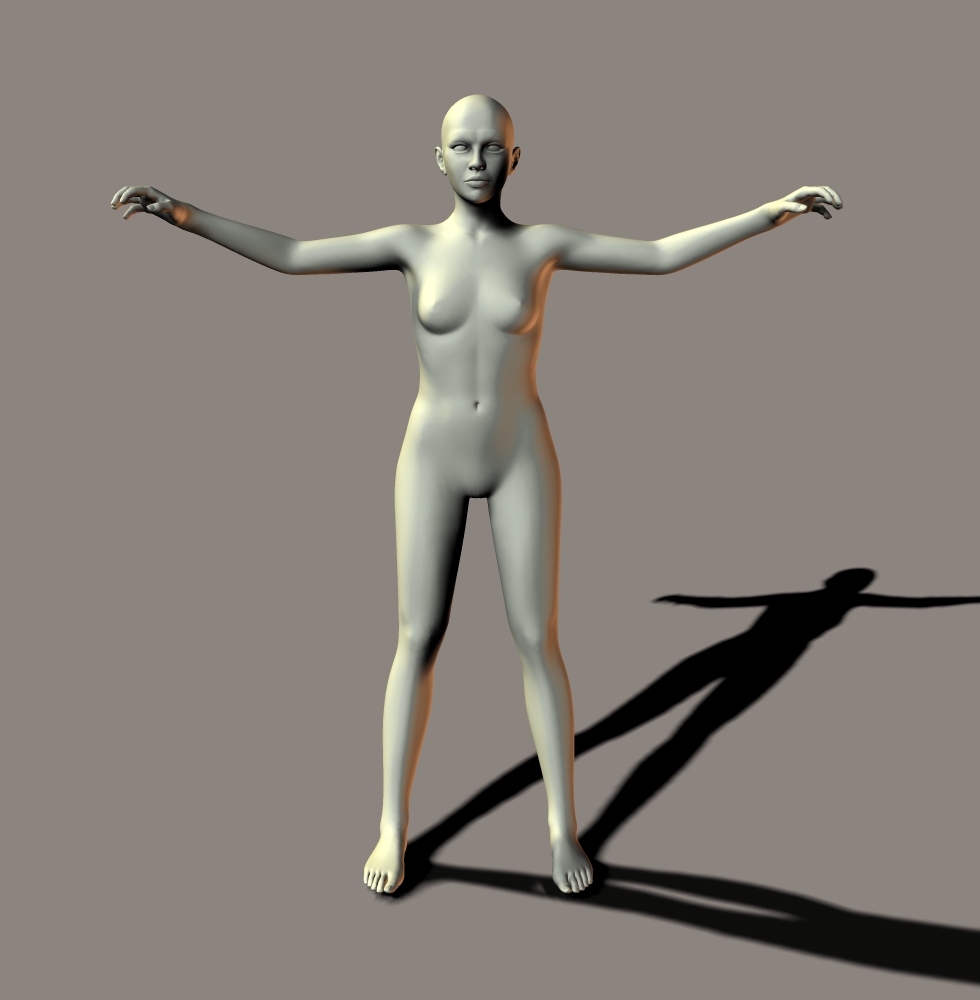
OMG, Antonia bit V4 and turned her into an Antonia-zombie. Run for the hills!! :lol:
Seriously, cool work!
LaurieA: I think Cage mentioned that he used Antonia 0.9.121 (a.k.a. 121). There's no difference in the head mesh or shape between 121 and 122, so either one should be fine. I imagine you could use older version of Antonia as well, but I wouldn't recommend it because of the changed eye size.
-- I'm not mad at you, just Westphalian.
Quote - You'll have to forgive me now, but I'm starting to get confused as to what I'm supposed to be using and why (I'm easily confused...lol). So many things have been posted...
I use Poser 7, but just recently got P8 which I'm still just exploring for the moment. Of course, I have V1-4 and Antonia (though I'm not sure which version of her I should be using either...lol). Perhaps, when all the kinks are ironed out, there should be a short tute or even a separate thread to explain which script to use for what ;o). Just for the denser folks like I'm...lol.
Laurie
Sorry for the confusion. this has unexpectedly turned into a development thread. :lol: :blushing:
Here's a quick outline:
- Use the transfer script which was posted in the final post on page 2 of the thread.
- Install the files included in the zip in the Runtime for the Poser version in which you'll be using the script.
- Load V1 (or 2) and Antonia-121 (not Antonia-121oldUVs, and use the High version, not the Lo version) into a Poser scene.
-Run the script.
-If the .vmf file included with the script was placed as instructed in the download readme file, there shouldn't be any problems.
-Note that the script will be referencing the figures by their base geometry name. In this case, blMilWom and Antonia-121. It might also get confused if either figure's head has been processed using the Grouping Tool, as this will create a GeomCustom reference in the actor.
-If today's newly-released version of Antonia has the same name for its .obj file (Antonia-121.obj), the comparison I've released will still work. The naming is important, because of how the script handles paths and folder-naming.
Umm. Does that help at all? The basic directions are in the readme for the download. If the instructions can be improved, let me know how you think they can and I'll try to do better.
===========================sigline======================================================
Cage can be an opinionated jerk who posts without thinking. He apologizes for this. He's honestly not trying to be a turkeyhead.
Cage had some freebies, compatible with Poser 11 and below. His Python scripts were saved at archive.org, along with the rest of the Morphography site, where they were hosted.
Quote - V4.2 to Antonia. I didnt do the fingers and toes, much too difficult to unbend them or get in between the toes LOL. But the rest of the figure fits pretty tight.
That is excellent! Wow! :woot:
Quote - Cage, the GUI looks fine for now. Bells and whistles can be attached later on.
I'll get back to you about reference figures and inter-Antonia transfers.
Okay. As long as the interface is good. :D
The comparison script is coming together nicely. :woot: I've managed to clean up the process and speed it up a bit. Right now it runs V1 to Antonia-121 in 40 seconds, using the tdmt.pyd. Without the .pyd, it takes 2 minutes and 30 seconds using squared distances, which don't seem to affect the accuracy at all, so far. Using normal point distance checks with the square root calculations, it takes 4 minutes and 35 seconds. Times will vary depending on the speed of your computer and the vertex counts of the actors being compared. Unfortunately this isn't the best combination for a speed test, because V1 is actually a kind of low-res figure nowadays. I suspect any comparison with V4 and similarly dense figures will take a few minutes with the .pyd and, unfortunately, considerably longer without it. I don't see any way around this, as the distance checks can't really be avoided.
But it's looking pretty good, so far.
===========================sigline======================================================
Cage can be an opinionated jerk who posts without thinking. He apologizes for this. He's honestly not trying to be a turkeyhead.
Cage had some freebies, compatible with Poser 11 and below. His Python scripts were saved at archive.org, along with the rest of the Morphography site, where they were hosted.
Quote - Ah, the naming of the obj file! I didn't take that into account. But despite that, what I said above holds. The new 0.9.122 release still uses Antonia-121.obj. In fact, I've tested the script with that release.
Good to know! So I can start referring to using Antonia-122, then.
===========================sigline======================================================
Cage can be an opinionated jerk who posts without thinking. He apologizes for this. He's honestly not trying to be a turkeyhead.
Cage had some freebies, compatible with Poser 11 and below. His Python scripts were saved at archive.org, along with the rest of the Morphography site, where they were hosted.
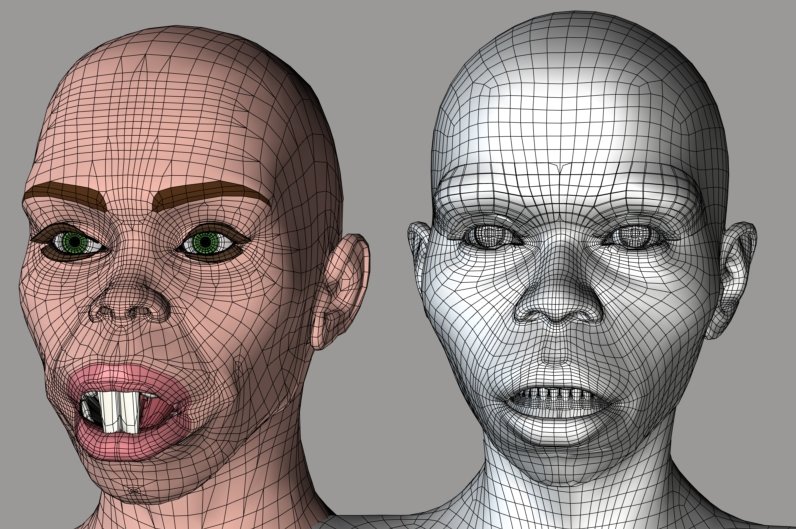
I've transferred the "Monkey" morph from V1 to Antonia, then back from Antonia to V1. Vicky's teeth have been moved along with her lips, because the teeth verts were close enough to the lips to be influenced by them. Antonia doesn't have this problem because her teeth aren't part of the head actor. (Also note that the morph is a bit rough, upon being copied back to Vicky from Antonia. I think this is largely due to flaws in the shaping I've used for this comparison.)
What I'm going to do is allow screening of materials in either actor for a comparison run. Then separate comparisons can be run which isolate teeth, lashes, or other problem areas from the rest of the actor. I'll then include a third script which will merge together separate user-specified .vmf files and create a combined file. (This could, of course, be done in a text editor, but it could get tedious with thousands of vertex listings.)
I'm also integrating the potential to use gzipped correlation files with a .vmz extension instead of .vmf. These should be able to be decompressed using any utility which supports gzip compression, and I'll build compression or decompression into the .vmf-combining script.
These are details which only users who make their own comparison files would have to worry about. The transfer script will remain simple and will handle both .vmf and .vmz invisibly, without the user even needing to know whether the files are compressed or not.
===========================sigline======================================================
Cage can be an opinionated jerk who posts without thinking. He apologizes for this. He's honestly not trying to be a turkeyhead.
Cage had some freebies, compatible with Poser 11 and below. His Python scripts were saved at archive.org, along with the rest of the Morphography site, where they were hosted.
I think the comparison script is pretty much together now. I need to run some tests to rule out any bugs and make sure the .vmf merge script works properly, but I think I should be able to get these up tomorrow. I'll prepare instructions for the correlation process and the comparison script GUI. Then any of you who want to try to create morph transfer correlations can give it a shot.
I'll also have an update for the transfer script, which is mainly behind-the-scenes cleanup and de-bugging.
Both scripts will look for the tdmt.pyd and will use it if it is present, but only if the OS is not Mac and the version of Poser is not less than 7.0 or is Pro. Anyone who can use the .pyd and plans to run the correlation script should install the tdmt.pyd, because the speed gains are definitely worth the trouble.
Once again, this is the link for the tdmt.pyd:
===========================sigline======================================================
Cage can be an opinionated jerk who posts without thinking. He apologizes for this. He's honestly not trying to be a turkeyhead.
Cage had some freebies, compatible with Poser 11 and below. His Python scripts were saved at archive.org, along with the rest of the Morphography site, where they were hosted.

http://www.the.cage.page.phantom3d.net/TDMT_Match/TDMT_Match_Compare1.zip
The scripts are now uploaded! :woot: Separate downloads for the transfer script and the comparison script.
Here's the comparison script GUI. Similar to the interface for the transfer script, with the same basic workflow. Hopefully both are user-friendly.
The comparison script download includes a text-editing program designed for the datafiles, which can be used to hand edit, merge, or compress/decompress the correlation files. Also included are poses and .pmd files to help set up the conditions I used to create my example data files.
The transfer script includes poses to position Vicky and Antonia for a shape transfer, as well as a copy of the restore detail script, for users who don't come by the download through this thread.
If anyone has problems or questions, please post them here.
===========================sigline======================================================
Cage can be an opinionated jerk who posts without thinking. He apologizes for this. He's honestly not trying to be a turkeyhead.
Cage had some freebies, compatible with Poser 11 and below. His Python scripts were saved at archive.org, along with the rest of the Morphography site, where they were hosted.
Quote - Wow! You're a busy bee, Cage. Render me impressed.
I hope I'll find time to try these tonight.
Thank you. :D Now, I must sleep. It's bad, being obsessive, when it begins to cut into the sleep time. :lol:
After that, I have a new Antonia to try! :woot:
===========================sigline======================================================
Cage can be an opinionated jerk who posts without thinking. He apologizes for this. He's honestly not trying to be a turkeyhead.
Cage had some freebies, compatible with Poser 11 and below. His Python scripts were saved at archive.org, along with the rest of the Morphography site, where they were hosted.

Wow! Thanks Cage :) I leave the forums for a few days and come back to some new super tools. LOL I'm gonna have to leave more often. :)
Quote - Wow! Thanks Cage :) I leave the forums for a few days and come back to some new super tools. LOL I'm gonna have to leave more often. :)
I hope the tools can be of use to you! :D And I thank you once again for giving them a home on the web!
Things kind of came together unexpectedly, with the new version of the morph script. I guess a breakthrough was a long time coming. My earliest posts on the topic were around Christmas of 2006, and Spanki had pulled together a working version using the raycasting approach by March of 2007, with minor assistance from me. I think possibly Spanki and Kuroyume were nudging me in this new direction in mid-2008 and it just didn't click at the time.
I suspect I'm babbling (still haven't slept :ohmy:). My point is: I work slooowly. Very slowly, usually. :lol: So if you go away again, sadly I prob'ly won't have cool new tools again. :sad:
Anyway, I hope you can use some of the scripts. Let me know if there are any problems.
===========================sigline======================================================
Cage can be an opinionated jerk who posts without thinking. He apologizes for this. He's honestly not trying to be a turkeyhead.
Cage had some freebies, compatible with Poser 11 and below. His Python scripts were saved at archive.org, along with the rest of the Morphography site, where they were hosted.
A possible issue with the example files uploaded for the comparison script: I found that a decent head comparison works best if both actors have their mouths open slightly. I assumed that the Antonia "Mouth Open" morph I'd used in the process would be available to users, but it's no longer distributed since version 118. So anyone who wants to compare Antonia's head to that of another figure should load Antonia 118's head morphs, if they have them. If not, then the transfer script can be used to port Vicky's "Yell" morph over to Antonia and this can be used to open her mouth for comparisons.
I'll add all of this to the comparison script readme file ASAP.
===========================sigline======================================================
Cage can be an opinionated jerk who posts without thinking. He apologizes for this. He's honestly not trying to be a turkeyhead.
Cage had some freebies, compatible with Poser 11 and below. His Python scripts were saved at archive.org, along with the rest of the Morphography site, where they were hosted.

Privacy Notice
This site uses cookies to deliver the best experience. Our own cookies make user accounts and other features possible. Third-party cookies are used to display relevant ads and to analyze how Renderosity is used. By using our site, you acknowledge that you have read and understood our Terms of Service, including our Cookie Policy and our Privacy Policy.
Obviously, WW2 and CrossDresser were made to alter a piece of clothing made for one mesh and rigging to fit another figure with a different mesh and rigging. They both require a file that defines the host and target figure. At first these programs did not do feet/shoes, because of the complexity of feet. Also there were systems to refit hair. There is even a program that can be used to convert a texture from one figure to another. It requires definition files just like the clothing converters do.
There has never been anything worn on the face, like a like cloths or shoes, that needed to be converted, and once converted to take or donate morphs. Except, of course, the face itself.
It was customers of these clothing programs who figured out that reforming the CR2 of a figure, or a SecondSkin of that figure, as if they were clothing, to the mesh and rigging of the target figure could be used to reshape morphs. The morphs could then be transferred to the target figure using Morphing Cloths (with more or less success depending on the specific morph).
In other words, there has never been a program specifically designed to transfer body morphs from one figure to another. But, the programs designed to alter cloths, and transfer morphs have been used to do something they are not actually designed to do. Even so, finding this new use for those applications has improved their values, and allowed people to share, not just clothing and shoes, but morphs. This makes the target figures more usable and versatile.
In your case, you are actually trying to design a program that will transfer facial, expression, and phoneme morphs from one figure to another. You will probably need definition files for each donor and/or target figure, and they will probably need to be created individually and specifically. If the process to create those definition files is not too complicated, maybe other people could assist, or do it for themselves.
Imagine when Antonia is ready, if WW2 or CrossDresser supports the figure, not only will cloths be available, but morphs can be transferred as well. The same could be true for Brad, when Phantom3D has progressed to a more finished stage of development. And, if the same can be done for the face, both figures could be introduced as finished products with a large degree of support already available.
Thank you for the effort. It really is a great contribution.
LMK
Probably edited for spelling, grammer, punctuation, or typos.