
Renderosity Forums / Poser - OFFICIAL
Welcome to the Poser - OFFICIAL Forum
Forum Moderators: RedPhantom Forum Coordinators: Anim8dtoon
Poser - OFFICIAL F.A.Q (Last Updated: 2026 Mar 02 11:12 pm)

Subject: Morph Cleanup Script

Quote - There is still gads of room on phantom3d.net for a website so when you get ready let me know. I also have poserpub.com if you would rather use that.
Ooh. Thank you! I've forgotten how much space I was allocated for http://www.the.cage.page.phantom3d.net. I doubt I'll come anywhere close to filling it up, and the script doesn't really generate any files that are particularly large. I'd assumed I'd just put the script's site up in the space you've given me.
Unless it deserves its own unique space? Hmm. :unsure:
===========================sigline======================================================
Cage can be an opinionated jerk who posts without thinking. He apologizes for this. He's honestly not trying to be a turkeyhead.
Cage had some freebies, compatible with Poser 11 and below. His Python scripts were saved at archive.org, along with the rest of the Morphography site, where they were hosted.
===========================sigline======================================================
Cage can be an opinionated jerk who posts without thinking. He apologizes for this. He's honestly not trying to be a turkeyhead.
Cage had some freebies, compatible with Poser 11 and below. His Python scripts were saved at archive.org, along with the rest of the Morphography site, where they were hosted.

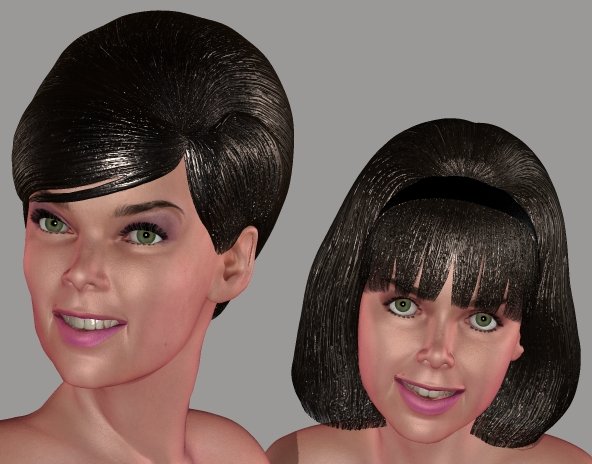
Quote - So that's your Barbara Gordon morph on Antonia? One on the left?
Hopefully that's where it's heading. :lol: Trending in that direction. Half the time I can't tell if it resembles her or not. The actress seems to have an odd face which looks almost like different people when comparing various photos. I think it's her cheeks. Very muscular cheeks, which change the shape of her face depending on whether they're relaxed or not. Hmm.
Umm. Shorter answer: Yes, it is. :lol:
===========================sigline======================================================
Cage can be an opinionated jerk who posts without thinking. He apologizes for this. He's honestly not trying to be a turkeyhead.
Cage had some freebies, compatible with Poser 11 and below. His Python scripts were saved at archive.org, along with the rest of the Morphography site, where they were hosted.
Looks like her to me. Some people just have elusive,mobile faces that are to rig in 3d programs.
Great likeness. She looks good on Antonia!
I cannot save the world. Only my little piece of it. If we all act
together, we can save the world.--Nelson Mandela
An inconsistent hobgoblin is
the fool of little minds
Taking "Just do it" to a whole new level!
Thank you. I've been trying to get a resemblance since... (counts on fingers) 1999. And I've been working on morph transfer since 2006. As I've said, I work verrry sloowwly. :lol:
===========================sigline======================================================
Cage can be an opinionated jerk who posts without thinking. He apologizes for this. He's honestly not trying to be a turkeyhead.
Cage had some freebies, compatible with Poser 11 and below. His Python scripts were saved at archive.org, along with the rest of the Morphography site, where they were hosted.

Quote - While acheiving the exact likeness of V3, or A3 would be nice to have, it is much more desirable that the morphs look good on Antonia, even if they are not an exact match.
Thanks for all of your hard work. The progress is impressive.
Thank you. 
The issue with full shape transfer is for character morphs. If you have a full-face character morph on V3 or Aiko, whatever figure, and you want to recreate that on another figure, you need to be able to recreate the base shape of the recipient figure's head. Otherwise the transferred character morph deltas will reshape the face relative to the recipient base and it won't be quite right.
For morphs like expressions, where the motion or adjustment of the base shape is more important than a close recreation of a shape, shape transfer isn't really important.
Both morph transfer and shape transfer do seem to be working effectively. The problem I'm noting is that limitations in the quality of the comparison data file can show up more thoroughly in a shape transfer, and even more so when, for instance, a comparison for V3 is applied to A3. My comparison data files are fairly effective, but I don't have the tools or expertise to really create a perfect comparison. Mike1950's approach seems like it might hold more promise.
If anyone knows of affordable and (fairly) easy-to-use software which can do something like what Mike1950 is doing with Transpose in ZBrush, or what Blender can do with its version of retopology, please let us know!
===========================sigline======================================================
Cage can be an opinionated jerk who posts without thinking. He apologizes for this. He's honestly not trying to be a turkeyhead.
Cage had some freebies, compatible with Poser 11 and below. His Python scripts were saved at archive.org, along with the rest of the Morphography site, where they were hosted.

Well, I didn't get much done yesterday, because I was trying to work out a way to improve the speed of the script, particularly for users who can't use Spanki's tdmt.pyd. I'm considering these test timing results on my system when I obsess about this:
-
Vicky 1 and Antonia
- With pyd: 50 seconds to 1:10.
- Without (just PPy): 2:30 -
Vicky 3 and Antonia
- With pyd: 2:30
- Without: (Cage is afraid to test, but should be over 5:00)
I suspect that comparisons could end up running longer than 10-15 minutes with V4 involved. Comparing two actors of V4-level resolution could give a user the opportunity to step out and run errands for a few hours. :lol:
So I'm trying to speed things up, and so far nothing has worked. Any additional screening steps have actually slowed things down. Numeric has basic vector and matrix tools, but all we need here is a vector length or point distance calculation, and Numeric doesn't provide that.
So I'm considering trying to make a simple console program using PureBasic, which can receive the vertex point cloud data and materials screening data, then write out the final file. I would be able to compile this for both Windows and Mac, and for different processors, as I understand it. Unlike a .pyd, this would not be sensitive to changes in Python version or version of the compiler used to build the program, and a Mac version wouldn't have to be created on a Mac. PoserPython could just start up the program and let it process the data, which processing should be much faster than what we can get from straight PoserPython. I'm not sure how it would compare to the speed of the .pyd. Use of the external program would be optional with the script, so no one is forced to use a process which they might not like, for whatever reason.
That's assuming I can put the program together. I know Dark Basic Professional game programming language pretty well, which is very similar. :unsure:
If anyone has thoughts or objections to this idea, or a better idea, please jump in! :m_bouncy:
===========================sigline======================================================
Cage can be an opinionated jerk who posts without thinking. He apologizes for this. He's honestly not trying to be a turkeyhead.
Cage had some freebies, compatible with Poser 11 and below. His Python scripts were saved at archive.org, along with the rest of the Morphography site, where they were hosted.
Quote - Well, knowing that "affordable" can be completely subjective, there's always 3D Coat which is within the range of most folks in the hobbyist field (for now anyway) ;o).
I WANT! lol
Anyway, it's just a suggestion. I wish I could tell you more about Blender but I really don't have a clue.
I've been looking at 3D Coat. This month I'm either getting that, or Miki. :lol:
I haven't seen an equivalent of what Mike1950 is doing in the 3D Coat features, though. What they call "retopology" isn't the same process which Blender calls by that name. Mike1950 is able to interactively shrink wrap one mesh around another, controlling how the different areas wrap to one another. All I see for 3D Coat is the (very worthwhile, in itself!) ability to re-work the structure of a mesh without affecting shape.
Am I missing something? I hope so!
===========================sigline======================================================
Cage can be an opinionated jerk who posts without thinking. He apologizes for this. He's honestly not trying to be a turkeyhead.
Cage had some freebies, compatible with Poser 11 and below. His Python scripts were saved at archive.org, along with the rest of the Morphography site, where they were hosted.
Quote - > Quote - Well, knowing that "affordable" can be completely subjective, there's always 3D Coat which is within the range of most folks in the hobbyist field (for now anyway) ;o).
I WANT! lol
Anyway, it's just a suggestion. I wish I could tell you more about Blender but I really don't have a clue.
I've been looking at 3D Coat. This month I'm either getting that, or Miki. :lol:
I haven't seen an equivalent of what Mike1950 is doing in the 3D Coat features, though. What they call "retopology" isn't the same process which Blender calls by that name. Mike1950 is able to interactively shrink wrap one mesh around another, controlling how the different areas wrap to one another. All I see for 3D Coat is the (very worthwhile, in itself!) ability to re-work the structure of a mesh without affecting shape.
Am I missing something? I hope so!
At this point in my insofar extremely brief modeling ventures, you would know that question much better than I...lol ;o). I just know it does retopology :o).
Laurie
Quote - At this point in my insofar extremely brief modeling ventures, you would know that question much better than I...lol ;o). I just know it does retopology :o).
Laurie
Thank you. I'm going to do some digging and see what I can learn about 3D Coat's potentials, and whether there's anything else that can do this controlled shrink-wrapping.
===========================sigline======================================================
Cage can be an opinionated jerk who posts without thinking. He apologizes for this. He's honestly not trying to be a turkeyhead.
Cage had some freebies, compatible with Poser 11 and below. His Python scripts were saved at archive.org, along with the rest of the Morphography site, where they were hosted.

Is the time-consuming bit the one where for each vertex of mesh A you identify the closest vertices in mesh B?
If that's so, one idea for speeding things up is to use a grid like you would on a map (only in 3d, of course, so the grid cells would be cubes instead of squares). First you go through mesh B and for each cell of the grid store the list of vertices in B that it contains. Then when you look for nearest neighbors of some vertex in A, you only need to look at the cell that vertex falls in and possibly its neighbors. If you space your grid cells right, you can be certain enough not to miss anything, but you'll only have to do a fraction of the distance computations.
-- I'm not mad at you, just Westphalian.
Quote - Is the time-consuming bit the one where for each vertex of mesh A you identify the closest vertices in mesh B?
If that's so, one idea to speed things up is using a grid like you would on a map (only in 3d, of course, so the grid cells would be cubes instead of squares). First you preprocess mesh B and for each cell in the grid you store the list of vertices in B that it contains. Then when you look for nearest neighbors of some vertex in A, you only need to look at the cell that vertex falls in and possibly its neighbors. If you space your grid cells right, you can be certain enough not to miss anything, but you'll only have to do a fraction of the distance computations.
Aha! We had this built into the old, pre-pyd version of TDMT. We were (probably inaccurately) calling it an octree process. It can help, but there are potential complications with any vertex which is near the edge of a sector. The solution we had was to run the comparison twice, first with sectors which don't overlap, to catch the majority of cases. Then a second time with slightly enlarged, overlapping sectors to try to catch anything which had been missed near the sector edges.
I've been hesitating to implement this again, in part because Spanki was so pleased that the pyd allowed us to get rid of it, in part because my implementation is rather messy and I'd end up having to create separate code for pyd processing and non-pyd with this "octree" in place. 
But it's a good idea, which can definitely speed things up. I'll start thinking about how I might be able to implement it more efficiently than in the past.
Any thoughts on the possible use of an external application? Is that too awkward, or tacky and frowned-upon in programming circles?
===========================sigline======================================================
Cage can be an opinionated jerk who posts without thinking. He apologizes for this. He's honestly not trying to be a turkeyhead.
Cage had some freebies, compatible with Poser 11 and below. His Python scripts were saved at archive.org, along with the rest of the Morphography site, where they were hosted.
Cage:
This is the Blender manual page on Remake-Topology. Is this what you are talking about?
http://wiki.blender.org/index.php/Doc:Manual/Modelling/Meshes/Remaking_the_Topology
What does this not do that ZBrush does?
LMK
Probably edited for spelling, grammer, punctuation, or typos.
I avoid external applications if I can, because they tend to complicate things. If I can't get things fast enough in pure Python, I'd rather make a .pyd like Spanki did than use a separate program.
Look, if this can be expressed as a function call with inputs and outputs, give me the specs and I see if I can come up with something. Or point me to the part of your code that does it.
-- I'm not mad at you, just Westphalian.
Quote - Cage:
This is the Blender manual page on Remake-Topology. Is this what you are talking about?
http://wiki.blender.org/index.php/Doc:Manual/Modelling/Meshes/Remaking_the_Topology
What does this not do that ZBrush does?
Oh, dang. That's not what I thought it was. Their retopo process actually IS the same thing as retopo in 3D Coat. And I had the full name for the process wrong.
I'm sure Blender has a fairly new feature which allows controlled shrink-wrapping of one mesh onto another. I remember reading a tutorial and being fascinated, but finding the process awkward and overly-complex for my tastes (like so much in Blender). What do they call that, I wonder? Just "shrink wrap"? Maybe....
Thank you, lkendall!
===========================sigline======================================================
Cage can be an opinionated jerk who posts without thinking. He apologizes for this. He's honestly not trying to be a turkeyhead.
Cage had some freebies, compatible with Poser 11 and below. His Python scripts were saved at archive.org, along with the rest of the Morphography site, where they were hosted.
Quote - I avoid external applications if I can, because they tend to complicate things. If I can't get things fast enough in pure Python, I'd rather make a .pyd like Spanki did than use a separate program.
Look, if this can be expressed as a function call with inputs and outputs, give me the specs and I see if I can come up with something. Or point me to the part of your code that does it.
I was afraid the idea might be too awkward. Dang.
I'm not trying to draft anyone into writing a new .pyd. :blushing: Not that I'll reject any offers. :lol:
All that's really needed is access to a fast form of vector length or point distance calculation. The script function which does this is close_verts_falloff(). The key lines are:
if no_pyd:
p2 = mesh1.verts[nvi]
dist = (p2[0]-vert[0])**2 + (p2[1]-vert[1])**2 + (p2[2]-vert[2])**2 # 2.48 min
else:
dist = vert.PointDistance(mesh1.verts[nvi]) # 48 seconds
I was considering just throwing all the data at the external program and letting it do the heavy work, trying to minimize any back-and-forth interactions between the external program and PoserPython.
If you want to look at it, then thank you. :thumbupboth: But don't let me drag you away from anything important (Antonia!). :laugh:
===========================sigline======================================================
Cage can be an opinionated jerk who posts without thinking. He apologizes for this. He's honestly not trying to be a turkeyhead.
Cage had some freebies, compatible with Poser 11 and below. His Python scripts were saved at archive.org, along with the rest of the Morphography site, where they were hosted.
Cage:
The Retopology Wiki page does say that it can do this:
"Projecting an existing mesh onto the object."
This sounds like what you are thinking about. Sadly, the Wiki Manual does not tell how to do this.
LMK
Edit:
How about this Blender function - Shrink-Wrap:
http://wiki.blender.org/index.php/Doc:Manual/Modifiers/Deform/Shrinkwrap
LMK
Probably edited for spelling, grammer, punctuation, or typos.
Quote - Cage:
The Retopology Wiki page does say that it can do this:
"Projecting an existing mesh onto the object."
This sounds like what you are thinking about. Sadly, the Wiki Manual does not tell how to do this.
Ah! Perhaps I was thinking about the same thing, then.
This is part of what makes Blender confusing and difficult. They overload all of their procedures, making things as opaque as their user interface. :lol:
I guess this is one of many areas where Blender lacks any formal documentation, and you need to get lucky and find a tutorial someone has put together. So maybe I should be looking for such a tutorial, rather than digging through the PureBasic docs today. :laugh:
===========================sigline======================================================
Cage can be an opinionated jerk who posts without thinking. He apologizes for this. He's honestly not trying to be a turkeyhead.
Cage had some freebies, compatible with Poser 11 and below. His Python scripts were saved at archive.org, along with the rest of the Morphography site, where they were hosted.
Cage:
After more scrutiny of the Wiki Manual I found Shrinkwrap Modifier:
http://wiki.blender.org/index.php/Doc:Manual/Modifiers/Deform/Shrinkwrap
I had edited my above post, but you saw it before I could save the edit.
LMK
Probably edited for spelling, grammer, punctuation, or typos.
Quote - Cage:
After more scrutiny of the Wiki Manual I found Shrinkwrap Modifier:
http://wiki.blender.org/index.php/Doc:Manual/Modifiers/Deform/Shrinkwrap
I had edited my above post, but you saw it before I could save the edit.
Aha! There is shrinkwrap, as well. I think what we need is the Retopo functions (from the Blender Retopo link provided above):
Quote - There are three ways to use retopo: - Retopo paint, where you paint lines on the mesh and painted intersections become vertex locations.
- Creating new mesh via standard mesh editing methods (the new vertices will “stick” to the reference object’s surface).
- Projecting an existing mesh onto the object.
We would want the third one. There is (or was, 18 months or so ago) a tutorial somewhere.
===========================sigline======================================================
Cage can be an opinionated jerk who posts without thinking. He apologizes for this. He's honestly not trying to be a turkeyhead.
Cage had some freebies, compatible with Poser 11 and below. His Python scripts were saved at archive.org, along with the rest of the Morphography site, where they were hosted.
Quote - Okay, thanks for the pointers! No promises, but I will play a bit and see what I can come up with.
Thank you! :woot: I will hold you to those no promises. :lol:
The .pyd-creation seems to be complicated and full of limitations. You have to compile using the version of your C++ compiler with which the target version of Blender was compiled. A Mac version has to be compiled on a Mac, or using a Mac version of the C++ compiler. Unfortunately, these complications put the process well outside of what I can hope to achieve. I can write a .exe or .app, but not a .pyd. :cursing: :lol:
Edit: Should I say "a .exe" or "an .exe"? I pronounce the "dot" and each letter: "a dot EE-EX-EE." I know someone who pronounces ".jpg" as "jay=peg", though, so I'm not sure. Hurm.
===========================sigline======================================================
Cage can be an opinionated jerk who posts without thinking. He apologizes for this. He's honestly not trying to be a turkeyhead.
Cage had some freebies, compatible with Poser 11 and below. His Python scripts were saved at archive.org, along with the rest of the Morphography site, where they were hosted.
Quote - Dangit! I forgot about that silly business of Python relying on Mcrs*ft compilers on Windows. Well, that means a .pyd is out of the question for me as well. But I have a bunch of ideas for speeding this up without going to C/C++. Hopefully, one will work.
Yeh, .pyd creation sounds pretty horrible.
Anything you can do to speed it up is quite welcome! :woot: But, again, don't let this cut into anything more important. I'll be sure to credit you in the script documentation for any changes you make.
===========================sigline======================================================
Cage can be an opinionated jerk who posts without thinking. He apologizes for this. He's honestly not trying to be a turkeyhead.
Cage had some freebies, compatible with Poser 11 and below. His Python scripts were saved at archive.org, along with the rest of the Morphography site, where they were hosted.
Content Advisory! This message contains nudity
What's important? Eating, sleeping, going to work and looking busy while there? Going to the loo on occasion, I guess? :lol:
Apparently, studies indicate that exercising ones mind on a regular basis helps prevent things like dementia and Alzheimer's. It must have been years since I had a really good puzzler, so at this point, I'll take anything I can get. 
-- I'm not mad at you, just Westphalian.
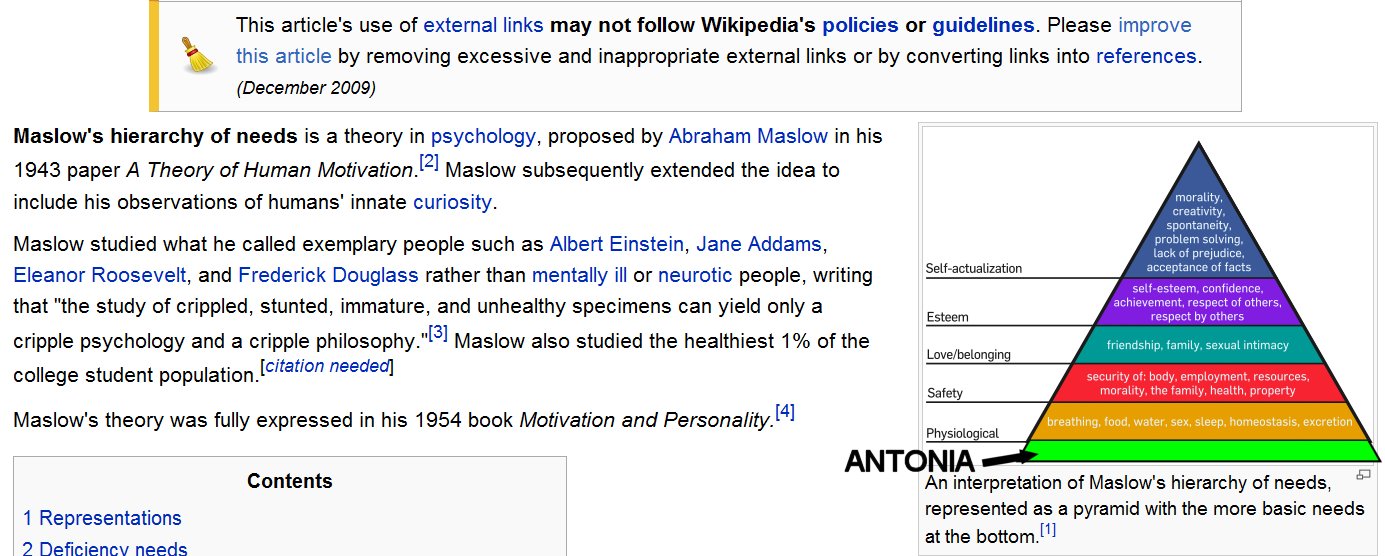
Well, Wikipedia tells me about Maslow's Hierarchy of Needs, but they seem to have omitted the most important one. I've added it to the base of the pyramid, here.... :lol:
===========================sigline======================================================
Cage can be an opinionated jerk who posts without thinking. He apologizes for this. He's honestly not trying to be a turkeyhead.
Cage had some freebies, compatible with Poser 11 and below. His Python scripts were saved at archive.org, along with the rest of the Morphography site, where they were hosted.
Quote - See, that's what I'm saying. If my brain turns to mush due to lack of exercise, that will have bad consequences for the Antonia project.
If it's good for Antonia, then go with it!
Possibly the code may reveal that my own brain is a bit mushy. :lol: :ohmy: I can often make things work, but I'm not sure I've ever learned proper coding technique or good coding practice. So my code may read like a school paper written by a first grader with spelling difficulties. Koff.
===========================sigline======================================================
Cage can be an opinionated jerk who posts without thinking. He apologizes for this. He's honestly not trying to be a turkeyhead.
Cage had some freebies, compatible with Poser 11 and below. His Python scripts were saved at archive.org, along with the rest of the Morphography site, where they were hosted.
Quote - I've only ever taught classes in algorithms, not coding practices. So I guess you're fairly save from the worst effects of teacher's syndrome on my part.

Eep! There's a teacher in the room? :scared:
If you can swing the algorithms, you might be able to improve my kludge-worthy weighting code. It's working, but I'm pretty sure it's a hack. :lol:
But I'm fairly certain the slowness is coming from the sheer volume of distance calculations. I've tried to reduce them however I can, short of adding the so-called "octree" screening by sectors or regions. Possibly the dict handling isn't the fastest way possible to get the set of closest vertices. I haven't tried tinkering with that portion of the function, so far.
===========================sigline======================================================
Cage can be an opinionated jerk who posts without thinking. He apologizes for this. He's honestly not trying to be a turkeyhead.
Cage had some freebies, compatible with Poser 11 and below. His Python scripts were saved at archive.org, along with the rest of the Morphography site, where they were hosted.
Well, I'm reading tutorials on Blender's Retopo tool, and so far I don't see any indication that it can actually do what I thought it could. It can snap one mesh to the surface of another, but it looks like the effect is global, for the entire mesh. We'd need to be able to select certain parts of a mesh and selectively move those to the other surface. I'm not sure Blender Retopo, or Shrinkwrap, actually allows that effect.
So maybe I should hold off on 3D Coat and Miki, and start saving pennies to buy ZBrush. Dangit. When I had the $$$ for pricey software, I bought Modo, when I should have gone with ZBrush. Sigh.
===========================sigline======================================================
Cage can be an opinionated jerk who posts without thinking. He apologizes for this. He's honestly not trying to be a turkeyhead.
Cage had some freebies, compatible with Poser 11 and below. His Python scripts were saved at archive.org, along with the rest of the Morphography site, where they were hosted.
Cage:
How many times do you need to run this comparison algorithm? Does it need to be run every time one tries to transfer a morph? Can it be run once for each host and donor or once for each comparison of a donor to the host? If it does not have to be run often, why do you care how long it takes to complete its task? Just tell every one who uses your process that set-up time for each figure will take an investment of time.
Concerning Blender, Retopo is dependent upon the angle at which the process is viewed. Shrinkwrap is dependent upon the position of the target object and the object being modified.
Looking at the Shrinkwrap Modifier, it looks as if the distance between the target object and the object being modified can be set during the shrinking project.
If Antonia's head is loaded, and Victoria's head is loaded larger than Antonia's, the shrinking process can be done in stages, with the positions of either being adjusted between stages of the process. Would that make the Shrinkwrap Modifier more usable for what you want to do?
LMK
Probably edited for spelling, grammer, punctuation, or typos.
The comparison process only needs to be run by those who want to create comparison data files. Anyone who just wants to use existing data files to transfer morphs or shapes doesn't need to worry about the matter at all. The comparison script generates the data file, which stores all the necessary data for any future transfers between the actors in question.
If you are creating comparison data files, however, the process is likely to involve repeated test runs, while refining the correlation. (Unless you have perfectly-matched actors such as could be created using Mike1950's process.) Particularly for comparisons involving higher-resolution geometries, then, it will be desirable to have a comparison process which is a fast as possible. Otherwise, the process gets old quickly, as I've learned with older versions of TDMT, over the years. Waiting an hour for a comparison to finish, then learning it was no good anyway, really wastes time and can ruin your enthusiasm for the whole process. :lol: I'd hope this could be as accessible and speedy as possible, so fewer people will be scared away from the process and we can hopefully develop a library of data files from many contributors.
But folks who just want to transfer don't have to worry about any of that. :woot:
The viewing angle doesn't really help us if the Retopo or Shrinkwrap process still can only affect an entire mesh in one run. If we can isolate certain areas, then run the process only on those, we could theoretically work toward what Mike1950 is doing. Although it souonds like it would be much more awkward in Blender, even if it can work. :(
I'm not sure an offset from the wrap surface really helps us much, either, unfortunately.
The stages idea would be workable if, as above, vertices to be shrunk (wrapped?) can be defined by the user. Otherwise there are complications because the placement of features can differ so greatly on any two heads. Usually lining up the features well isn't just a matter of rotation, scaling, and translation. There has to be deformation involved. Blender obviously has tools to deform a mesh, but I find them rather awkward, myself. Blender is another 3D program about which I'll say, "Looks like a fish, moves like a fish, steers like a cow." :lol: And I'm never quite sure what it will do to my .obj file this time, upon I/O.
Blender and I have some trust issues. :lol:
===========================sigline======================================================
Cage can be an opinionated jerk who posts without thinking. He apologizes for this. He's honestly not trying to be a turkeyhead.
Cage had some freebies, compatible with Poser 11 and below. His Python scripts were saved at archive.org, along with the rest of the Morphography site, where they were hosted.
Cage:
Far be it from me to be a Blender advocate. The best thing that one can say about Blender is that it is free. It was worth a few hours of research though.
Thanks for explaining the problems with Shrinkwrap. I understand more of the issues involved now. As I read the limited documentation, Retopo will allow you to choose just the vertices you want to project onto your target figure. It must be from a lined up point of view. If you can undo mistakes, then by trial and error, you could eventually accomplish what you want. It would probably be a very arduous process, requiring that you hide about everything you do not want to affect on the target, and the object being Retopo-ed. You would need to do that about every time you took another step. Ouch. If you had to do this for each figure you might want to compare, then $595 (USD) for ZBrush begins to sound cheap.
Seeing that Blender uses Python for scripting. You might have better luck writing your own comparison utility in Blender.
Maybe someone else will have another application to suggest..
LMK
Probably edited for spelling, grammer, punctuation, or typos.
Quote - Far be it from me to be a Blender advocate. The best thing that one can say about Blender is that it is free. It was worth a few hours of research though.
As I read the limited documentation, Retopo will allow you to choose just the vertices you want to project onto your target figure. It must be from a lined up point of view. If you can undo mistakes, then by trial and error, you could eventually accomplish what you want. It would probably be a very arduous process, requiring that you hide about everything you do not want to affect on the target, and the object being Retopo-ed. You would need to do that about every time you took another step. Ouch. If you had to do this for each figure you might want to compare, then $595 (USD) for ZBrush begins to sound cheap.
Sorry if I sound grouchy about Blender. :lol: I've had questionable experiences with the program. Others can make it work for them, and it's good that you're sharing this information. Thank you for bringing it to the thread. Thank you for doing all this research into the matter! :woot: It's just that I, personally, probably won't try to use Blender for this.
So it could actually work, more or less, but not very easily. Is that right? Perhaps someone will want to try it.
Where can one get ZBrush for that amount? Last time I checked their website, they had it listed for closer to $750.00, IIRC. That $150.00 difference in price could make the difference in driving me toward - or away from - the product. :laugh:
===========================sigline======================================================
Cage can be an opinionated jerk who posts without thinking. He apologizes for this. He's honestly not trying to be a turkeyhead.
Cage had some freebies, compatible with Poser 11 and below. His Python scripts were saved at archive.org, along with the rest of the Morphography site, where they were hosted.
Cage:
Seeing that I have never used a modeler, Blender would probably not be my choice as a starting point, even though the price is right. I did look over some of the Python scripts, and there is some evidence that a vetex by vertex shrink wrap could be programed, the thought of which should be the source of many bad dreams.
I got the $595.00 (USD) from the Pixologic store site.
http://www.pixologic.com/store/
I guess the price has come down from when you last looked? I don't think I will be saving for this anytime soon.
LMK
Probably edited for spelling, grammer, punctuation, or typos.
Quote - I guess the price has come down from when you last looked?
I don't think I will be saving for this anytime soon.
Gee. I dunno. :unsure: My winning streak seems to have ended, the past couple of days. :lol: Today I seem to be confused about many things. Hmm. Mind you, a lower price is a better price. It will still take a while to save enough beans to make a ZBrush. :lol:
===========================sigline======================================================
Cage can be an opinionated jerk who posts without thinking. He apologizes for this. He's honestly not trying to be a turkeyhead.
Cage had some freebies, compatible with Poser 11 and below. His Python scripts were saved at archive.org, along with the rest of the Morphography site, where they were hosted.
The cheapest I could find the newest version of ZBrush is $510 (USD).
http://www.novedge.com/Prods_Pixologic.asp
Still a little steep.
LMK
Probably edited for spelling, grammer, punctuation, or typos.

Once you have purchased Zbrush you never need to pay upgrade prices. So figuring that into it it's not too bad a price.
Thanks, guys. :thumbupboth:
I'm interested in ZBrush.
[squeakyteenvoice]
Verrrry interested.
[/squeakyteenvoice] :lol:
But it won't be able to happen in the near term. Looking at 3 to 6 months, probably. Something to look forward to. :woot:
===========================sigline======================================================
Cage can be an opinionated jerk who posts without thinking. He apologizes for this. He's honestly not trying to be a turkeyhead.
Cage had some freebies, compatible with Poser 11 and below. His Python scripts were saved at archive.org, along with the rest of the Morphography site, where they were hosted.

Hi,
Just a bit of lateral thinking here. And probably crazy talk.
Is it possible to read the UV coordinates of a vertex? If so could you take advantage of the remapping that has been done by DPH and others?
So I'm thinking
1/ Take a head, for example V3
2/ Read off the UV coordinates of each vertex
3/ Take an Antonia head that has been remappd to take V3 textures.
4/ Read off the UVcoordinates of each vertex
5/ Since both head meshes are mapped to similarl UV's by the remapping process
that should give you a look up table of which V3 vertex ( by its UV ) needs to share the same/similar x,y,z position on the head surface as the corresponding Antonia vertex ( by its remapped UV ).
This would only be as good a match as the UV remapping, but hopefully would get you close enough for your script to then correct any errors. So you would be using the remapped UV to basically put the verticies of the ears, nose, mouth etc in the matching places and right orientations.
Cheers
Ian
Quote - This would only be as good a match as the UV remapping, but hopefully would get you close enough for your script to then correct any errors. So you would be using the remapped UV to basically put the verticies of the ears, nose, mouth etc in the matching places and right orientations.
Hi, Ian!
Yes! You can do this. I did it with an earlier version of TDMT. Spanki used the idea in the version of TDMT he apparently created for C4D.
But there was a critical problem neither of us could overcome. For each vertex, there can be as many texvertices as there are polygons of which that vertex is a part. Which leaves a lot of potential ambiguity about how arbitrary seams for the UV's (where the texverts have been split between polygons) should be worked out. The UV's copy quite nicely, until you get to the edges. There, you get a mess, which I found impossible to sort out by hand or in code. :crying:
Spanki, far smarter and more experienced in programming than I, couldn't come up with a solution to the problem, either. So I stopped tinkering with the idea and haven't bothered to integrate it into subsequent versions of TDMT.
I guess if odf is looking for a puzzler, this could be a doozy for him. :lol: As far as Spanki and I could determine, the problem has too many arbitrary elements to be readily solved.
===========================sigline======================================================
Cage can be an opinionated jerk who posts without thinking. He apologizes for this. He's honestly not trying to be a turkeyhead.
Cage had some freebies, compatible with Poser 11 and below. His Python scripts were saved at archive.org, along with the rest of the Morphography site, where they were hosted.
Hi Cage, Oh and belated Happy Birthday greetings ;-)
Yes I can understand that. So if a vertex was a corner of a dozen polygons, such as maybe the centre of a circle made of twelve segments, and for some reason the UV mapping separated those dozen polygons onto different areas of the map, then that one vertex would have a dozen different but equally valid UV coordinates.
That is an interesting problem. I wish I was better at maths, and programming. I find puzzles like this fascinating.
Cheers
Ian
Quote - How many coordinates of the normal does each vertex have? Or do normals have coordinates?
A normal only has a direction and a length. It doesn't have a location. Coordinates and normal vectors share the same format of (x,y,z), but they're different entities altogether.
http://en.wikipedia.org/wiki/Euclidean_vector
http://en.wikipedia.org/wiki/Vertex_normal
It was ages before I understood the difference between the two. Hoo boy. :lol:
===========================sigline======================================================
Cage can be an opinionated jerk who posts without thinking. He apologizes for this. He's honestly not trying to be a turkeyhead.
Cage had some freebies, compatible with Poser 11 and below. His Python scripts were saved at archive.org, along with the rest of the Morphography site, where they were hosted.
Quote - Hi Cage, Oh and belated Happy Birthday greetings ;-)
Yes I can understand that. So if a vertex was a corner of a dozen polygons, such as maybe the centre of a circle made of twelve segments, and for some reason the UV mapping separated those dozen polygons onto different areas of the map, then that one vertex would have a dozen different but equally valid UV coordinates.
That is an interesting problem. I wish I was better at maths, and programming. I find puzzles like this fascinating.
Thank you!
You've got it! It's a real puzzler. I'm not sure it's something which can be solved algorithmically. It may be something that requires user intervention to resolve the ambiguity. If PoserPython gave us access to mouse interaction with the 3D Preview and allowed selection of vertices or lines, maybe something could be created in PPy to help resolve the matter. I tried to write a native Python UV editor to help sort out the seam edge mess, but the editor was slow, even with Spanki's tdmt.pyd in use. So it looks like this is beyond PoserPython, at least. Maybe Blender, with full Python access to the 3D view and geometry, could pull it off. (I'm on about Blender again. :lol: I have this love-hate thing with the program.)
I'm not really a whiz with math, myself. Spanki seemed to be one, to me. That he couldn't solve the problem really helped convince me that it's a biggie.
===========================sigline======================================================
Cage can be an opinionated jerk who posts without thinking. He apologizes for this. He's honestly not trying to be a turkeyhead.
Cage had some freebies, compatible with Poser 11 and below. His Python scripts were saved at archive.org, along with the rest of the Morphography site, where they were hosted.

Privacy Notice
This site uses cookies to deliver the best experience. Our own cookies make user accounts and other features possible. Third-party cookies are used to display relevant ads and to analyze how Renderosity is used. By using our site, you acknowledge that you have read and understood our Terms of Service, including our Cookie Policy and our Privacy Policy.
There is still gads of room on phantom3d.net for a website so when you get ready let me know. I also have poserpub.com if you would rather use that.
.
A HOMELAND FOR POSER FINALLY