
-
Marketplace
-
Free Stuff
-
Galleries
-
Community
Forums General
- News
- Deals
- Poser
- Contact
Renderosity Forums / Poser Technical
Welcome to the Poser Technical Forum
Forum Moderators: Lobo3433, Staff Forum Coordinators: Anim8dtoon
Poser Technical F.A.Q (Last Updated: 2026 Feb 21 8:15 pm)
Welcome to the Poser Technical Forum.
Where computer nerds can Pull out their slide rules and not get laughed at. Pocket protectors are not required. ;-)
This is the place you come to ask questions and share new ideas about using the internal file structure of Poser to push the program past it's normal limits.
New users are encouraged to read the FAQ sections here and on the Poser forum before asking questions.
Checkout the Renderosity MarketPlace - Your source for digital art content!

Subject: Dials no longer accept decimals, any ideas why?

Report Post

Not sure what you mean by localise? It's on my hard drive, not a network if that's what you mean. Yep, tried using commas, tried reinstalling poser... I'm having so many problems, i'm sure this has to be a registry issue. My motherboard fried last weekend and I've had nothing but problems since rebuilding my PC. I think it's time for a reformat :-( Thanks for the suggestions, compiler. Have a great weekend.

Yep, it was set properly for dots, not commas. My registry was all messed up, I ran some recovery tools and it had to truncate a TON of files. So, reformatting was what I had to do, and now my problems with poser & my computer in general seem to be a lot better. Lots more work to do though, I'm afraid. So much to reinstall!
-
- Renderosity Page
- Renderosity Communities
- Blender 3D
- iClone
- Poser Users
- Poser Software
- Become an Affiliate
- Memorials
-
About
- About Us
- Contact Us
- Team
- Policies
- Terms of Service
- Copyright Policy
- Refund Policy
- Licenses
- Standard License
- Extended License

Privacy Notice
This site uses cookies to deliver the best experience. Our own cookies make user accounts and other features possible. Third-party cookies are used to display relevant ads and to analyze how Renderosity is used. By using our site, you acknowledge that you have read and understood our Terms of Service, including our Cookie Policy and our Privacy Policy.
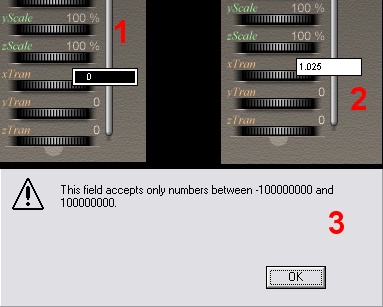
Hello, I've been having some computer problems lately, and now it seems poser is a bit screwed up. I use Poser 4 Pro Pack and I used to be able to set my dials with decimals, such as 1.234 Now, it will only let me do whole numbers. Instead of 1.234, I can only type in 1. or 2. etc. Here is a screen shot of what I'm talking about. 1 - In this example, I clicked on the x-tran dial. You can see it is set to zero. (used to be 0.000). 2 - Number 2 shows that I have typed 1.025 into the box. When I hit "enter", I get the error (#3). I really need to fix this. I like being able to use decimals. lol. I suspect I will need to fiddle with the Poser.ini (thanks ynsaen) and I took a peek at it, but, I'm not sure what I need to change? I asked this question on another board, and was told that me PARM_DIALS_ON 0 is correct. Is there anything else in the ini that would cause my dials to no longer accept decimals? I'd really apprecieate any help with this. Thanks.