
Renderosity Forums / Poser - OFFICIAL
Welcome to the Poser - OFFICIAL Forum
Forum Moderators: RedPhantom Forum Coordinators: Anim8dtoon
Poser - OFFICIAL F.A.Q (Last Updated: 2026 Mar 07 3:03 pm)

Subject: buttons in cloth sim distort


That didn't help either. But I got them working mostly the way I want them to. Thanks :)
LukeA

Hey Luke
Are your buttons physically joined to the mesh?
If they are then adding them to the Rigid decorated group will do more or less nothing :) they will just behave the same as the main cloth group.
The rigid group (and the soft) can't be connected to the main cloth in any way, took me a while to figure that one out :)
John.
Fugazi (without the aid of a safety net)
https://www.facebook.com/Fugazi3D
I did not know that! thanks
TemplarGFX
3D Hobbyist since 1996
I use poser native units
Quote - I did not know that! thanks
It's a bit odd isn't it, it almost seems counter intuitive to have them seperated from the main mesh :)
John
Fugazi (without the aid of a safety net)
https://www.facebook.com/Fugazi3D

Didn't someone post a trick for dynamic chains where you'd have one big (invisible) polygon for every link and that'd help to keep the links rigid? If so, a single poly for the button would do the trick as well.
WARK!
Thus Spoketh Winterclaw: a blog about a Winterclaw who speaks from time to time.
(using Poser Pro 2014 SR3, on 64 bit Win 7, poser units are inches.)
SVDL's Blouse pack has a single poly joining the buttons onto the shirt, and those buttons stay rigid (although not rigidly in place, just in shape)
TemplarGFX
3D Hobbyist since 1996
I use poser native units
Not sure how svdl does it, but I stick by my original post :) I have been making dynamic cloth with rigid and soft decorations for a while now, and keeping the decorated parts seperate from the main mesh works.
I'd have to look at svdls blouses to see what he is up to ;)
John
Fugazi (without the aid of a safety net)
https://www.facebook.com/Fugazi3D
John
Fugazi (without the aid of a safety net)
https://www.facebook.com/Fugazi3D

Quote - Had a quick look at scdls blousepack from freestuff, the buttons I looked at are completely seperate from the main mesh.
John
Yeah that's how I had to do it in the blouse I just released into the marketplace too. In fact, having the pins/threads of the buttons sticking into the fabric actually caused my Poser 8 clothroom to crash! So some space between is definitely a good idea. :)
Quote - > Quote - Had a quick look at scdls blousepack from freestuff, the buttons I looked at are completely seperate from the main mesh.
John
Yeah that's how I had to do it in the blouse I just released into the marketplace too. In fact, having the pins/threads of the buttons sticking into the fabric actually caused my Poser 8 clothroom to crash! So some space between is definitely a good idea. :)
Interesections with the main cloth are not fatal on my machine, but they are not ideal :) I find as long as the button is close to the cloth things usually work ok, though it will poke through the base cloth in certain extreme poses.
John
Fugazi (without the aid of a safety net)
https://www.facebook.com/Fugazi3D

Privacy Notice
This site uses cookies to deliver the best experience. Our own cookies make user accounts and other features possible. Third-party cookies are used to display relevant ads and to analyze how Renderosity is used. By using our site, you acknowledge that you have read and understood our Terms of Service, including our Cookie Policy and our Privacy Policy.
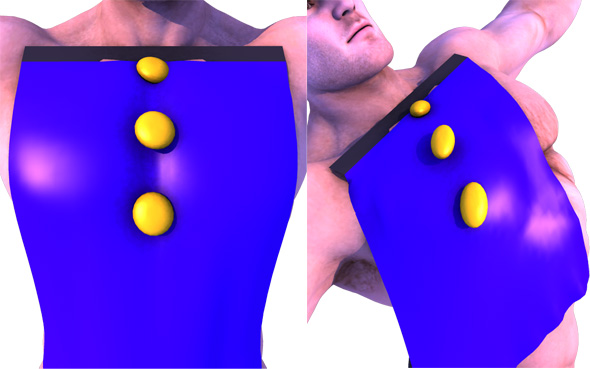
I find that when I create a set of buttons (and yes they are rigid decorations) they squish and distort at some point. Isn't the whole point of them to keep their shape? How can I prevent this squishing of the button mesh?You can see in the image they start out round and end up oval.
Thanks
Luke
LukeA
My latest novel