
-
Marketplace
-
Free Stuff
-
Galleries
-
Community
Forums General
- News
- Deals
- Poser
- Contact
Renderosity Forums / Poser - OFFICIAL
Welcome to the Poser - OFFICIAL Forum
Forum Moderators: RedPhantom Forum Coordinators: Anim8dtoon
Poser - OFFICIAL F.A.Q (Last Updated: 2026 Mar 05 7:26 am)

Subject: Poser 8 Direct Manipulation tool

Report Post



-
- Renderosity Page
- Renderosity Communities
- Blender 3D
- iClone
- Poser Users
- Poser Software
- Become an Affiliate
- Memorials
-
About
- About Us
- Contact Us
- Team
- Policies
- Terms of Service
- Copyright Policy
- Refund Policy
- Licenses
- Standard License
- Extended License

Privacy Notice
This site uses cookies to deliver the best experience. Our own cookies make user accounts and other features possible. Third-party cookies are used to display relevant ads and to analyze how Renderosity is used. By using our site, you acknowledge that you have read and understood our Terms of Service, including our Cookie Policy and our Privacy Policy.
Hi folks and Happy Halloween,
I've been meaning to ask this question for a while now, and hopefully there's an answer out there somewhere...
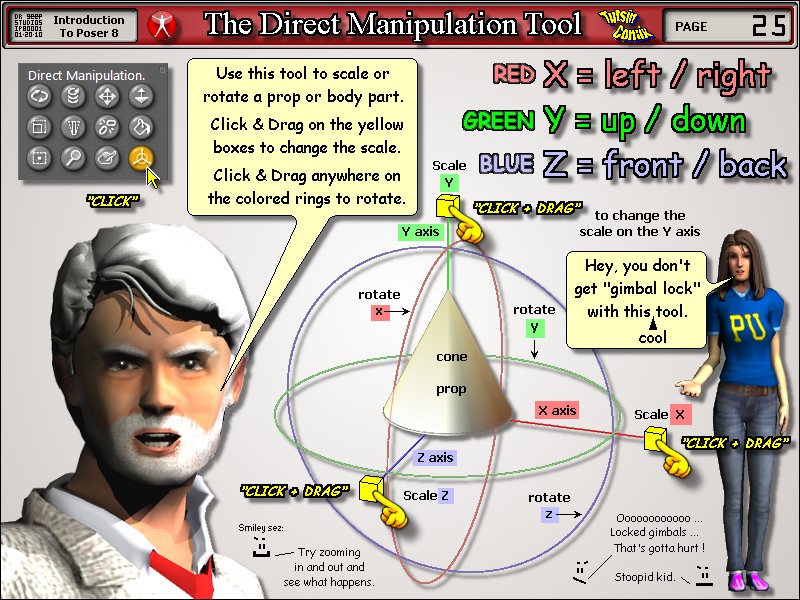
When you use the Direct Manipulation tool (with the X/Y/Z circles and lines around a body part or prop), is there a way that you can set it up temporarily so that when you mouse over the handles to make an adjustment, that Poser doesn't highlight another prop/body part and move/adjust that, instead of what you had selected in the first place?
Thanks,
Tom
Seaview123