
Renderosity Forums / Poser - OFFICIAL
Welcome to the Poser - OFFICIAL Forum
Forum Moderators: RedPhantom Forum Coordinators: Anim8dtoon
Poser - OFFICIAL F.A.Q (Last Updated: 2026 Mar 05 8:06 pm)

Subject: Quick ? EzSkin 2


I'm sorry, but I'm still confused and realise this is second nature to you, but it's as clear as mud to me.
This may be the best way to ask....
I unpacked and found
EZEffects Folder
and
EZSkin2.pyc
ezskin-figure-defs.cfg
ezskinpreset.cfg
Nodegrabber.pyc
From what I'm getting is I'm to put all these in the EZffects folder and put that folder into Python/Poserscripts...is this correct?
I should have been clearer. Create a new folder and call it EZSkin2, for the lack of a better name, and place all the content you listed into it. Next, take the folder and place it into the ScriptsMenu of you Poser runtime. The path should resemble the follow:
Poser>Runtime>Python>poserScripts>ScriptsMenu
When you open Poser and pull down the Python Script Menu, you will see the EZSkin2 folder.
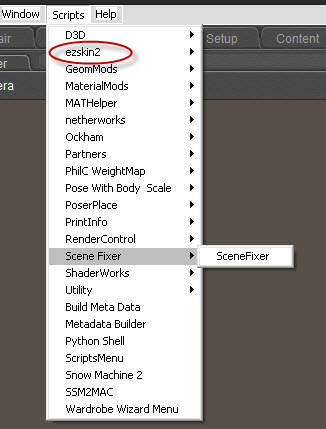
This is great! Even though I've only skimmed through the PDF, Wow what a difference;)
One thing.... IOn your dropdown menu you have only one ezskin, I have three items but only one works, ezskin2, and it's great.
EZEffects has an arrow but there's nothing there......you wouldn't happen to know?
I've skimmed through the PDF but can't find anything on it.
EZEffects is a separate plugin for EZSkin. You need to have EZSkin open and navigate to the Special Effects tab. At least, I think that is what it's called, not sitting at my own computer currently to verify. Under that tab, there is an import button to load the EZEffects file. IIRC, you only need to do this once; the app remembers the addition after it is closed.

Privacy Notice
This site uses cookies to deliver the best experience. Our own cookies make user accounts and other features possible. Third-party cookies are used to display relevant ads and to analyze how Renderosity is used. By using our site, you acknowledge that you have read and understood our Terms of Service, including our Cookie Policy and our Privacy Policy.
I'm a Poser pre-schooler, and have a quick question about EZSkin.
I've downloaded but I'm not sure where everything goes...I know where the python goes but not where the .cfg and the EZEffects file.
Hope someone can help.