
Renderosity Forums / Poser 14

Subject: Drive Letter Changed... I'm Going Bald!


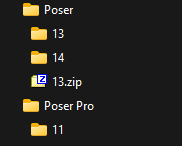
All paths to your different runtimes are stored in an XML file in poser's profile folder: LibraryPrefs.xml
Header over to %APPDATA% (use the run command: it will open a file explorer in the roaming part of your own profile)
Then: jump in the corresponding sub folder:
That being, it's weird and surprising that your windows installation constantly or randomly changes the driver letters.
In my case, I am used to run compmgmt.msc:
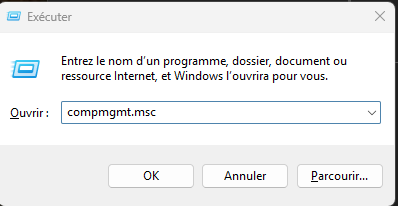
which opens this window:
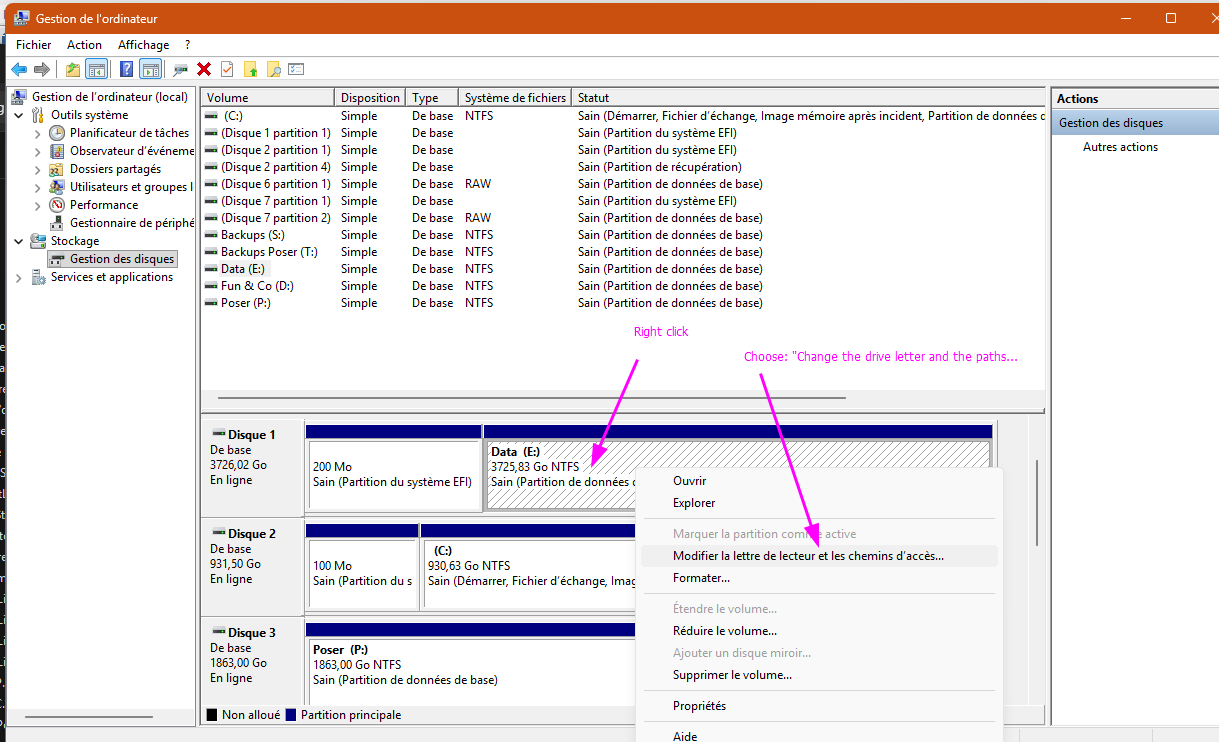
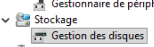
In French here, you should have: Storage -> Disks management
The only times when Windows has ever changed the drive letters is when a newly inserted drive receives one of your external drive's letter. But this should force Windows to reserve those using this method.
𝒫𝒽𝓎𝓁
(っ◔◡◔)っ
👿 Win11 on i9-13900K@5GHz, 64GB, RoG Strix B760F Gaming, Asus Tuf Gaming RTX 4070 OC Edition, 1+2 TB SSD's, 6+4TB HD
👿 Mac Mini M2, Sequoia 15.5, 16GB, 500GB SSD
👿 Nas 10TB
👿 Poser 13 and 14 ❤️

Thank you very much, I changed the drive letter in question to the correct one, and made sure everything matched in the .xml, and my project loads perfectly again. I've also created a notepad document on each drive to remind me of the letter in future.
Yes, I'm using the drive management method to change the letters back, so that's fine, it's just that Windows keeps changing them on its own, it's very frustrating. I don't know exactly why, but I've been having umpteen issues with Windows for months now, it even crashes when I try to repair or reinstall it, so I'm just waiting until I have the money to buy another drive, so that I can start again completely, hopefully on Linux, but that's another topic I'll be looking at; getting Poser to work in Linux. Oh joy, more headaches, lol!
Well, for now at least, I can stop pulling out what little bit of hair I have left, lol! Thanks a million!
I'm running Win 10 Pro 32GB RAM Intel Core i7-4790K CPU @ 4.00GHz Nvidia GeForce GTX 1660 Ti
My DA Gallery: glen85.deviantart.com/gallery
Peace, love and polygons!
Sorry, I didn't spot your reply there. Well, why doesn't that surprise me in the slightest? I have a hessian bag full of somewhere in the region of twenty hard drives, each one contains a failed and unrecoverable version of Windows, and tons of important files; everything from 3D and Poser projects, to music projects, and all sorts. Most of them are now backed up, but I keep them around to remind myself of just how completely rubbish Windows has been for me over the years. Every one has failed, I've tried to fix it, been unable to, bought another drive, and started again, so as not to lose my data. It's a sick joke, and with this latest move from Microsoft, which ostensibly makes perfectly good and serviceable PCs into junk, is absolutely criminal; as such, I'm one of countless others considering junking Microsoft instead. I'm running 10, by the way, but Windows is Windows, all rubbish.If it is Windows 11, there have been known issues with external drive connections for quite some time. Some individuals claim that external SSDs have become subject to debilitating corruptions. But that information is unsubstantiated, ATM.
I'm running Win 10 Pro 32GB RAM Intel Core i7-4790K CPU @ 4.00GHz Nvidia GeForce GTX 1660 Ti
My DA Gallery: glen85.deviantart.com/gallery
Peace, love and polygons!

Except for XP and Win7 Pro, both of which had some issues, all other versions have been garbage, and are getting worse. I've actually had it delete programs from my system, including both Poser and Daz, along with photo and video editing software. A couple of times, there was a message saying that the program removed wasn't Microsoft-approved
I'm surprised this happened. From some brain-damaged anti-vir progs yes, but...Except for XP and Win7 Pro, both of which had some issues, all other versions have been garbage, and are getting worse. I've actually had it delete programs from my system, including both Poser and Daz, along with photo and video editing software. A couple of times, there was a message saying that the program removed wasn't Microsoft-approved
Just in case: Brave's AI returned this message:
The message indicating that the program you're trying to install isn't a Microsoft-verified app appears when your Windows system is configured to only allow installations from the Microsoft Store or when the device is running in S mode. This restriction can be resolved by changing the app installation settings. To do this, go to Settings > Apps > Apps & features (or Advanced app settings on Windows 11), then select "Choose where to get apps" and change the setting from "The Microsoft Store only (recommended)" to "Anywhere". This change allows installations from other sources and takes effect immediately. If the option is greyed out, it may be managed by your organization via Group Policy, or you might be in S mode, which requires switching out of S mode entirely to install non-Store apps. Note that switching out of S mode is a one-way process and cannot be reversed.
𝒫𝒽𝓎𝓁
(っ◔◡◔)っ
👿 Win11 on i9-13900K@5GHz, 64GB, RoG Strix B760F Gaming, Asus Tuf Gaming RTX 4070 OC Edition, 1+2 TB SSD's, 6+4TB HD
👿 Mac Mini M2, Sequoia 15.5, 16GB, 500GB SSD
👿 Nas 10TB
👿 Poser 13 and 14 ❤️

Privacy Notice
This site uses cookies to deliver the best experience. Our own cookies make user accounts and other features possible. Third-party cookies are used to display relevant ads and to analyze how Renderosity is used. By using our site, you acknowledge that you have read and understood our Terms of Service, including our Cookie Policy and our Privacy Policy.
Hello folks,
This is a general Poser enquiry, as it's happening in both 12, and the trial version of 14, but I figured I'd post it here for maximum exposure, as 14 is the one being most talked about right now.
Basically, I have three external drives, and three internal drives. The internal drives keep their drive letters, but due to the externals continually shutting off all the time (which I hate and cannot seem to change, there's nothing going on with the power saving features of the PC), they keep changing their letters around and screwing up my projects.
This has happened with a Poser project, and it's not finding the elements used in the scene on loading, despite me being sure I reassigned the correct drive letters again. What I need to see is, when Poser says it cannot find, say, 'ball.obj', I need to see where Poser thinks it should be, in the form of a full path, but it doesn't, so it's useless to me. I've opened the project file up in Notepad++, but all that shows me is the path from the runtime folder, which is still useless to me, because I don't know which runtime folder, on which drive letter, it is expecting to find the file in.
How can I find this information, please? I've learned my lesson now; if I can find out which drive letters Poser is expecting to find certain files on, I can reassign the drives to those letters, and, most importantly, use my label maker to make labels for the drive bodies, so that when Windows soils itself, as usual, and messes up all the drive letters, I'll know which letter to reassign the drives to, in order to stop this from happening again.
Ugh!!! Why can't it just leave things alone?! I outright HATE Windows!!!
BONUS GRIPE:
Is there a way I can change this forum to be black text on a white background? I hate this look, it completely wrecks my vision, I end up with bands in my vision for ages afterwards, and can't see anything properly.
Thank you, all!
I'm running Win 10 Pro 32GB RAM Intel Core i7-4790K CPU @ 4.00GHz Nvidia GeForce GTX 1660 Ti
My DA Gallery: glen85.deviantart.com/gallery
Peace, love and polygons!