Sun, Mar 8, 6:05 AM CDT

Renderosity Forums / Poser 14



Welcome to the Poser 14 Forum

Forum Moderators: tim, nerd

(Last Updated: 2026 Mar 07 4:02 pm)


Subject: Poser 14 Renders


Digitell ( ) posted Mon, 22 December 2025 at 9:12 AM · edited Fri, 06 March 2026 at 10:02 PM
Forum Moderator

I have been trying out Poser 14. I rarely use the cloth room so it being gone is no issue with me.

Here are a couple of renders, one Firefly and one is Superfly.

Superfly


Firefly

AMD RYZEN 9 9950X 16-Core 4.3GHz (5.7 GHz Turbo)
DDR5 64GBRAM
GeForce RTX 5070 Ti 16GB
Apevia 1000W GOLD Power Supply
Windows 11 PRO


hborre ( ) posted Mon, 22 December 2025 at 11:27 AM

In both cases, I would suggest exploring ambient occlusion to add depth to the renders.  You are missing shadow details in areas where light does not reach.


Digitell ( ) posted Mon, 22 December 2025 at 11:32 AM
Forum Moderator

Thank you for your suggestion! I will look into that!

AMD RYZEN 9 9950X 16-Core 4.3GHz (5.7 GHz Turbo)
DDR5 64GBRAM
GeForce RTX 5070 Ti 16GB
Apevia 1000W GOLD Power Supply
Windows 11 PRO


hborre ( ) posted Mon, 22 December 2025 at 12:38 PM

Firefly is straightforward; there is a waco for it in the Material Room.  For Superfly rendering, the setup is involved depending on the root node used.


Digitell ( ) posted Mon, 22 December 2025 at 12:51 PM
Forum Moderator

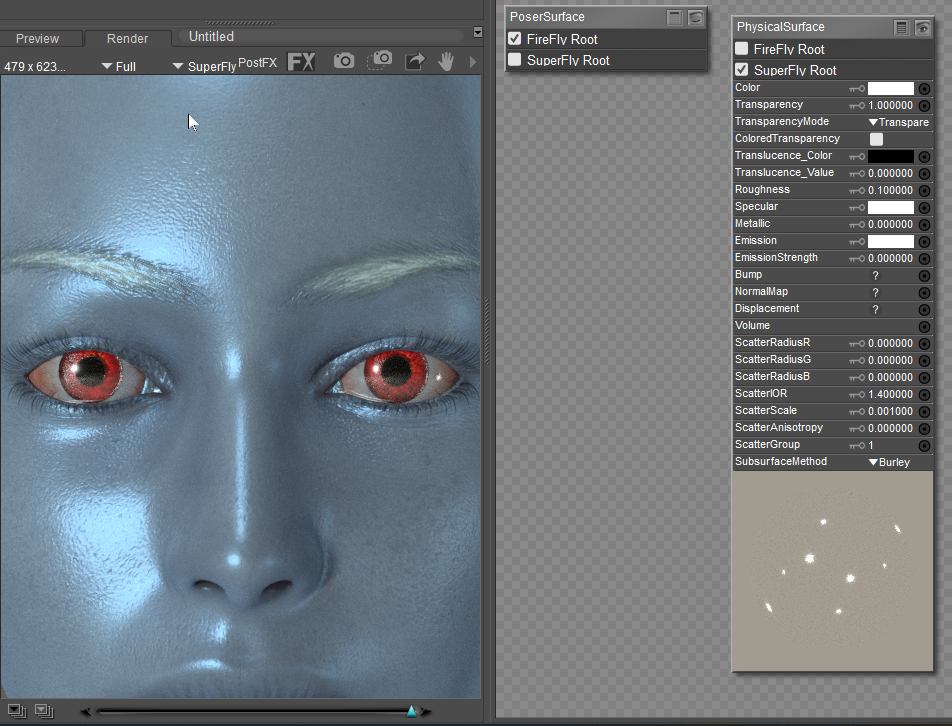
Yea I have issues with Superfly. I get white eyes so many times. I use the mats specified for Superfly, yet the eyes still come out white. So frustrating when you dont have a clue what is causing it.
AMD RYZEN 9 9950X 16-Core 4.3GHz (5.7 GHz Turbo)
DDR5 64GBRAM
GeForce RTX 5070 Ti 16GB
Apevia 1000W GOLD Power Supply
Windows 11 PRO


hborre ( ) posted Mon, 22 December 2025 at 2:32 PM

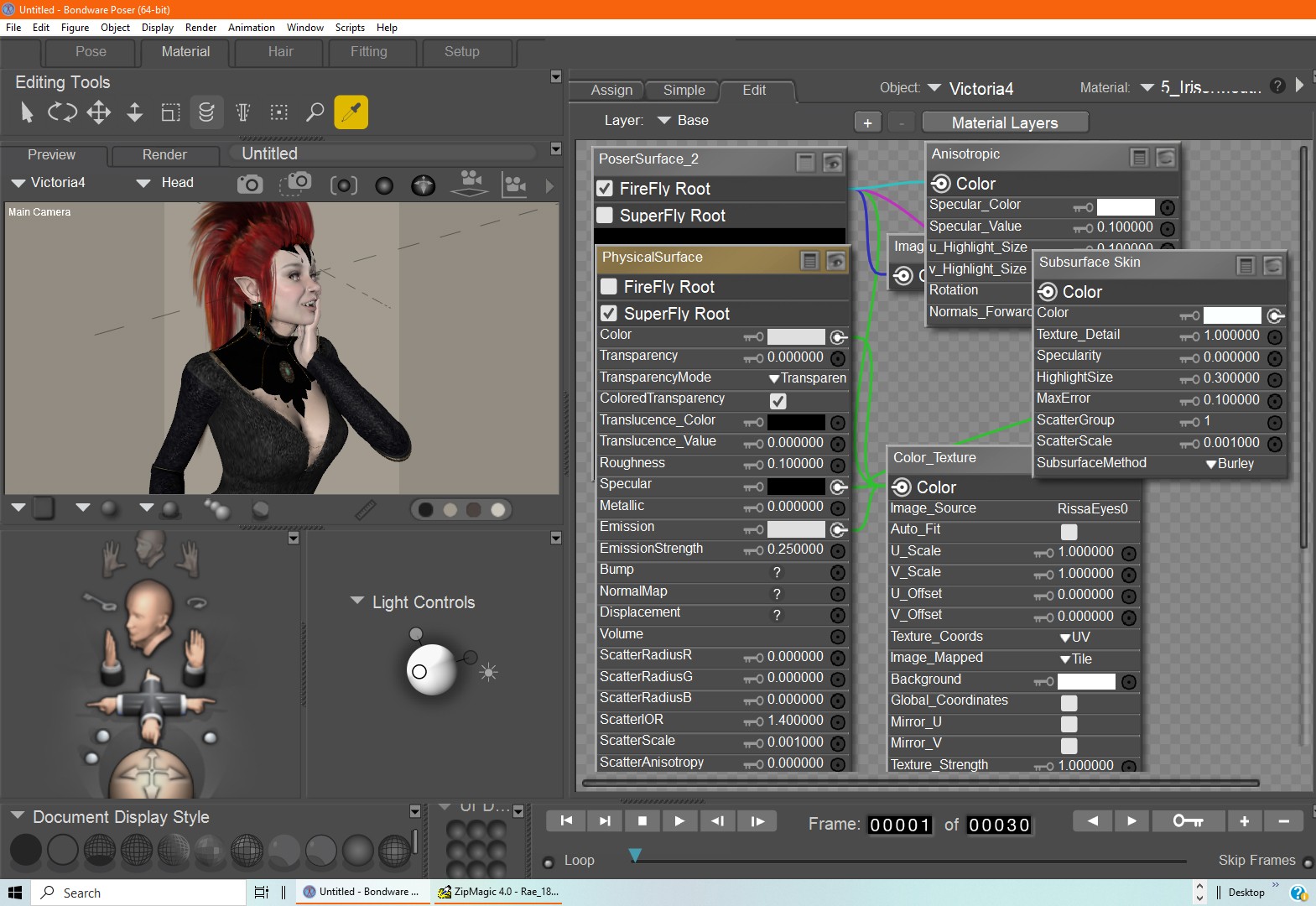
Show me the shaders for the eyes and for which figure.


Digitell ( ) posted Mon, 22 December 2025 at 3:37 PM · edited Thu, 12 February 2026 at 3:02 PM
Forum Moderator

Here are the shaders for the iris and the figure is V4:

AMD RYZEN 9 9950X 16-Core 4.3GHz (5.7 GHz Turbo)
DDR5 64GBRAM
GeForce RTX 5070 Ti 16GB
Apevia 1000W GOLD Power Supply
Windows 11 PRO


hborre ( ) posted Mon, 22 December 2025 at 4:30 PM · edited Thu, 12 February 2026 at 3:02 PM

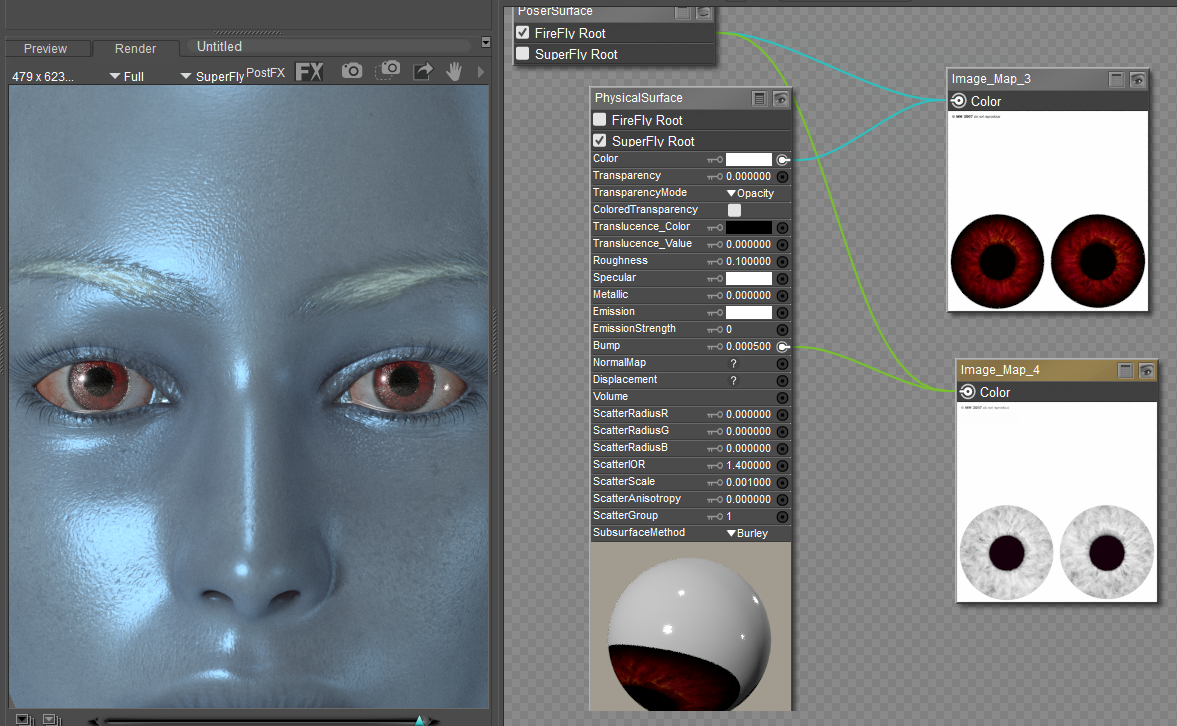
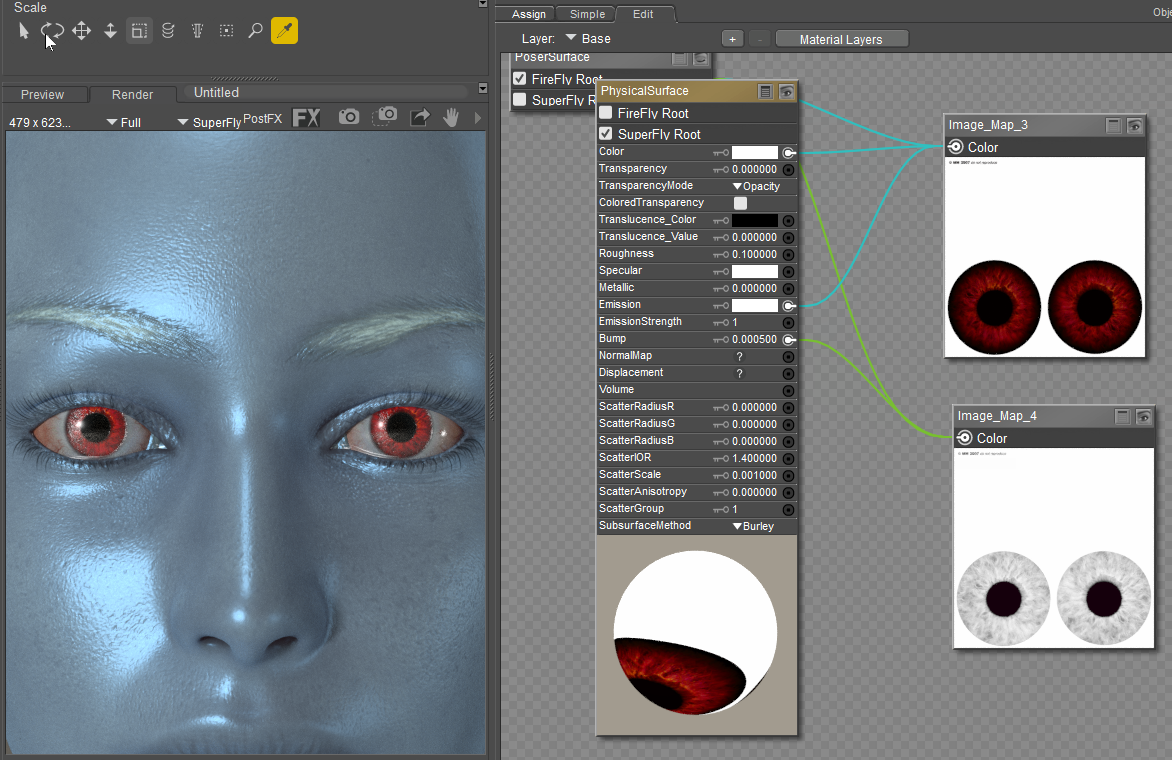
Let's simplify the iris shader for Superfly rendering.  Try selecting an eye texture without baked-in highlights.  The highlights will never match the surrounding reflection and lighting.  Try not to use emission unless you desire glowing eyes in a darkened environment.  That is easy to set up.  

Below is my quick iris shader using the PhysicalSurface root node for Superfly.  I ignore the subsurface scatter and the anisotropic effects because, in most cases, extreme eye rendering is rarely done.
HLcRlqYSTW9hgQWnk4lnVD1Cg2QRwMP9AexZQw1z.png

If you want glowing eyes, then arrange the nodes as follows:
4Y3sshlJsFTOmXJXiQyhc4C1NFbt4DoumJCNTfao.png


Digitell ( ) posted Mon, 22 December 2025 at 4:33 PM
Forum Moderator

Thank you for your help! I will give this a try and post my results tomorrow. Thanks so much for helping me!

AMD RYZEN 9 9950X 16-Core 4.3GHz (5.7 GHz Turbo)
DDR5 64GBRAM
GeForce RTX 5070 Ti 16GB
Apevia 1000W GOLD Power Supply
Windows 11 PRO


hborre ( ) posted Mon, 22 December 2025 at 4:39 PM · edited Thu, 12 February 2026 at 3:02 PM

The eye surface texture in V4 should be transparent with specular highlights; otherwise, you will not have a reflective surface.  The cornea should be treated the same way.

S2EshLdBBsD78XvlYbeA1EzuglP8CFioxJlvlVB9.png

In both cases, the roughness can be decrease further to render absolutely clear.


hborre ( ) posted Mon, 22 December 2025 at 4:41 PM

No problem, and you are welcome.  I will be more than happy to help.


Digitell ( ) posted Tue, 23 December 2025 at 7:18 AM
Forum Moderator
Good Morning, I am excited. I just did my set up as instructed and it worked! Now I am going to try the emission to see if I can get the eyes to glow. Baby steps..Thank you again for your help on this!

AMD RYZEN 9 9950X 16-Core 4.3GHz (5.7 GHz Turbo)
DDR5 64GBRAM
GeForce RTX 5070 Ti 16GB
Apevia 1000W GOLD Power Supply
Windows 11 PRO


Digitell ( ) posted Mon, 12 January 2026 at 2:15 PM · edited Thu, 12 February 2026 at 3:02 PM
Forum Moderator

Poser 14 using LaFemme Pro 1 rendered in SuperFly. Topaz Studio 2 for the vignette

AMD RYZEN 9 9950X 16-Core 4.3GHz (5.7 GHz Turbo)
DDR5 64GBRAM
GeForce RTX 5070 Ti 16GB
Apevia 1000W GOLD Power Supply
Windows 11 PRO


hborre ( ) posted Mon, 12 January 2026 at 4:40 PM

Very nice.  The skin specularity appears slightly too high; you are missing fine details to the texture.  Otherwise, I like the portrait quality of the render.


Digitell ( ) posted Mon, 12 January 2026 at 5:50 PM
Forum Moderator

Thank you@ hborre!😊

AMD RYZEN 9 9950X 16-Core 4.3GHz (5.7 GHz Turbo)
DDR5 64GBRAM
GeForce RTX 5070 Ti 16GB
Apevia 1000W GOLD Power Supply
Windows 11 PRO


Privacy Notice

This site uses cookies to deliver the best experience. Our own cookies make user accounts and other features possible. Third-party cookies are used to display relevant ads and to analyze how Renderosity is used. By using our site, you acknowledge that you have read and understood our Terms of Service, including our Cookie Policy and our Privacy Policy.