
Renderosity Forums / Poser 14

Subject: PoserCloth


Another option would be to run the simulation in Poser 13 and then spawn a morph target. This will create a morph of the drape. You can then save the scene and switch to Poser 14 if it has other features you like. Or if you have a few poses you use often, you could create morphs of all of them and save the clothing back to the library.
Available on Amazon for the Kindle E-Reader Monster of the North and The Shimmering Mage
Today I break my own personal record for the number of days for being alive.
Check out my store here or my free stuff here
I use Poser 13 and win 10

Another option would be to run the simulation in Poser 13 and then spawn a morph target. This will create a morph of the drape. You can then save the scene and switch to Poser 14 if it has other features you like. Or if you have a few poses you use often, you could create morphs of all of them and save the clothing back to the library.
So theoretically: I can import dForce clothing, fit it to my poser dolls, simulate it once in the default pose, and then save it as a morph so I can store the clothing as a prop and always apply it the same way to said doll... then start the actual simulation with the pose afterward? (in P13)
That honestly sounds like more or less the solution I’ve been looking for. :D You’re a genius! Thanks for the nudge :D


That's right, as long as the clothing simulation doesn't work properly in Poser 14 we won't be able to create new dynamic clothing because I think Renderosity will require products that work in Poser 14 without requiring imports from Poser 13.Work Arounds may be good for Customer, but
I want to create and sell clothes for Poser 14 , but that can only be done when they say..this is the Final .
so i will wait for that before i spend Hours and Hours☺️

Karth posted at 9:15 AM Wed, 25 February 2026 - #4504232This is so messed up all in all. I hope for an actual solution soon. Vendors will again leave Poser if solution isn't found soon, but maybe Renderosity doesn't care about retaining them? It's hard to understand.That's right, as long as the clothing simulation doesn't work properly in Poser 14 we won't be able to create new dynamic clothing because I think Renderosity will require products that work in Poser 14 without requiring imports from Poser 13.Work Arounds may be good for Customer, but
I want to create and sell clothes for Poser 14 , but that can only be done when they say..this is the Final .
so i will wait for that before i spend Hours and Hours☺️
The workaround was meant as something to do while we wait for a fix. No, it was not meant to be for stuff for the marketplace or the freestuff.
Available on Amazon for the Kindle E-Reader Monster of the North and The Shimmering Mage
Today I break my own personal record for the number of days for being alive.
Check out my store here or my free stuff here
I use Poser 13 and win 10

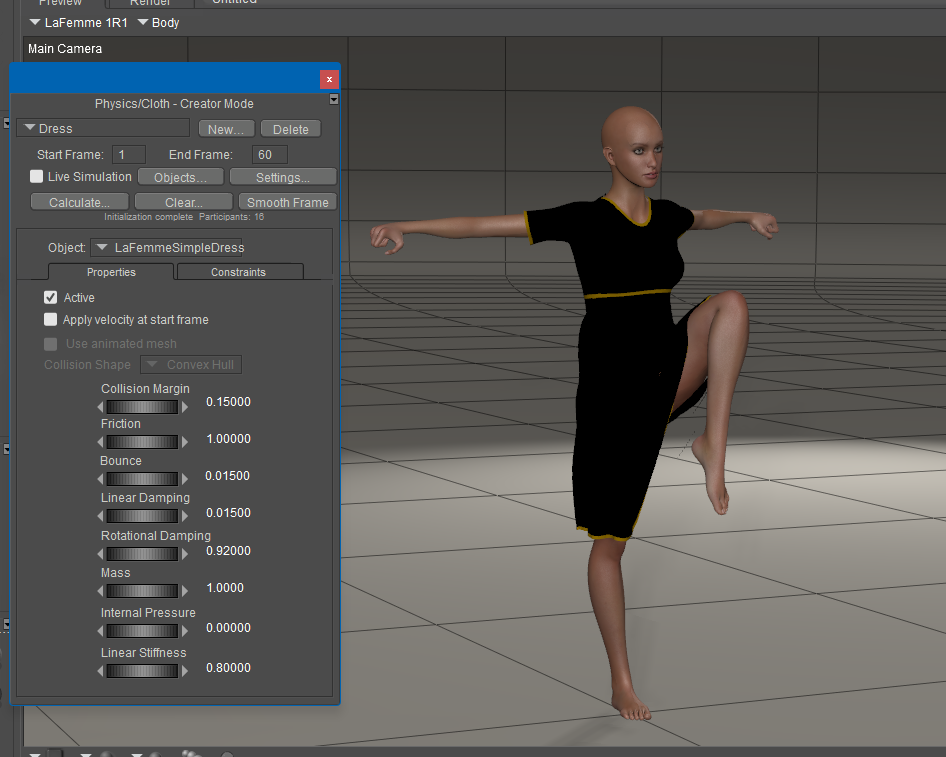
It looks like it's doing much better. Here's a compare of the same dress in Poser 13 and 14.
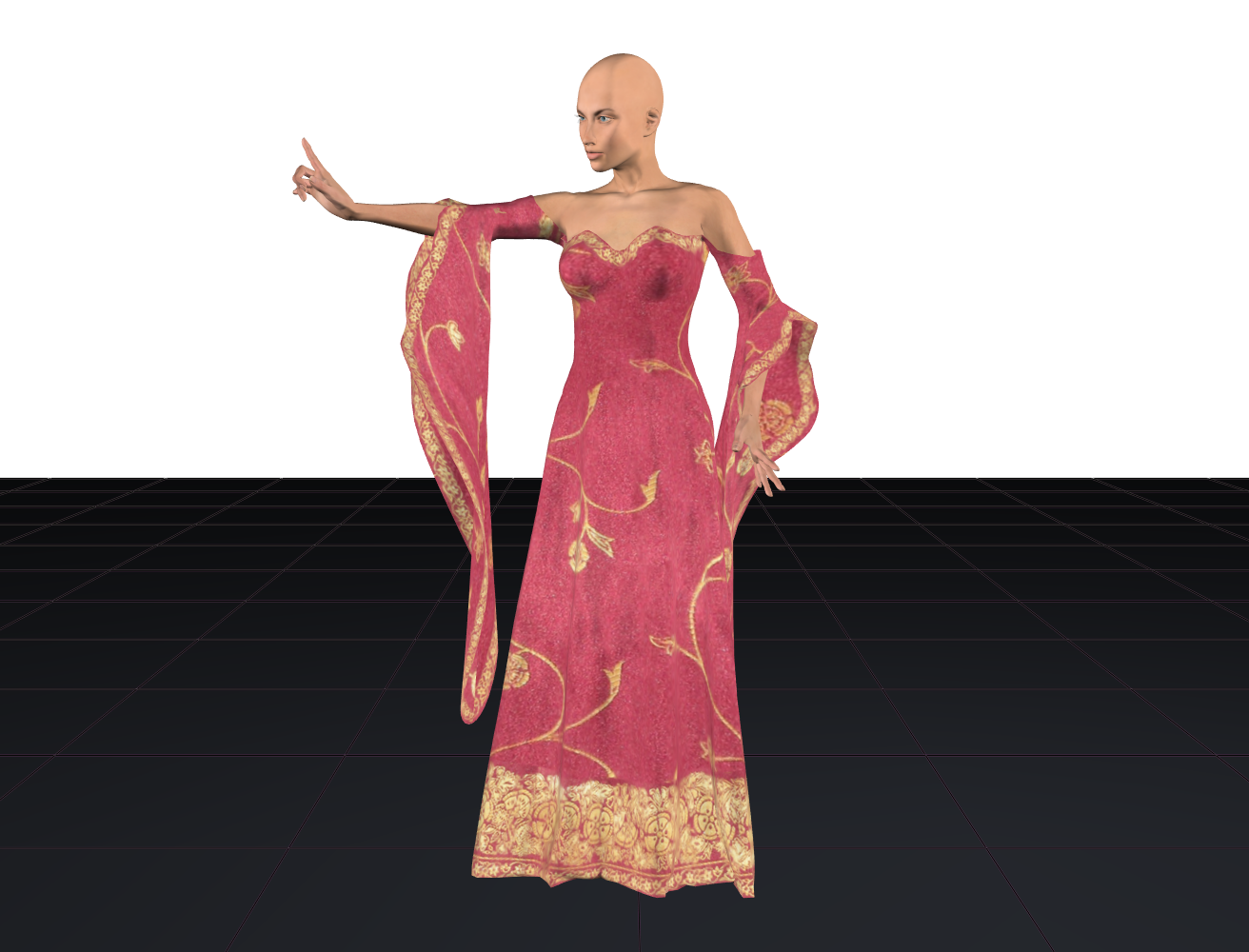
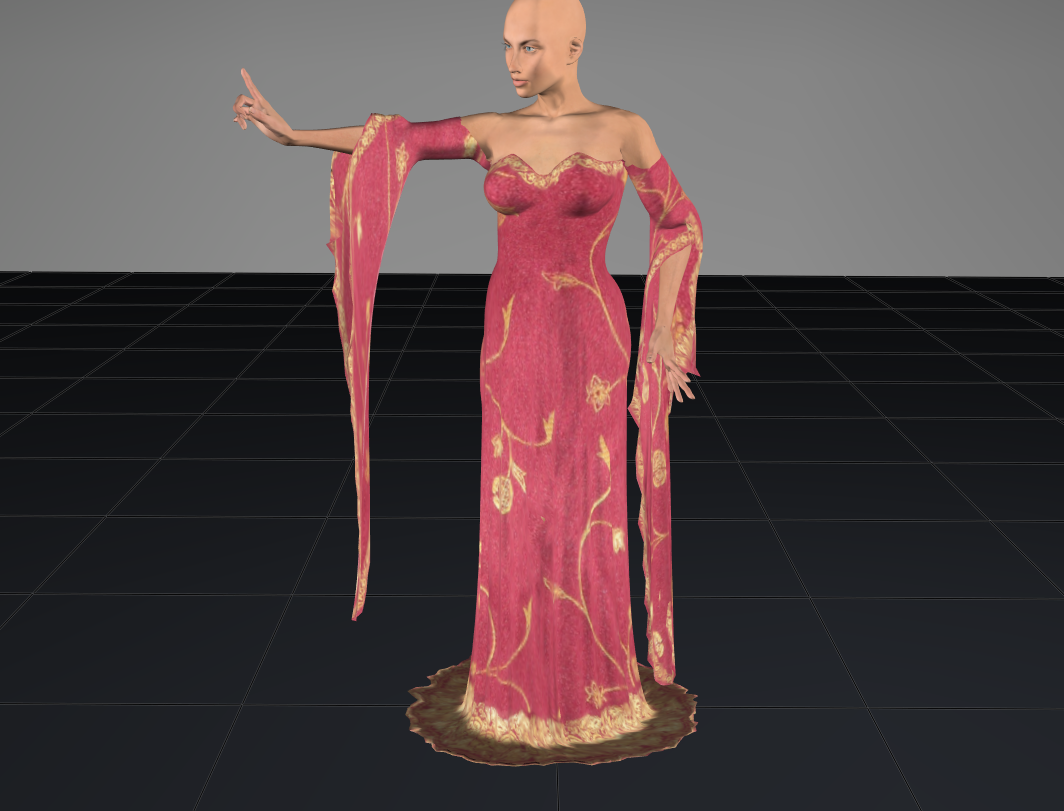
not exactly the same but it's something. These were the default settings. Will have to try other settings to see if I can get it to look like other fabrics
Available on Amazon for the Kindle E-Reader Monster of the North and The Shimmering Mage
Today I break my own personal record for the number of days for being alive.
Check out my store here or my free stuff here
I use Poser 13 and win 10
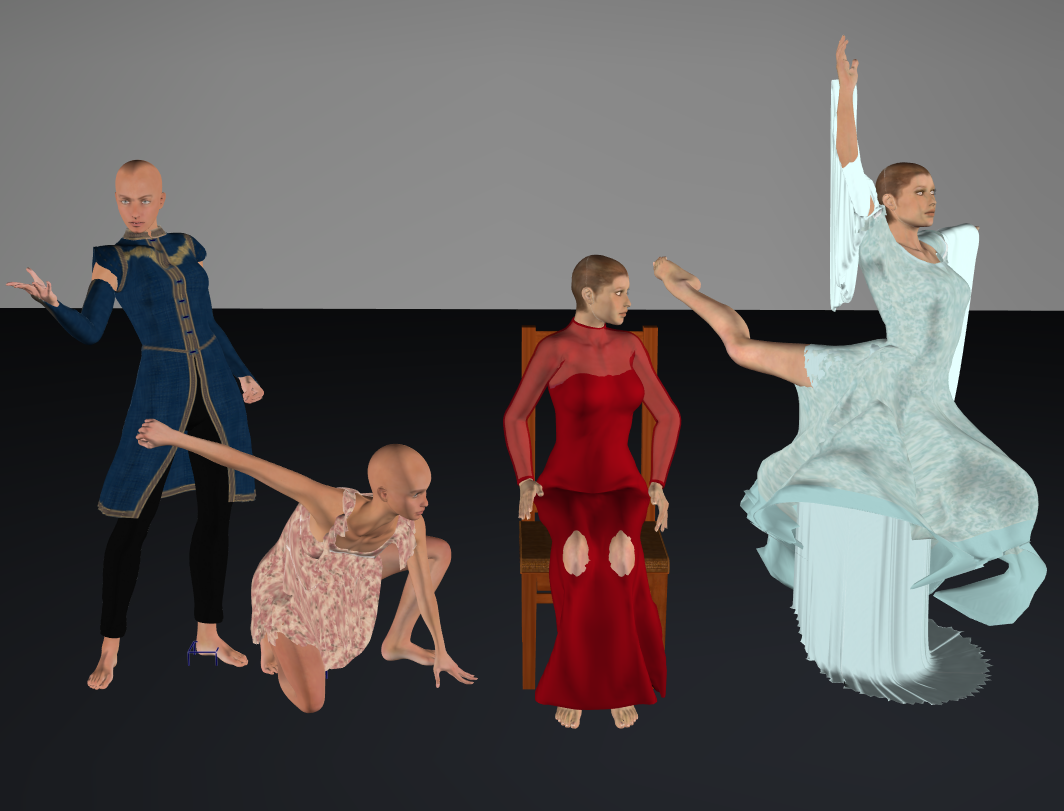
I decided to put it through its paces. I had varying results.
Available on Amazon for the Kindle E-Reader Monster of the North and The Shimmering Mage
Today I break my own personal record for the number of days for being alive.
Check out my store here or my free stuff here
I use Poser 13 and win 10

One of the things to do in a new sim is to turn down the gravity value. -10 meters per second puts in way too much energy into the cloth. A better value is around -3 for cloth. For items banging into each other rigid dynamics -10 is a good value. The smaller the value of Gravity the less the cloth will compress. Of course this is all going to depend on what you are trying to do. Still shots and animations are going to have different requirements.
RedPhantom did you turn down the liner stiffness on the Right Blue dress? Having a high gravity and low stiffness will result in the polys stretching.
Poser 5, 6, 7, 8, Poser Pro 9 (2012), 10 (2014), 11, 12, 13, 14
There are improvements. The sims I ran did not result in poke-throughs with different poses. The draping is better. Finding the right setting combinations will be a challenge, but it is heading in the right direction.So basically it's still broken, with every piece of clothing you put it through with. Okay.
Rhia474 posted at 11:11 PM Sat, 28 February 2026 - #4504298
Actually, the left 2 didn't break. The arms on the blue one are separate pieces from the top. The pink one didn't have any poke through, but hangs too much in my opinion.So basically it's still broken, with every piece of clothing you put it through with. Okay.
The other 2 leave a lot to be desired. I think the chair collision is causing the issue with the red dress. The last one is just no good.
Available on Amazon for the Kindle E-Reader Monster of the North and The Shimmering Mage
Today I break my own personal record for the number of days for being alive.
Check out my store here or my free stuff here
I use Poser 13 and win 10
Yes, it's not quite there yet, even though there's been an improvement. I tested some of my products; for the simpler ones, it seems to work fairly well, but for the more complex ones with ruffles and buttons, it doesn't work. In the previous versions of Poser, the Cloth Rooms allowed you to make certain parts rigid while still allowing them to move with the garment depending on the pose. This isn't possible in Poser 14, and the buttons get deformed. Similarly, in other Cloth Rooms, you can define more or less rigid parts of the garment by defining these parts during creation in the material fields. This allows for a more natural drape. In Poser 14, my garments with ruffles behave strangely, and the ruffles overlap each other.
Richard60 posted at 11:13 PM Sat, 28 February 2026 - #4504299
Both are using the default settings. I did mess around with some of the settings, but nothing I tried helped. I don't remember which settings I tried. I'll have to mess around more this afternoonOne of the things to do in a new sim is to turn down the gravity value. -10 meters per second puts in way too much energy into the cloth. A better value is around -3 for cloth. For items banging into each other rigid dynamics -10 is a good value. The smaller the value of Gravity the less the cloth will compress. Of course this is all going to depend on what you are trying to do. Still shots and animations are going to have different requirements.
RedPhantom did you turn down the liner stiffness on the Right Blue dress? Having a high gravity and low stiffness will result in the polys stretching.
Available on Amazon for the Kindle E-Reader Monster of the North and The Shimmering Mage
Today I break my own personal record for the number of days for being alive.
Check out my store here or my free stuff here
I use Poser 13 and win 10
The left 2 didn't break just had pikethroughs all over and hang like pieces of plastic. Yup. Sorry to be a downer, but it seems to me the community is used as betatester for a product that was released in alpha stage.
Best of luck, really. I will hold out on spending on this until it works as intended.
Sorry last night I wasn't feeling well. The problem you are having with the right cloth item is there is no weight map applied and it is an open-ended tube. To fix this is really simple. 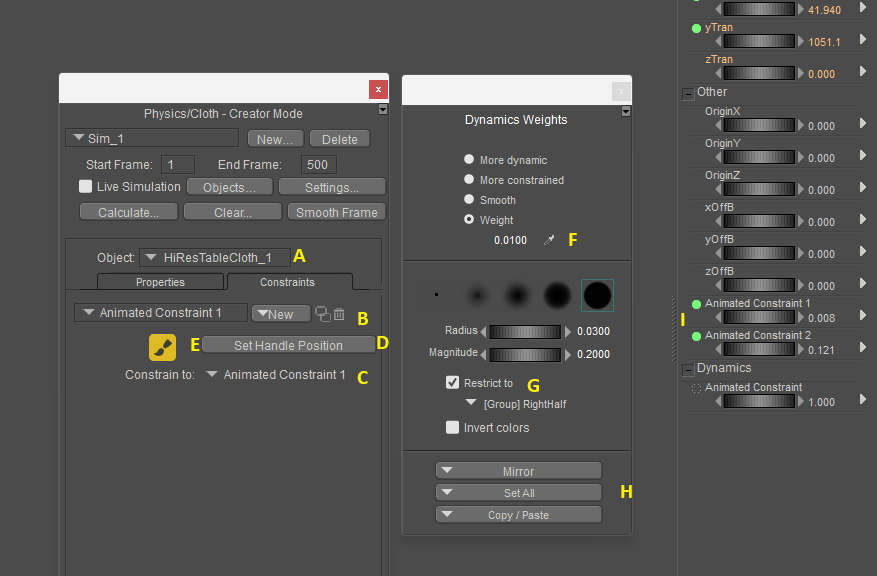
Step A make sure that the cloth item is selected in the object marked A
Step B Create a new Animated Constraint remember the name
Step C Here you need to select a body part to constrain the animated constraint to. If you don't when the figure moves the constraint will be left behind.
Step D press the Set handle position. If you don't then if you move the constraint handle it won't have an effect on the cloth. Not that you normally need to move the handle but you might.
Step E Press the paint weights button it will then open up the Dynamics weight dialog.
Step F select the Weight button and put in a value. I use small values most of the time. A value of 0.0100 should be a good starting point.
Step G Select the Restrict to and select the part of the cloth you want to paint. It could be either a Material or Group.
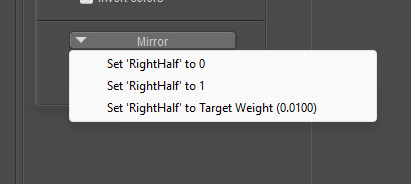
Step H press the Set All button and when the popup shows press the bottom one Set "Part" to Target Weight (x.x). This paints the part with the selected weight value. I whole lot faster then trying to paint with the brush.
Step I adjust the constraint dial to a low value. This will be trial and error process as between the weight you have on the cloth and the dial value will determine how much cloth will free float.
And the program is not broken it is just that this process is meant for creators to make NEW cloth items. Once the weights are applied and working then you save the prop back to the library and next time you load it the item it will come in with the values you have assigned. Since the cloth items you have shown are not close to a body part then the program leaves them un-weighted, otherwise you would have to go in and delete the assigned values and apply your own. As it is now the Auto assigned weights are fairly close and make a starting point.
The reason you have those long draping tubes is that the bottom is open that is not connected to another part. That along with the fact there is no weight map to restrict the movement the cloth will stretch. If you were to look at the Mesh you will find that the top polys are very long and each row down will be one set of polys shorter then the one above until you get to the last row and they will be unchanged. If the polys are perfect squares then the bottom will be a square the next row up will be 2x taller and third row will be 3x taller etc. This caused by the weight of each point pulling down on the cloth.
Poser 5, 6, 7, 8, Poser Pro 9 (2012), 10 (2014), 11, 12, 13, 14
Also a set of vertex's can be assigned to several groups. So a part that is weighted to a value of 1.0 or 100% will not be effected by other weighted constraints. However, if they overlap is set to lower values then they will have an effect on the other groups. Such as one part might want to be pulled down but another smaller part is weighted to go up the overlap may not go down as far as if they didn't have that slight upward pull.
Poser 5, 6, 7, 8, Poser Pro 9 (2012), 10 (2014), 11, 12, 13, 14
Here are some pictures of the effects of weight mapping and adjustment of the Animated Constraint dial. This the Valentine Day dress for La Femme 2 and I put in weight maps for the 3 tiers and an edge trim map for a total of 6 maps. I then added in a 7th map that follows the ridge of each of the curved tiers of the dress and the painted value is .0500. The pictures then have a value of .0000, .080 and .240 for the animated constraint.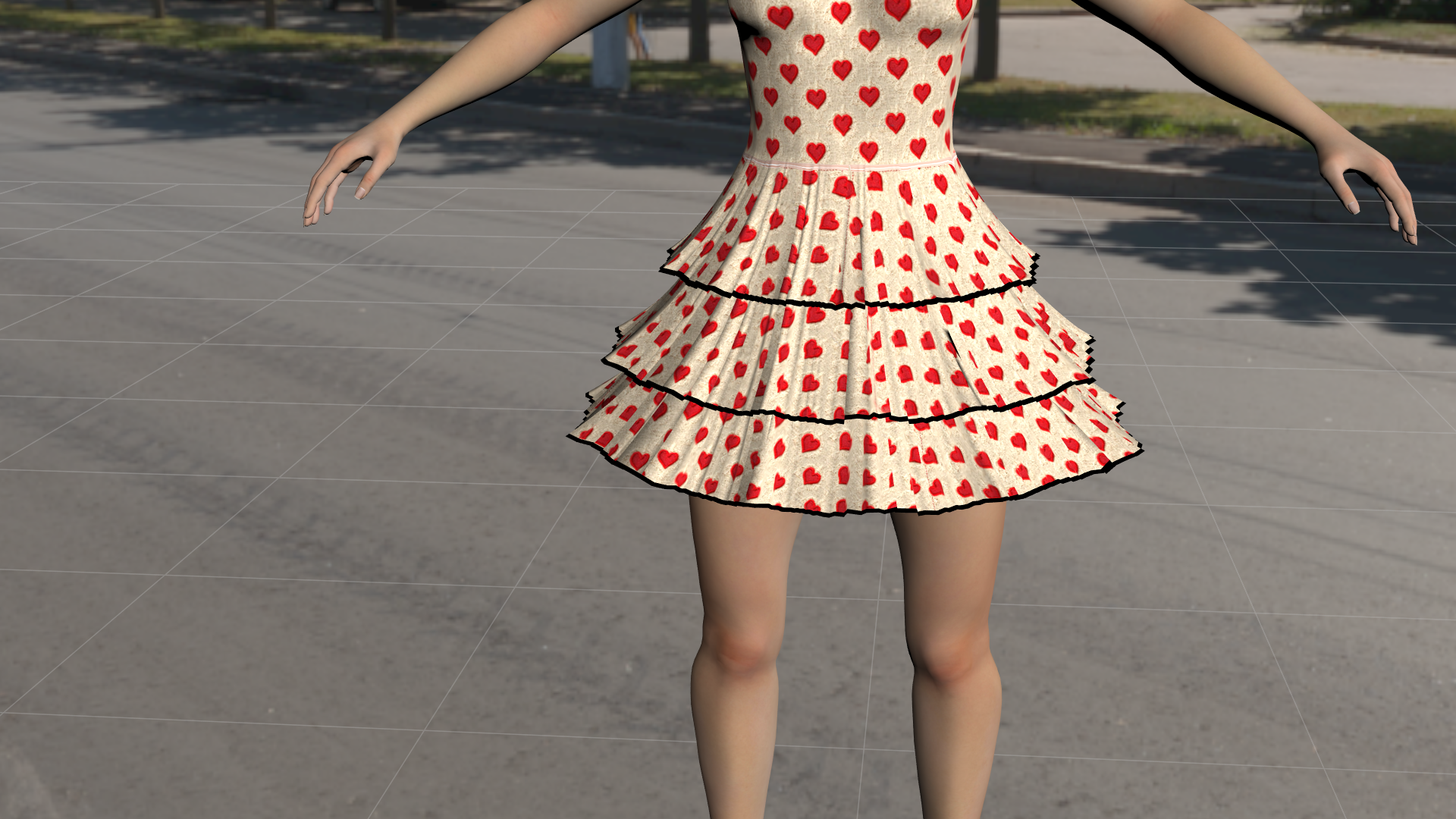
Above is at Animated Constraint of .000. It has some ripples.
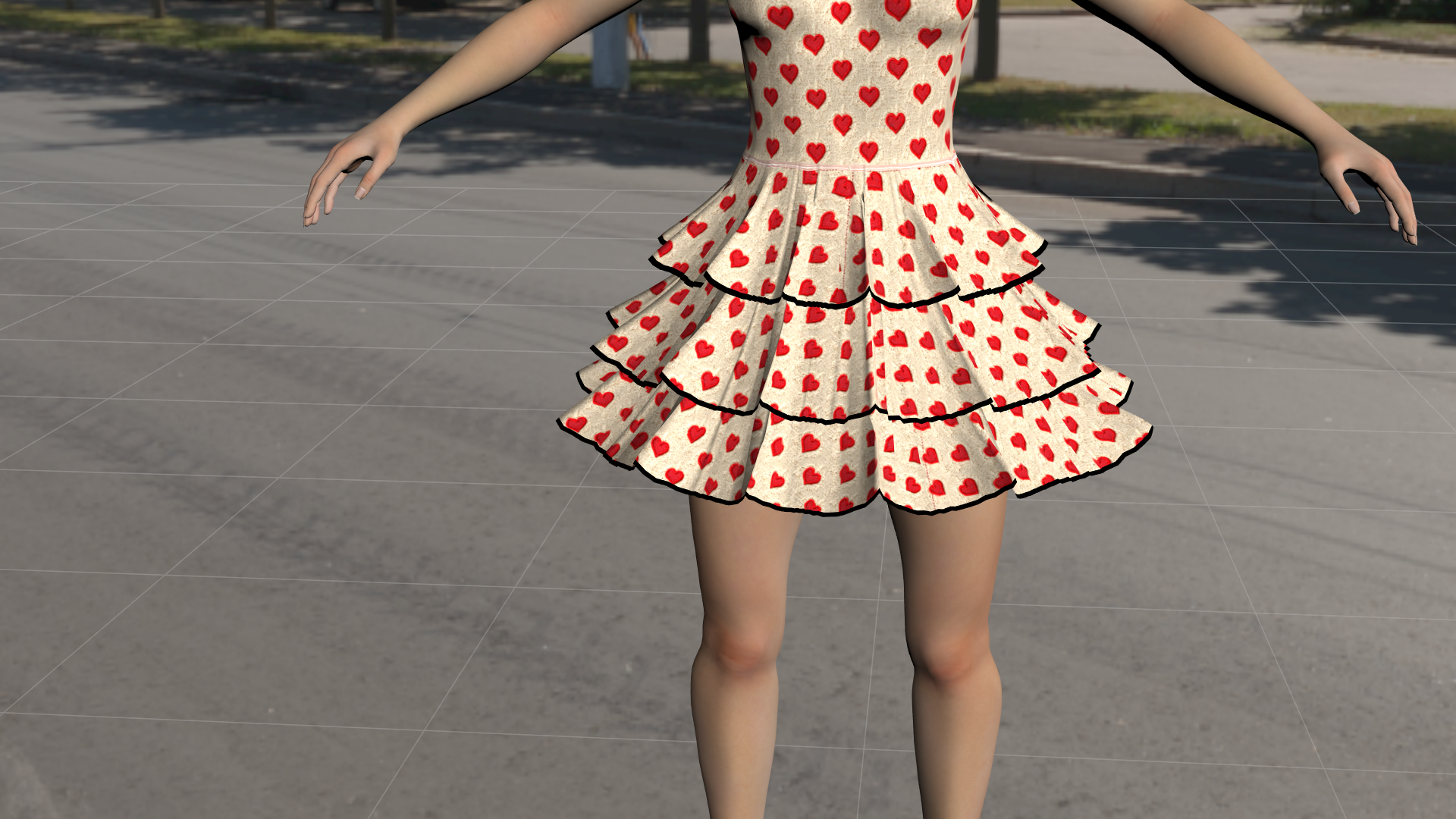
Above at .080 now has defined curves
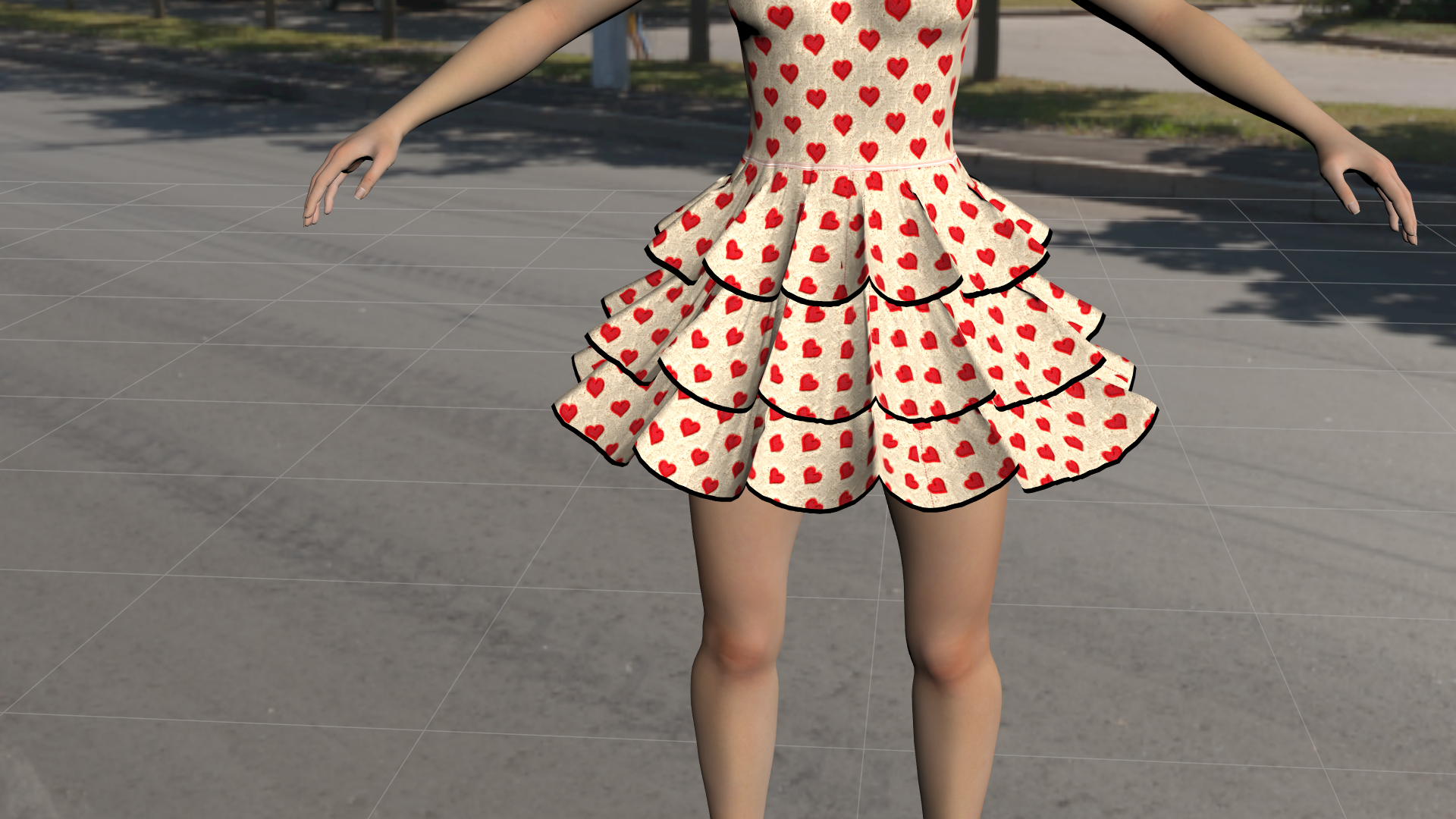
And finally animated constraint at .240. At this point you can really see the curves.
In my gallery I have the dress above being put to some stress tests and compare it to Poser 13. The Poser 14 versions simulate the 500 frames in 2 minutes and 6 seconds or close to. The Poser 13 version took 38 minutes. Just to be clear the above are a fast test and could use more work to improve them if that was required. And as I said the peek of the layers is a single line of vertexes painted with a value of .0500 and all three layers took about 30 minutes to complete.
Poser 5, 6, 7, 8, Poser Pro 9 (2012), 10 (2014), 11, 12, 13, 14
Considering that clothing for Dawn 2 and LaFemme 2 is primarily dynamic via Renderosity and elsewhere and a Crossdresser license is nowhere in sight, the whole Poser 14 fiasco is quite frankly bizarre in the extreme. I feel quite fortunate to be able to use older ShareCG Dynamic clothing and a few odds and sodds from Sshodan to keep the poor figures from being stuck in a Poser 14 nudist colony being questioned by inspector Clouseau.
We will see what happens and I will be curious to see the new Cloth functionality but so far, Poser 14 has come across as underwhelming.
An interesting simulation demonstration of "La Valentine Day dress for La Femme 2" in Poser 14, but it doesn't give the look I originally intended for the model. I would have to go through all my models one by one and spend hours trying to get them to work correctly with the Poser 14 simulation to provide a Poser 14 version. I confess I'm discouraged at this point; I don't know if I'll continue creating dynamic clothing for Poser. Currently, I can't bring myself to create anything at all.
An interesting simulation demonstration of "La Valentine Day dress for La Femme 2" in Poser 14, but it doesn't give the look I originally intended for the model. I would have to go through all my models one by one and spend hours trying to get them to work correctly with the Poser 14 simulation to provide a Poser 14 version. I confess I'm discouraged at this point; I don't know if I'll continue creating dynamic clothing for Poser. Currently, I can't bring myself to create anything at all.
I'm REALLY sorry to hear this from you. The people at Poser have seriously alienated many of us.
:(
Tipol posted at 7:59 AM Sat, 7 March 2026 - #4504437
And this is exactly what I was afraid of. That this wasn't even discussed with a beta test creator group, that creators were left without help, explanation, tools, anything...this is inexcusable.An interesting simulation demonstration of "La Valentine Day dress for La Femme 2" in Poser 14, but it doesn't give the look I originally intended for the model. I would have to go through all my models one by one and spend hours trying to get them to work correctly with the Poser 14 simulation to provide a Poser 14 version. I confess I'm discouraged at this point; I don't know if I'll continue creating dynamic clothing for Poser. Currently, I can't bring myself to create anything at all.
I8m have been with Poser since P7, but I am now saddened by how I don't see a future for it the way this release went. Again, i understand that the Cloth Room was deprecated code etc. But not warning creators, not helping them to overcome it, and most of all not giving us a working replacement with an easy way of using it ... I really am disappointed and, frankly, angry.
The old cloth room was untenable and cost money for each copy sold. They are still working on improving the Poser Cloth feature but that will take a bit of time as itis not a simple off the shelf program that just slips in and auto-magically works. Back when Poser 14 came out there was the uproar over the fact it was presented with NO fanfare. Since there were bugs in other areas of the program such as shaders etc. and the fact that the Poser Cloth was being worked on and is now part of the program not easily removed, they sort had to release the current bug fixes along with what was currently working in the Poser Cloth. So, they did the big announcement and again a big uproar. There would have be just as big an uproar if they had released the fixes and not said anything about the Poser Cloth. Then they would have been accused of trying to sneak something in.
Which is why if you go back and look Poser 14 said right up front that it is not meant for those of you who depend on the OLD cloth room. So, let's say Poser has to keep adding on more and more things and never removing anything old, what feature would you say makes for a new release version? And bug fixes don't count as they are not new features just fixes to existing ones. Part of the problem Poser has is that it has added on things over the years and almost none of them work together. This is way before Bondware's times and to some degree even Smith Micros. For Poser to go forward it is going to have to reorganize what it has inside and make it work together across the platform and not just in one little part of the program. The problem with this is that it will break how someone uses Poser as they will have come to rely on the quirk and it won't be there anymore.
So you wanted the vendors to be warned? What would this warning have looked like? What options do you think they should have given? The fact is the OLD cloth was going to be removed to make it possible for Poser to have options in the future. What those options are I won't say.
Now as far as trainings given the fact the program is being changed all the time it makes it hard to write a specific set of instructions as some of it will have changed. They have given a basic set of guides as to how to start it will take a bit o playing to find out what works for you. Also, it is going to come down to what you find acceptable as a result. Obviously, Tipol is not happy with the Valentine Day dress, The fact is I have posted videos of that dress both in Poser 13 and Poser 14. Multiple of Poser 14 as It is super easy to make changes to how it drapes and it simulates about 19 times faster. Poser 13 took 38 minutes to run the test. Poser 14 will do it in 2 minutes 6 seconds. In Poser 14 a simple change to a single dial on the dress will result in what you see above. And if I really wanted to, I could go in and paint in weights to curve the droop, so it is smoother, as it is that is a Single line of vertex's painted to a value to make them stiffer. With the proper mapping it would have a solid center with fall off to the sides which would result in more curving. And if you look the Dress starts with several inverted V's in the tiers which disappear in Both versions but in Poser 14 If I really wanted, I could make those stay. One of the things this version can do that the old version can't is to keep in pleats. As far as the dresses look it is kind of hard to determine what the look was supposed to be as some promo pictures it looks like a Tu-Tu and others it appears to drape more like what I have shown above. But that come down to a matter of what you like.
Poser 5, 6, 7, 8, Poser Pro 9 (2012), 10 (2014), 11, 12, 13, 14
And I have talk to a vendor who is/was worried about having to go through and fix all their old stuff. And I pointed out that a lot vendors make a product and then sell add on textures to change the look of that product. So, the question is should be allowed to sell those extra textures? Or should they give them away for free since they already made the base product? So it is with the current Dynamic clothing, it was made for the old Cloth Room and works as intended there. If the user wants to they can redo the cloth in the newer version of Poser OR the vendor could sell an add-on that allows it to be used in the new room. That is much the same as the user could put in new materials to replace those that came with the product instead of buying new ones from the vendor. And as far as going forward you might want to charge a bit more for both dynamic options or stick to one or the other. There is nothing saying that a product has to work in ALL versions of Poser, just that it work in the versions that it says it will work in.
Poser 5, 6, 7, 8, Poser Pro 9 (2012), 10 (2014), 11, 12, 13, 14
Richard60 posted at 3:49 PM Sat, 7 March 2026 - #4504442
The old cloth room was untenable and cost money for each copy sold. They are still working on improving the Poser Cloth feature but that will take a bit of time as itis not a simple off the shelf program that just slips in and auto-magically works. Back when Poser 14 came out there was the uproar over the fact it was presented with NO fanfare. Since there were bugs in other areas of the program such as shaders etc. and the fact that the Poser Cloth was being worked on and is now part of the program not easily removed, they sort had to release the current bug fixes along with what was currently working in the Poser Cloth. So, they did the big announcement and again a big uproar. There would have be just as big an uproar if they had released the fixes and not said anything about the Poser Cloth. Then they would have been accused of trying to sneak something in.
Which is why if you go back and look Poser 14 said right up front that it is not meant for those of you who depend on the OLD cloth room. So, let's say Poser has to keep adding on more and more things and never removing anything old, what feature would you say makes for a new release version? And bug fixes don't count as they are not new features just fixes to existing ones. Part of the problem Poser has is that it has added on things over the years and almost none of them work together. This is way before Bondware's times and to some degree even Smith Micros. For Poser to go forward it is going to have to reorganize what it has inside and make it work together across the platform and not just in one little part of the program. The problem with this is that it will break how someone uses Poser as they will have come to rely on the quirk and it won't be there anymore.
So you wanted the vendors to be warned? What would this warning have looked like? What options do you think they should have given? The fact is the OLD cloth was going to be removed to make it possible for Poser to have options in the future. What those options are I won't say.
Now as far as trainings given the fact the program is being changed all the time it makes it hard to write a specific set of instructions as some of it will have changed. They have given a basic set of guides as to how to start it will take a bit o playing to find out what works for you. Also, it is going to come down to what you find acceptable as a result. Obviously, Tipol is not happy with the Valentine Day dress, The fact is I have posted videos of that dress both in Poser 13 and Poser 14. Multiple of Poser 14 as It is super easy to make changes to how it drapes and it simulates about 19 times faster. Poser 13 took 38 minutes to run the test. Poser 14 will do it in 2 minutes 6 seconds. In Poser 14 a simple change to a single dial on the dress will result in what you see above. And if I really wanted to, I could go in and paint in weights to curve the droop, so it is smoother, as it is that is a Single line of vertex's painted to a value to make them stiffer. With the proper mapping it would have a solid center with fall off to the sides which would result in more curving. And if you look the Dress starts with several inverted V's in the tiers which disappear in Both versions but in Poser 14 If I really wanted, I could make those stay. One of the things this version can do that the old version can't is to keep in pleats. As far as the dresses look it is kind of hard to determine what the look was supposed to be as some promo pictures it looks like a Tu-Tu and others it appears to drape more like what I have shown above. But that come down to a matter of what you like.
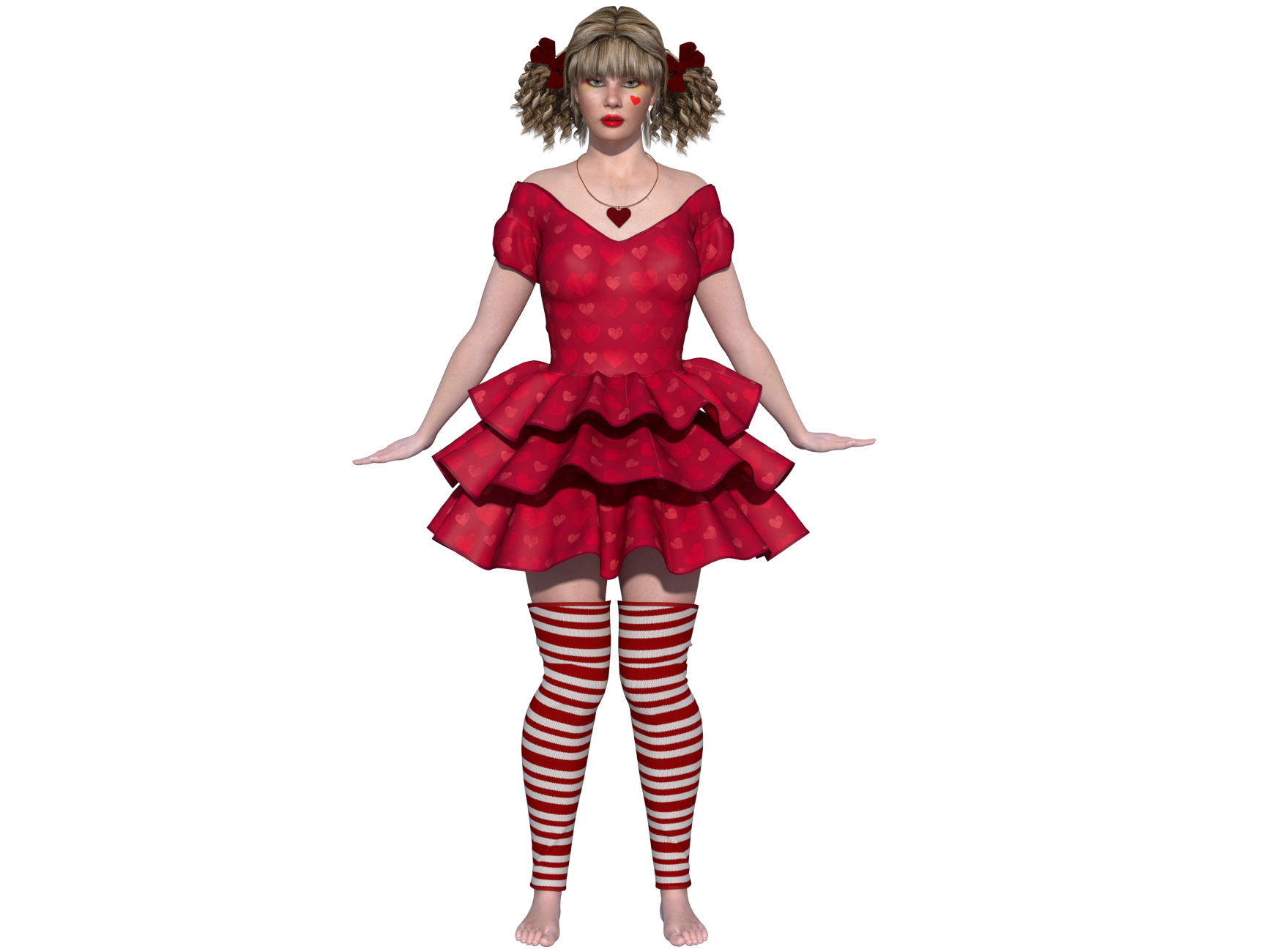
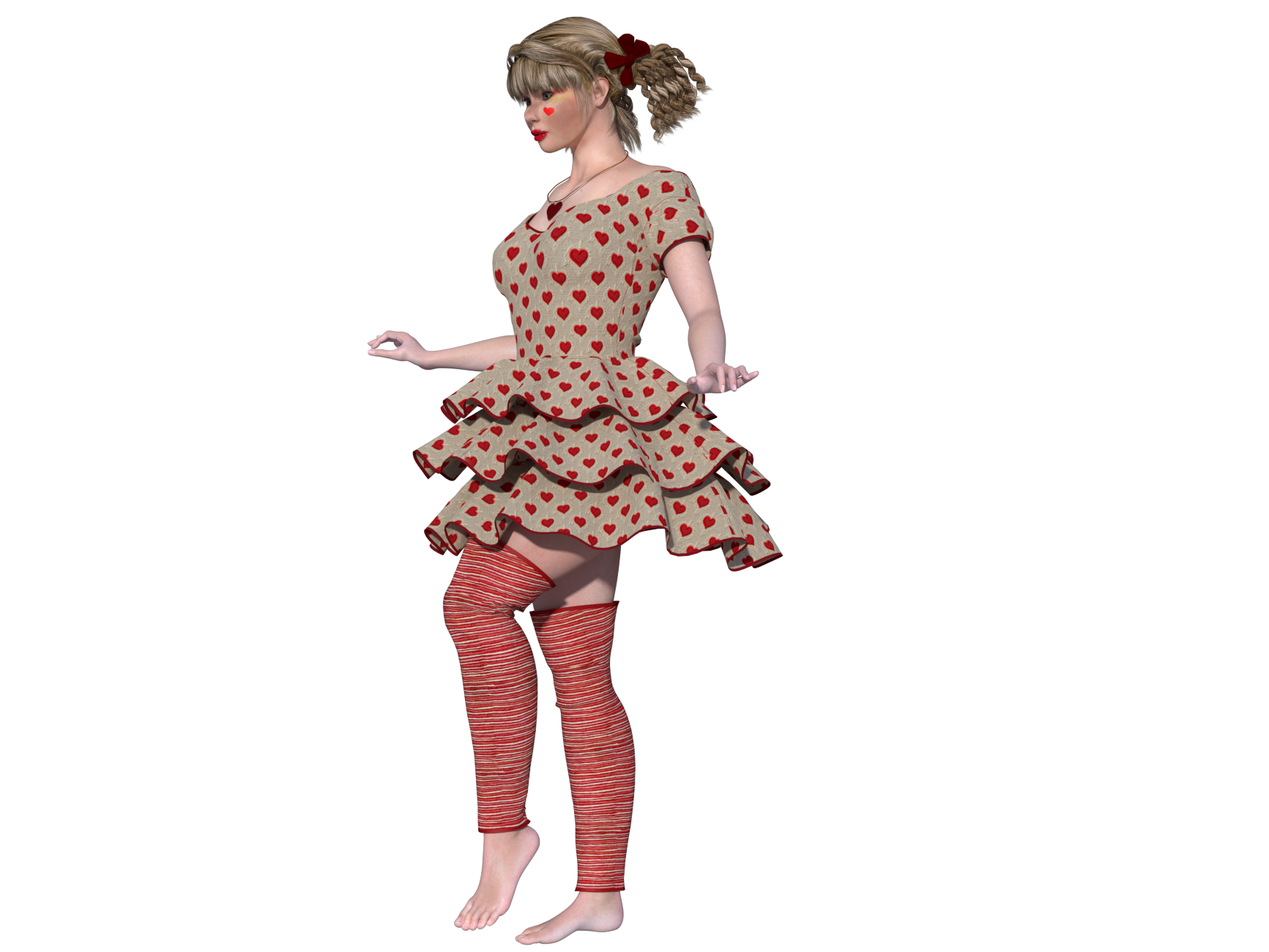
This is how the Valentine's Day dress is supposed to fall and what it should look like as I designed it. In Poser 14 it becomes something other than what I intended to create.
That is for the 500 frames in the test animation. During the setup first 60 frames it was about 3-4 seconds per frame. But when it got to moving that jumped to 10-12 seconds and I saw a couple that clocked in at 18 seconds. But the set-up part is easy as nothing was moving except the dress. how many frames did you use? Standard 30? If so a 7-minute simulation works out to about 14 seconds per frame.
And as I have said above My work on the tiers was only a single set of vertexes painted to a specific weight as part of a larger testing experiment. There are two weight maps on each tier along with the single vertex line. Since weight maps can be added together I have the whole tier weighted at a value of .0200 and that is super simple to do as you restrict the weight painting to a material group as in this case Flying X. Then you set the constraint dial to a value that gives the droop you want. For the 3 tiers that ranges between .38 and .45 depending on how heavy the tier is. And each tier does have its own set of maps, not necessary as you can put that all in the same group, but I like to have control over how it looks. Then I put in the single line of weights on each tier and their value was .05 and they tied into a single constraint dial. When a constraint dial is set to Zero then that weight map has no effect and you get the look of the first picture I posted above. Then I just changed the value of the single dial and you can see the effect as the dress parts with that weight start to rise. And as I said if I went in and painted the single line with a wider brush that has fall off instead of the solid Black brush with a fixed value assigned then the dress parts would rise the most in the center and curve off on the sides. Which would look a lot more like what you posted. My point of the pictures was to show how much control you can have or the end user as the dials are part of the dress dials, and you don't need to be in the creator mode of the Poser Cloth room to make those changes.
Poser 5, 6, 7, 8, Poser Pro 9 (2012), 10 (2014), 11, 12, 13, 14
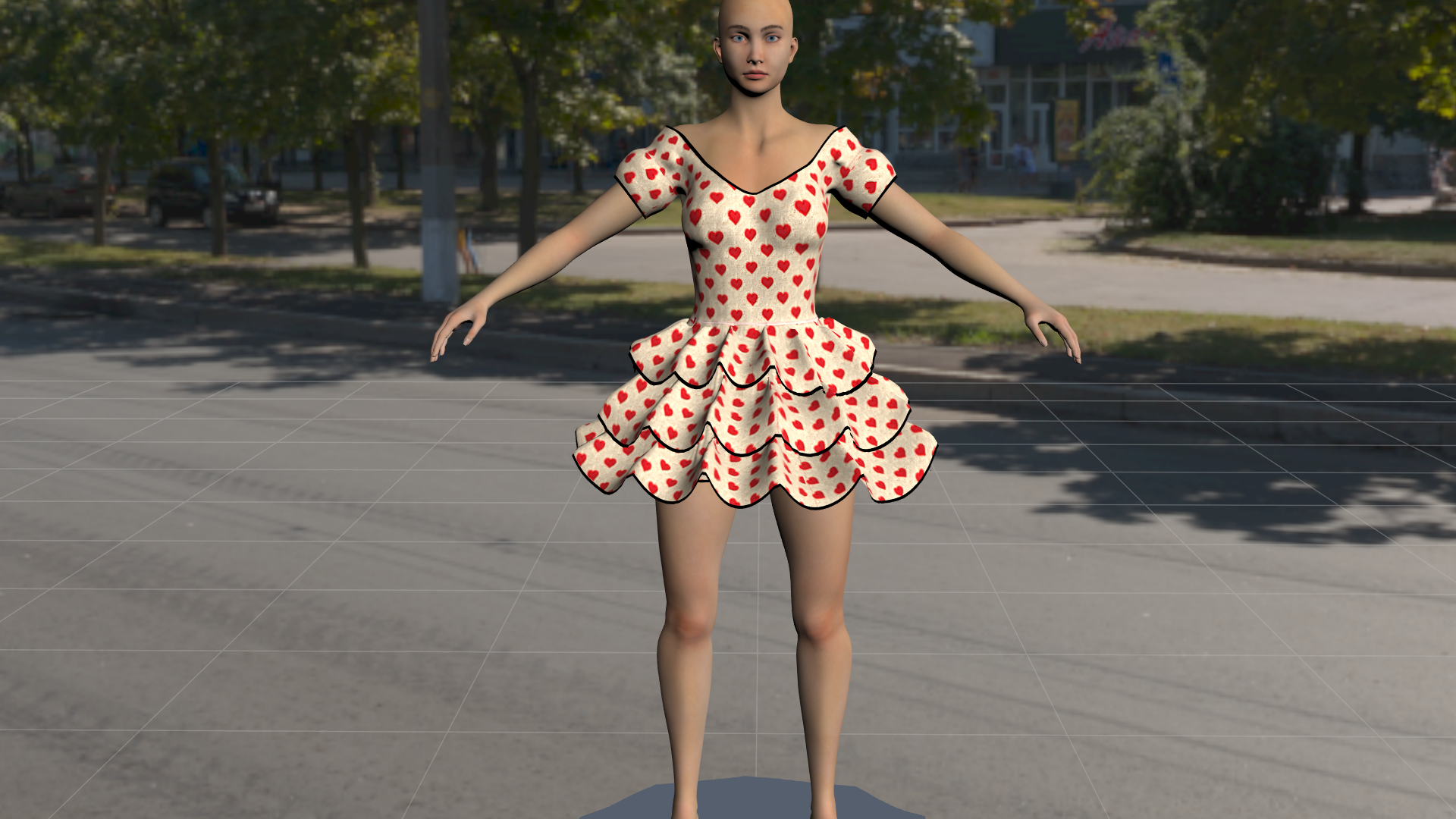
Thiws is another pass with the extra weight maps. This time I just did a simple pass with the brush with fall off a taking in a couple of the side vertexes. Again this is not perfect but it was done in about 15 minutes. Whit more skill and time I could get to be like your curvy tiers. Again this is a demo piece of what can be done. And I did not change the constraint values to fine tune.
Poser 5, 6, 7, 8, Poser Pro 9 (2012), 10 (2014), 11, 12, 13, 14
Can you post more of a step by step on how to do all this? I've been trying and failing, so I think I'm missing something.
Available on Amazon for the Kindle E-Reader Monster of the North and The Shimmering Mage
Today I break my own personal record for the number of days for being alive.
Check out my store here or my free stuff here
I use Poser 13 and win 10
I will work on putting together a how to based on what I do. One of the biggest things to remember this is not like the old cloth room. The concept here is that the shape of the cloth is the starting point. The dress above has built in peaks that are harder to flatten in Poser 14 then in Poser 13. So you need to put in some constraint in order for the cloth to keep its basic shape but not so much as to make it rigid.Can you post more of a step by step on how to do all this? I've been trying and failing, so I think I'm missing something.
Poser 5, 6, 7, 8, Poser Pro 9 (2012), 10 (2014), 11, 12, 13, 14
As someone who bought MetaCreation's Poser 3.0 and every upgrade since, and someone in the group of users (perhaps only me) who actually got dynamic clothing to work 0.5% of the time, I want to emphasize what Rhia cautioned in various posts. This 'new and (presumably) improved' function must be user-friendly. By that, I mean it has to be as easy to use as conforming clothes for those of us who want to merely create art and not explore the intricate aspects of quantum computing (as interesting as those are in another context). Admittedly, I don't understand the Poser 13 dynamic clothing parameters. But from what I've read here, this next best thing seems even more complicated. If well respected vendors and well-established users can't figure it out, where does that leave the rest of us and the vendors who hope to sell product to us?
These aren't pleats but ruffles; they were created to be rounded but rigid. The transition to Poser 14 makes them right-angled but too flexible. What I'm trying to explain is that the dress is a creation created to react in a certain way, which is what makes it unique. The transition to Poser 14 transforms it into a different dress altogether. It's interesting for a user to manipulate it and do something else with it, but for the seller who imagined and created it, it cannot be sold as a version for Poser 14 because they are 2 different dresses and not a version to find the same dress in Poser 14. I don't know if my explanation is very clear.
If well respected vendors and well-established users can't figure it out, where does that leave the rest of us and the vendors who hope to sell product to us?
That's a very good point!
I don't understand why a vendor, even a veteran who's been selling since Poser 3, should have any more insight on a new feature than anyone else.
Available on Amazon for the Kindle E-Reader Monster of the North and The Shimmering Mage
Today I break my own personal record for the number of days for being alive.
Check out my store here or my free stuff here
I use Poser 13 and win 10
Perhaps because a software that wants people to create art may use content that vendors create? And if the vendors who a website like this depends on to create the content that their software would use can't create said content because they don't know how to...perhaps they'll stop creating for said software and said software's current version will be released without any new content...like Poser 14? Just a guess.I don't understand why a vendor, even a veteran who's been selling since Poser 3, should have any more insight on a new feature than anyone else.
I would like to point out that Poser has had the tools for Poser Cloth since Poser 9 and 10. Poser 9/2012 added the constraint system and Poser 10/2014 added the Bullet Physics. About the only thing new in Poser 14 is the version of Bullet that allows bodies to be inside of cloth objects. Since I have been playing with those features all the time I have a really good idea as to how they work. Here is a fun problem see if you can figure it out. I hope everyone knows what a baseball diamond looks like. Using 3 constraints make an object travel around all four bases starting at home plate at the bottom going to first on the right to second at the top, to third on the left and finally back to home plate.
Of course very few people are going to know the answer as there has been almost no content made that takes advantage of either of those two systems. Which kind of leads back to a question I had earlier about what new features would be needed to make Poser better? Since almost nothing they have added in over the years has ever made it in the market place.
Poser 5, 6, 7, 8, Poser Pro 9 (2012), 10 (2014), 11, 12, 13, 14
I'm sorry, I live in France, where almost no one plays baseball and there are no baseball fields ;D. Regarding the clothing I create, to achieve the desired look, I primarily use the "dynamic group," "stretch resistance", and "cloth density". And I can't find these options in Poser 14's solution for dynamic clothing.I would like to point out that Poser has had the tools for Poser Cloth since Poser 9 and 10. Poser 9/2012 added the constraint system and Poser 10/2014 added the Bullet Physics. About the only thing new in Poser 14 is the version of Bullet that allows bodies to be inside of cloth objects. Since I have been playing with those features all the time I have a really good idea as to how they work. Here is a fun problem see if you can figure it out. I hope everyone knows what a baseball diamond looks like. Using 3 constraints make an object travel around all four bases starting at home plate at the bottom going to first on the right to second at the top, to third on the left and finally back to home plate.
Of course very few people are going to know the answer as there has been almost no content made that takes advantage of either of those two systems. Which kind of leads back to a question I had earlier about what new features would be needed to make Poser better? Since almost nothing they have added in over the years has ever made it in the market place.
OK so try this. You do know what a compass and the compass points are? North-South, East-West? So, place an object on the South point move it to the East point in a straight line. Next from East to North, from North to West and Finally from West to South. That is the same movements as done on a Baseball Diamond. But the point is this is a test of your knowledge of the Poser constraint system. So, the test is to make the object travel to the 4 points using only 3 constraints. And yes, this is related to the Poser Cloth as one of the parts of it is the constraint system. The other part is the Bullet physics part and how it relates to mesh handling. So, the cloth will either fall to the ground (as best it can) if it has no constraints on it or the other extreme is that it will be rigid and none moving. In between those two points is where you want to be with your stiffness. Since a mesh that is painted and has a constraint if allowed to would return to it starting point at least in the Physics Cloth tab.
Poser 5, 6, 7, 8, Poser Pro 9 (2012), 10 (2014), 11, 12, 13, 14
I'll try it, thank you. But there's another problem with this dress. It was designed to behave a certain way in the cloth room, but it doesn't behave the same way in the Poser 14 simulation. The sharp creases you see are supposed to widen to create soft, flowing ruffles, which they don't do in Poser 14. This might be due to my workflow. I model a garment and test how it behaves in the cloth room. Then I modify the model and adjust the parameters until I get the desired effect. I go back and forth between the modeling software and the cloth room as many times as necessary until I get a satisfactory result. So I've come to think that these garments I create can only work in the cloth room, not in the Poser 14 simulator.
And that is probably true since the two systems are totally different but trying to get the same basic result. Looking at your store and years ago you would model a skirt as dynamic and then do the same thing except conforming. I looked at them and the dynamic has NO creases or sharp edges, which is what the old cloth room does. It flows the cloth and while it mostly flows it is uncontrollable and loses any built-in folded details. Poser Cloth will be able to keep those details and also free flow to an extent. And as I hinted above a Poser Cloth item will try to keep its shape and return to the starting point. So whatever final design you have in mind the closer the model is to the desired shape the easier it will be to make it move with that shape.
Poser 5, 6, 7, 8, Poser Pro 9 (2012), 10 (2014), 11, 12, 13, 14
Yes, that's it. It's a completely different way of working. The model has to already have the desired shape from the start, whereas my creations are modeled based on the results obtained in the Cloth Room. And the more older models have been reworked based on the Cloth Room, the less they adapt to the Pose 14 simulation. What's terrible for buyers is that a large part of their dynamic content won't work in Pose 14 as things stand. I had considered making an adaptation for each one, but that seems extremely difficult, if not impossible.
I am not sure what to think about the new cloth feature. For me it does not feel very comfortable to use. Maybe I am just too stupid, but I do not even understand the compass metaphor.
For me the old Cloth Room was very intuitive. I only had to tell Poser what the fabric was, what the body was, and start the simulation. Even with the default settings the clothing usually draped well. Even clothes loaded from object files or exported from DAZ draped nicely unless the polygon count was too high.
With the new Poser Cloth system I have to draw weights. First I have to learn what that even means. Without reading the manual or asking ChatGPT I would assume it means the part that is affected by gravity and moves downward. And what does “constrain” mean? I only know this because I have used Poser for a very long time. A constraint is the part that keeps the fabric stiff like an object so it does not move.
So with the new Poser Cloth system I have to draw all of this onto my clothing. Ok, I understand that part. But now I have a question from a simple adult user who grew up with the old Cloth Room, where an object simply wrapped around a figure like clothing does in the real world. Why can Poser Cloth not just do this automatically?
I think simple clothing like a dress or a shirt might work fine with the new system. But let us take Tipol as an example. For example the Molly Chubb Dress. How exactly am I supposed to draw the weights and constraints for something like that?
Richard, I really appreciate your effort and your knowledge in explaining how to set up the new Poser Cloth system. But how would you draw this dress? The full outfit? I would be happy to gift it to you if you do not already have it.
Because if even Tipol struggles to show us her well draped dress, how can normal users figure out how to draw the weights and constraints correctly?
Let us imagine this is not an old dress. Let us pretend it is a completely new item that just came fresh from Tipol’s imagination. She already knows how the dress should fall and how it is supposed to look. If she does not have Poser 13, she cannot show us simple users how it should look. Without that reference, how are we supposed to imagine where we need to draw all the lines to achieve the correct result?
Yes, we can be creative. But honestly, most of the dresses I bought from Tipol were not for creative draping. I bought them because they already looked beautiful, and because I knew that every single piece from Tipol drapes well and produces results like the promo images.
Yes, I understand why this change was made for Poser 14. And by the way, thank you very much for explaining the reasons behind it. This is exactly how I imagine good communication, so thank you for that.
You asked what kind of change I would have liked to see in Poser 14. For me personally, it would be great if Blender material tutorials could be used in Poser, or even better if the materials themselves could be used with some level of compatibility. From what I have read, it seems that you have already made progress in that direction with the new material room, although I have not tested it yet.
I never had any problems with the old Cloth Room. It always worked perfectly as long as the polygon count was not too high. But if you asked me what a replacement for it should look like, I would honestly say to look at dForce in DAZ and simply copy that idea. I do not know anything about the programming behind it, but in DAZ you put the clothing on the figure, press simulate, and it fits. It is that simple.
For me, every version of Poser has always been great. The only thing I ever really wished for was more compatibility with DAZ. It would be wonderful if DUF files, whether props or figures, could simply be imported and used without needing a script.
Another really great feature for Poser 14 would have been something that could make old scripts usable again. I do not even know if something like that could be done automatically, but a tool or script that helps restore compatibility would be amazing.
In general I always like to be surprised by new software versions. I originally did not want to switch to Poser 13 either, because I thought I would have to redo many materials. But it rendered so incredibly fast in SuperFly that the upgrade was absolutely worth it.
What would make Poser 14 worth upgrading to for me? I am not really sure. Maybe more compatibility with materials. Right now, since the Cloth Room is missing, Poser 14 is just decoration on my hard drive. Poser 13 is perfect for me and already offers everything I need.
But the point about creativity is true. With this system I can play with the clothing much more, and that is probably the reason why I would use Poser 14. It is fun to experiment with the sliders and see what happens.
However, to really understand Poser Cloth I think a person needs a good imagination and the ability to picture physically how fabric behaves. And that is exactly the point that will make it difficult for many users to draw constraints and weights on a piece of clothing.
It would be nice if the cloth simply started by falling naturally downward and wrapping around the body underneath. No exaggerated gravity, no extreme stretch settings, just a natural drape around the figure without passing through the body.
For those of us who are not native English speakers it might also help if some of the parameter names were changed. Personally I do not find some of the terms very easy to understand, and the German translation is not very self explanatory either.
But as I said before, I already struggle to understand the compass metaphor.
First off I am just a Beta tester and not part of the Dev team so what insight I have to the program is limited in that respect. But I have been playing with Poser for a long time, since Poser 5 came out. Currently I have finished the pictures for a tutorial on how to map the weights, at least the ones not close to the body. Now I have to write the text to explain the pictures. And no I am not going to make a video, even though a lot of this looks neat while moving.
The one advantage I find in this version is the fact that I can turn on Live Simulation and adjust the dials and see the results in almost real time. Another is that the simulation time is vastly faster. Not to pick on anyone but the Valentine Day dress is modeled way different then the final desired result. A lot of the sharp folds that it starts with blend out in the old cloth room. And that is something that is not easy to try to map to get the same results. I can come up with several dozen different effects that sort of look like the Poser 13 version but not that exact look. That with the fact that what took Tipol 7 minutes to get the simulation done takes about 20 seconds in Poser 14 so gives a lot of time to tweak to tune it right. And by right that is in my opinion and does not detract from the creators vision. And who knows maybe once they get a beter understanding they may make something that while not the exact same as the original might be good enough to make an update for.
The auto gen parts are not a bad starting place and they will probably get better as the new system is better understood. There are still a couple of improvements they need to make in that area. And they may add more to the auto constraints to include those parts that are not close to the body. However, that is much harder since a lot of the skirts were made to be high up at the start and fall down to hang well below where they started.
Adn as the tutorial will explain you don't really need to DRAW weights, just apply a set value to an area to give it a map. Blanket fill is fast. Drawing is meant for the fine tuning.
Poser 5, 6, 7, 8, Poser Pro 9 (2012), 10 (2014), 11, 12, 13, 14
I just had a thought. Tipol likes the way the tiers flow in the old cloth room. One of the cool features I have used in the past was to simulate an action and had the cloth flow to the desired position, such as sitting down. In order not to have to re-simulate the actions leading to the sitting position I would make a morph of the cloth in the final position and a pose for the figure at that same position. Later I could start a new scene where they start seated and go from there. Tipol could simulate the Valentine Dress in Poser 13 with everything at the default positions and let the cloth room drape the dress to get the curvy wave they like and make a morph of that. Go into Poser 14 set up the dress on the figure and then apply the P13 morph which just moves the vertexes into the proper location and then P14 can run the cloth sim on that. Since the morph position is the starting spots for all the vertexes they will just flow from that spot onwards and not know the difference. Of course you have to leave the morph in place, but that is no different then what I use to do anyway.
Poser 5, 6, 7, 8, Poser Pro 9 (2012), 10 (2014), 11, 12, 13, 14

Privacy Notice
This site uses cookies to deliver the best experience. Our own cookies make user accounts and other features possible. Third-party cookies are used to display relevant ads and to analyze how Renderosity is used. By using our site, you acknowledge that you have read and understood our Terms of Service, including our Cookie Policy and our Privacy Policy.