
Renderosity Forums / Poser - OFFICIAL
Welcome to the Poser - OFFICIAL Forum
Forum Moderators: RedPhantom Forum Coordinators: Anim8dtoon
Poser - OFFICIAL F.A.Q (Last Updated: 2026 Mar 02 2:28 pm)

Subject: Antonia - Opinions?


i dunno.
basically, your suggestion would give me the same results i used to get when using V3 and M3 textures that slapped the texture on the lens. imho, they looked awful, flat and like bad colored contacts. they were always improved by placing the texture on the iris and using refraction or even just transparency and fancy highlights. but maybe you have some better tricks than i've learned over the years.
edited to add: you almost definitely have better tricks than i do. i can say, however, that my experience was not only negative, i used to be able to spot the dead look of textures on the lens all the time in the galleries. so it wasn't just me that couldn't get them to look good.

I don't think that giving the iris some convexity (some!) is quite as bad as putting the iris texture on the cornea.
There is a big difference when the highlight appears lifted from the iris.
Work the math - compare a refractive cornea and flat iris versus a transparent cornea and a somewhat convex iris. There's very little difference when viewed near straight on. There is a big difference when viewed from the side, but the price to pay for that refraction is a bit much in some circumstances.
If we had an iris-convex-concave morph, you could just dial the scheme you want to use, and then set up the cornea shader to match the strategy you've chosen - transparency versus refraction.
Renderosity forum reply notifications are wonky. If I read a follow-up in a thread, but I don't myself reply, then notifications no longer happen AT ALL on that thread. So if I seem to be ignoring a question, that's why. (Updated September 23, 2019)

Just for information, Red eye happens when the flash is too close to the lens axis - hence the fact that compact cameras with onboard flashguns suffer a lot.
Get the flash as far away from the lens axis as you can and you reduce or eliminate redeye
My Freebies
Buy stuff on RedBubble

@ cobaltdream,
Have a look at my second image on the previous page, the bottom part of the image. It's only an anti-aliased preview, not a render, but I think it shows that the convex toroid section shape looks quite realistic, especially the way it catches the light. It should do, because it is not far from the shape of a real iris. Compare it to the default dish shape, or convex sphere section from the previous image.

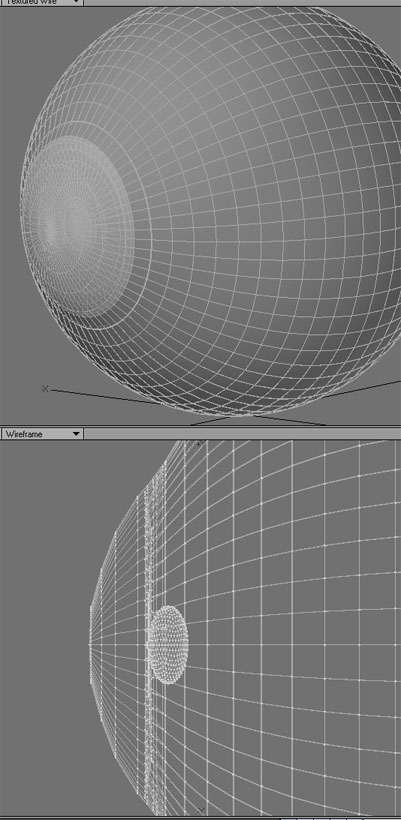
It may be different when I have textures to apply to it, but the dish and concave shapes seem to make a more realistic looking image when using refraction. That makes sense, because the look of refraction through the cornea IS that of a convex iris.
I was using Lightwave for my tests. I really don't want to get in on the argument about what's best for use in Poser without refraction and raytracing. But if something such as Les's convex morphs can give the illusion of being convex without having to suffer through Poser raytracing, that has to be a good thing. ;-)
Quote - @ cobaltdream,
Have a look at my second image on the previous page, the bottom part of the image. It's only an anti-aliased preview, not a render, but I think it shows that the convex toroid section shape looks quite realistic, especially the way it catches the light. It should do, because it is not far from the shape of a real iris. Compare it to the default dish shape, or convex sphere section from the previous image.
i wish we could quote images. ah well.
actually, your image shows that it shades much less well, imho. that's part of why i'd be concerned with this as a more permanent fix (say new eye geometry). you've got a photo texture with so many burned in effects, of course it looks more realistic without any additional shading. you can see the reflection of the lashes in the texture, and the highlights are burned in as well. that's great for lighting that's similar to what's burned in and fairly even (as yours is), but i personally find that kind of texture absolutely unusable in practice. lots of people use textures like that very, very effectively, and many well-known and popular merchants sell them. they just don't work very well for me.
yes, getting rid of the doubling of shadow is good. i'm certainly not for making geometry or anything else double the effect of burned in lighting. but with a proper texture that doesn't have lighting effects burned in, it wouldn't have most of the shading you're showing now nor the shading from the geometry. i'd anticipate from the shading of the untextured model, it would just look painted on and weird to me. but i could be totally off.
edited to add, imho, the untextured view also looks absolutely nothing like the inset diagrams i've seen of irises all over the Web (and at my optometrist's) , and certainly not like the opposing shading i saw on my own irises just a short while ago. but to each their own, and i certainly applaud your efforts.
@ cobaltdream,
Well I can agree with you on one point at least. I don't like burnt in reflections either. The textures and material settings where those that came with Antonia, and the only textures I have for her at the moment. As to iris shape, I guess time and results will tell in the end. I'm happy to use my shape at the moment because I like the results much better than those I get from the default shape. If a new shape comes along, I'll try that too, and judge by results.
bagginsbill: I'll repeat what I said before. Let me know how you think the iris and cornea should be shaped to work correctly with diffraction, and I'll make it so. The render you showed are certainly the most realistic I've seen.
I don't know why the iris seems to catch the light like a concave surface, but that's what I see. I can do the math until the cows come home, but I suck at Physics. So I won't try to predict what I should see.
-- I'm not mad at you, just Westphalian.
Ahahah, odf.
I've been googling for images of a real dissected human eye.
If cut up dead people bothers you, don't go here.
http://www.oddee.com/item_96547.aspx
There's an eye 2/3 of the way down. The iris looks convex to me. But it's hard to tell because the eye is turned a little bit.
I found lots of dissected cow eyes - the iris on those is clearly convex, but that's got nothing to do with humans, perhaps.
Renderosity forum reply notifications are wonky. If I read a follow-up in a thread, but I don't myself reply, then notifications no longer happen AT ALL on that thread. So if I seem to be ignoring a question, that's why. (Updated September 23, 2019)
Eye cross section.
http://lane.stanford.edu/bassett/raw/bassettLargerView.html?t=largerView&bn=58-2
http://lane.stanford.edu/bassett/raw/bassettLargerView.html?t=largerView&bn=58-3
Mike, your lens is way too tiny. The lens is almost as large as the iris, and the iris floats over it like a ring shaped island. It is slightly convex.
Renderosity forum reply notifications are wonky. If I read a follow-up in a thread, but I don't myself reply, then notifications no longer happen AT ALL on that thread. So if I seem to be ignoring a question, that's why. (Updated September 23, 2019)
http://www.missionforvisionusa.org/anatomy/uploaded_images/GrosASlabMfV-702936.jpg
The part labeled #5 is the iris.
Renderosity forum reply notifications are wonky. If I read a follow-up in a thread, but I don't myself reply, then notifications no longer happen AT ALL on that thread. So if I seem to be ignoring a question, that's why. (Updated September 23, 2019)
Quote - Eye cross section.
http://lane.stanford.edu/bassett/raw/bassettLargerView.html?t=largerView&bn=58-2
http://lane.stanford.edu/bassett/raw/bassettLargerView.html?t=largerView&bn=58-3Mike, your lens is way too tiny. The lens is almost as large as the iris, and the iris floats over it like a ring shaped island.
Excellent find!
To summarize what I see:
1) The iris is slightly convex, but a bit flatter than the sclera.
2) There's an indentation towards the iris, just as in lesbentley's morph.
3) The iris tucks in smoothly under the cornea and sclera, so instead of the sharp angle I have there now, I should just set it back in order to get some shadowing.
I'm still wondering about the way the iris catches diffuse light that's stronger on one side (like from a large window). I agree that diffraction of incoming light can't be responsible. Could it be inward reflection from the surface of the sclera?
-- I'm not mad at you, just Westphalian.
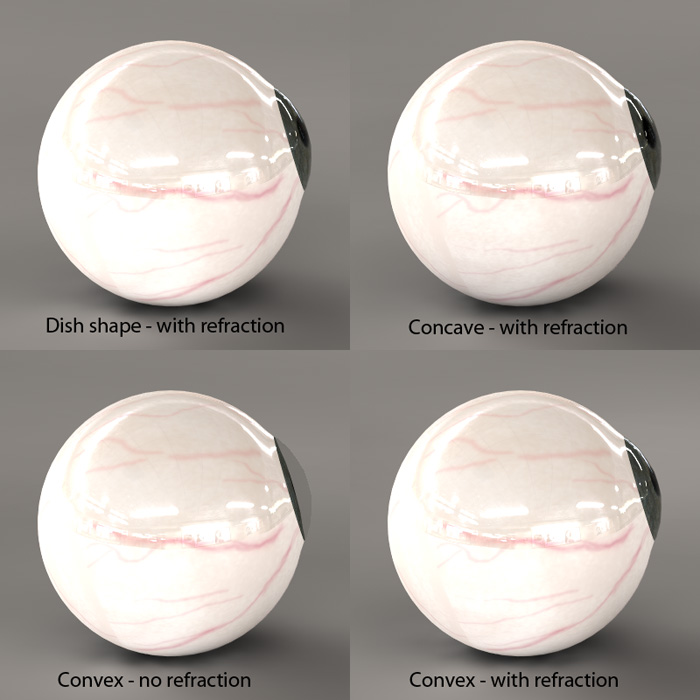
OK, well here it is. Forgive me the crappy textures and shaders, but I didn't put much time into that, just sloshed some brushes around in Photoshop. ;-)
(Click image for larger size, as BB would say...)
The individual frames are labeled, so it should be fairly obvious what's what.
Yeah, the lens is kind of small I guess, but I enlarged it for these. I don't think it really added anything in a side view though, even with refraction on for it.
The images don't show any real drastic changes, but are subtle enough differences to be able to see.
Possibly if I had tried to model a more physically accurate eye it might have been different.
Also, the morphs aren't particularly extreme, just more or less within what it seems to me to be as far as I should go in either direction. The one that shows "convex - no refraction" doesn't look like it protrudes much, and maybe I didn't pull it out far enough, but without it all you see is a fraction of that - a tiny sliver.
When I say "refraction", I'm referring to refraction on the cornea and nothing else - I used a refraction value of 1.37, which is a number I found on teh interwebs on some eye geek site. ;-)
Quote -
oh, and wow, that's a lot of polys. how much is one eye?
It's 5,792 polygons for one eye. You should see the hi-res version I had. ;-)
Quote - That's one thing I love about DAZ Studio. You can load up a different set of UV's in the Surfaces tab and not have to reload the figure!!

You can do that in Maya, Softimage and 3ds Max too.
You can try to do that in Lightwave, but chances are it will change your point order and/or hose your UVs - if it doesn't outright give up and crash first. ;-)
Lightwave has the suckiest built-in UV tools of any pro app I've ever seen.
I use UVLayout for that though, since you can just pick an OBJ file from a folder and it creates a whole new object with the UVs transferred. And it's perfect, as long as the topology is the same.
I'm pretty sure UV Mapper can do that too, but obviously both those methods involve using a whole new OBJ file.
I didn't know that about D|S though. Pretty cool, for them to have such foresight and to offer it in such an inexpensive program.
Quote -
Mike, your lens is way too tiny. The lens is almost as large as the iris, and the iris floats over it like a ring shaped island. It is slightly convex.
Yeah, I changed that for the above renders, not like it makes much of a difference anyway. I was just kind of winging it at the time, not really following anything but memory of pictures I had looked at.
If I set out to model something more accurate, I'll see that it gets done up right. ;-)
Great find with the dissections bagginsbill! 
I must say that I feel somewhat vindicated.
The dissections show the shape very clearly. Not exactly my shape, but not far off given the constraints of the mesh.
If I stand in front of a mirror in a darkened room and shine a flash light at an approximate right angle to my eye, I see the side of the iris closest to the light catching the light, except where it dips in towards the pupil where it is in shadow. I see the other side or the iris as it curves out from the pupil lit strongly then fading away to shadow as it curves back in towards the sclera. This is all as I would expect from my understanding of the shape. I don't see anything that would suggest an overall concave.
@ MikeJ,
Your image clearly shows (as did one of bagginsbill's) that refraction can counter concavity. In fact I think there is too much refraction in the "Convex-with refraction" image, and that a real iris does not appear so close to the cornea. However I am still not convinced that there is any good reason to use a concave iris, when a real one is convex. I will stand to be corrected on this point, but I have not seen any convincing evidence so far. Cobaltdream posted some links to good photos of eyes, and seems to think they display deviance of a concave appearance. I look at those same photos and see nothing but evidence of a shape that is roughly a convex toroid.
Quote -
Your image clearly shows (as did one of bagginsbill's) that refraction can counter concavity. In fact I think there is too much refraction in the "Convex-with refraction" image, and that a real iris does not appear so close to the cornea. However I am still not convinced that there is any good reason to use a concave iris, when a real one is convex. I will stand to be corrected on this point, but I have not seen any convincing evidence so far. Cobaltdream posted some links to good photos of eyes, and seems to think they display deviance of a concave appearance. I look at those same photos and see nothing but evidence of a shape that is roughly a convex toroid.
You caught me right as I was about to go to bed. ;-)
Well I really wasn't trying to convince you of anything, just showing some results of experiments.
There's a good possibility the material I used was exaggerating the effect a bit because it also uses internal reflections, as well as refraction.
At any rate, it looks like the physical evidence is in, regarding the actual iris shape, so I would think the only thing left to do is to make sure Antonia has iris and pupil morphs to accommodate however people want to deal with it, either with refraction and raytracing or just morphs.
Quote -
@ MikeJ,Your image clearly shows (as did one of bagginsbill's) that refraction can counter concavity. In fact I think there is too much refraction in the "Convex-with refraction" image, and that a real iris does not appear so close to the cornea. However I am still not convinced that there is any good reason to use a concave iris, when a real one is convex. I will stand to be corrected on this point, but I have not seen any convincing evidence so far. Cobaltdream posted some links to good photos of eyes, and seems to think they display deviance of a concave appearance. I look at those same photos and see nothing but evidence of a shape that is roughly a convex toroid.
I think that a toroid that's set back from the sclera by an appropriate amount would probably produce a more accurate image. If I interpret MikeJ's wireframes correctly, his iris isn't set back from the sclera, and there's no dent in the middle for the pupil, either.
-- I'm not mad at you, just Westphalian.
Quote -
I think that a toroid that's set back from the sclera by an appropriate amount would probably produce a more accurate image. If I interpret MikeJ's wireframes correctly, his iris isn't set back from the sclera, and there's no dent in the middle for the pupil, either.
Actually it's set back from the sclera ever so slightly. It's a separate mesh, not attached to the sclera.
No real dent leading down to the pupil, no. I didn't think it necessary being that the pupil is completely transparent, in essence not really there.
But I see what you mean now.


Messing with meshes IS infectious. Must not WORK ON 3D EYES! :laugh: LOLOLOL
Remeber folks, we don't want to add thousands and thousands of polys to the base mesh Start off low poly, especially with the unseen parts, and work up from there. I know everyone knows that, I'm just getting on record for saying it. :laugh:
I cannot save the world. Only my little piece of it. If we all act
together, we can save the world.--Nelson Mandela
An inconsistent hobgoblin is
the fool of little minds
Taking "Just do it" to a whole new level!
Quote -
Remeber folks, we don't want to add thousands and thousands of polys to the base mesh Start off low poly, especially with the unseen parts, and work up from there. I know everyone knows that, I'm just getting on record for saying it.
Good idea.
And I too will go on record again for saying I wasn't trying to make a new Antonia eye, but rather just experimenting, just like I said a couple pages back. ;-)
it's not that it's concave. look at the photos i posted again. in each and every one, the darkest part of the iris is right under the highlight. the lightest part of the iris is directly opposite it. your texture with the burned in highlights and shadows shows the same effect, if more subtly.
your untextured eye does not show this shading.
everything i've seen so far shows a significant inset from the scelera.
every accomplished visual artist seems to use this effect to show depth to eyes. from cartoonists and anime artists, to painters, to photographers.
the only reason i keep saying anything is that not only have i personally had serious problems with irises that were too protruding, and not only have i witnessed this problem in galleries since i started using Poser, but "flat" or "dead" eyes are about third on the list of common criticisms i've seen, behind nostril glow and lack of shadows.
in the end, it's not just about reality. it's about what the renderer can do. i'm not sure that a perfect scale model of the eye will actually shade properly in Poser or anything else. in MikeJ's renders, the convex model with refraction looks way wrong, and the concave one with refraction looks right. and i don't think i've ever been able to find a setting that got me realistic shading from the eyelid (though i have seen bagginsbill do this) and reflection from the lashes. i've just about always had really strange reflections of the lacrimal back when i used D|S (many versions ago- no fresnel).
but either way, it's ok. i'd just rather not have to do the kind of work entirely repainting an eye takes. i think i was pretty good at it the last time i did, but it takes me a lot of painstaking work to do meet my own standards. and since i'm looking forward to the finished Antonia becoming my new primary figure, i'd rather not personally find her default eyes unusable. that said, i haven't been satisfied yet by what i can do with any figure's eyes. kind of like their shoulders, knees and ankles. since she's already ahead on the anatomy and joint issues, having better eyes would be icing, not the cake.
I think the appearance due to side lighting is from total internal reflection, like what happens in a prism.
Light entering at a shallow angle to the iris goes into the cornea, hits the other side of the cornea, and bounces down.
Renderosity forum reply notifications are wonky. If I read a follow-up in a thread, but I don't myself reply, then notifications no longer happen AT ALL on that thread. So if I seem to be ignoring a question, that's why. (Updated September 23, 2019)
possibly. i doubt it's that complicated, but possibly. i think it's as simple as the iris is set significantly back from the scelera, and it has it's own (radially) uneven surface (why i usually see a shading differential towards the center). how it's shaded seems, imho, perfectly consistent with all the diagrams i've ever seen (and the scale of the iris), so i'm not sure why it would need a really complicated explanation. but perhaps you're right.
and in the end, why only matters so much. for me, just personally, it would be a step backward to have a technically accurate eye that couldn't render accurately at all or needed burned in artifacts to look realistic.
Hang on.
You really need to show me, because you've brought up new issues now. (differential towards the center). The differential towards the center is because the inner iris fibers, near the center, become transparent and runny, not solid, and also because the iris is donut shaped.
I'm troubled by using words, now, instead of pictures, but I was referring to the idea that you observed the semi-circle that is farther from the light source being the brighter half. Total internal reflection isn't a complicated explanation, when you consider that TIR actually happens any time you're bouncing light inside a liquid. For most side lighting situations, fully 1/3 the interior of the cornea is a concave mirror, sort of like the light collector in a telescope. It focuses light onto the iris.
Renderosity forum reply notifications are wonky. If I read a follow-up in a thread, but I don't myself reply, then notifications no longer happen AT ALL on that thread. So if I seem to be ignoring a question, that's why. (Updated September 23, 2019)
no, i didn't meean the transparent aspect. that's entirely different. look at your second link and the last link in my original post. it shows bumpiness (for lack of a better term). it's not as if the fibers lay flat. and all of those diagrams, including your cross sections, show the iris inset the entire thickness of the scelera. in fact, the highest point of the scelera is almost equal to the highest point on the iris in the first cross section (at least by my Firefox MeasureIt extension and my estimation of edges). maybe i'm misreading that model, but i could have sworn the highest point of scelera was pretty much even with the very lowest point of the iris, and then the iris rose in a donut from there. and there was absolutely no dip between scelera and iris.
i'm pretty sure the shading effect i can see is at least mainly from that overhang/depression or whatever you want to call it, but you know much more about these things than i do. unfortunately, i'm guessing true prism effects is another aspect of those caustics pjz99 was talking about. i'm guessing you couldn't even test the theory that it had to do with the lens in Poser. since my only other rendering tools are the Blender internal and Yafaray, i'm guessing i don't personally have a renderer that can test it. at least not well. i played around with caustics in Yafaray a long time ago and was pretty awful at it.
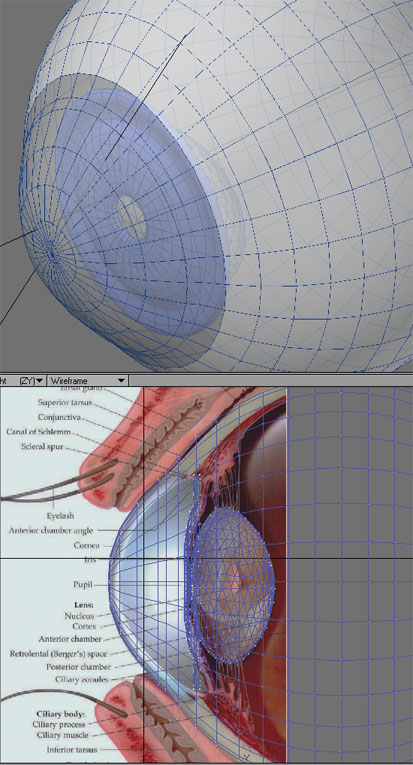
So after about half an hour of modeling, this is what I have. Obviously I'm using a reference picture this time, and I do still have a considerable amount of shaping I need to do for the iris.
Nothing at this point is anywhere near approaching finished and right now I'm working out the basic shapes.
Just wondering if we can agree if this is generally what an iris is shaped like. ;-)
I'll have to add more edges for more shaping and extrude it out to get it closer to the cornea and sclera, set it up for easy morphing into other shapes, blah blah blah and all that.
I don't know how it would work in Poser either. I'm not making it for Poser - at least not right now - I'm making it for my own tests.
But assuming I finish it and it looks OK, I can convert it into a lower poly version easily enough and maybe BB will be good enough to test it in Poser with refraction and all that shader magik of his.
Well, slap a texture on it with some refraction on the cornea, and render it in Poser and see what it looks like! I'm dying to see it! That IS the most realistically shaped eye, I've seen a mesh of! WOW.
I cannot save the world. Only my little piece of it. If we all act
together, we can save the world.--Nelson Mandela
An inconsistent hobgoblin is
the fool of little minds
Taking "Just do it" to a whole new level!
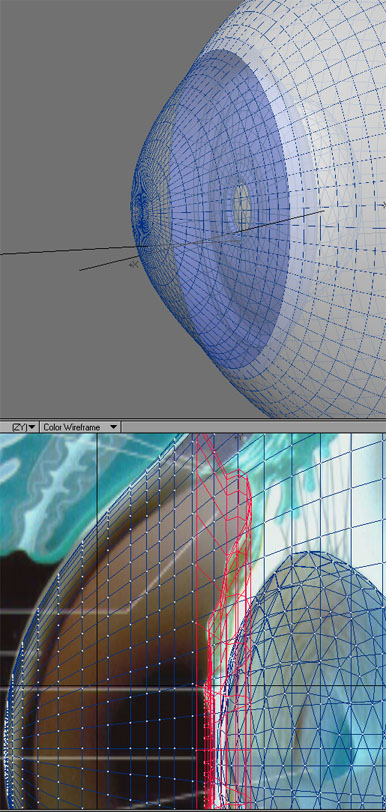
I did a little more work to it. I'm not sure how to attach the iris to the cornea area. I can't tell if that picture is meant to indicate the cornea's thickness, or the way it was illustrated. It doesn't seem right to me that a cornea's thickness would be about a quarter of a pupil's width.
The problem is on the outer edge of the iris and why I just brought it straight forward and up for now. I can't tell if I'm supposed to curve it more inward, or double it back on itself then bring it forward...
It's up to 4500 polygons right now and won't need much more. Making the lens lower-res would shave off about 500 polys probably, and the eyeball/cornea itself can be reduced a lot. Most of the detail would need to be in the iris.

Looks really good so far.... (no pun intended ..... :lol: )
---Wolff On The Prowl---
Quote -
I did a little more work to it. I'm not sure how to attach the iris to the cornea area. I can't tell if that picture is meant to indicate the cornea's thickness, or the way it was illustrated. It doesn't seem right to me that a cornea's thickness would be about a quarter of a pupil's width.
If you wanted to be perfectly realistic, shouldn't you model the inner surface of the cornea and connect that to the iris surface?
According to this, though, the refractive indices of the cornea and the anterior chamber are pretty close, so it seems a bit pointless.
-- I'm not mad at you, just Westphalian.
I see two possible options:
a) Let the iris surface come forward like now, but make sure you put the sclera texture on that part.
b) Continue the surface parallel to the sclera but set back from it (and again put the sclera texture on the part that's under the sclera).
-- I'm not mad at you, just Westphalian.


In a FYI, I had bleeding into the Vitreaous humor, (which is a transparent smoky purple, BTW, I was shown a video of the operation, after the fact. BLEAHHHH) back in 2001. My vision was messed up after they put salt water to replace the Viterous humor. SInce I had NONE before, my eyesight is a LOT better now! That is how I got to know about my eyes. The school of hard knocks. :laugh:
The vitreous humor also provides a lot of UV filtering to the retinae. Everything was ultra-brite after the operation and tinted with a bluish hue. I'm told this is typical. Weird, but typical.
I cannot save the world. Only my little piece of it. If we all act
together, we can save the world.--Nelson Mandela
An inconsistent hobgoblin is
the fool of little minds
Taking "Just do it" to a whole new level!
Seeing as how there is a lot of debate over eye shapes, I rekindles a thought I had before, but never quite got round to expressing. I wonder if for the next version of Antonia it would be worth putting some 'geomChan' channels in some actors, to allow easy swapping of geometry in those parts? Candidate actors would be the eyes, head, collars, and hip.
Of course one could always use a pose file to inject new geometry into an actor, without using a geomChan, but in that case a problem arises in switching back to the original geometry. You would need separate default obj versions of those parts in order to restore them.
I don't know if it's a good idea or not. Perhaps it is making things more complex than they need be.
I would vote for hidden geomChan channels that could be unhidden if needed with a pose what would come with the alternative geometry of the new parts
lesbentley: Great idea, but I tend to be a bit reluctant to put extra complexity into the base cr2 because it might be used. That's the kind of thing DAZ et al need to do because they make it so hard to redistribute modified versions of their models.
With Antonia, there are no restrictions whatsoever for changing the cr2 to ones heart's content and sharing the results. In addition, I am in the process of writing a cr2 manipulation library that will make it easier even for people with no intimate knowledge of Poser file formats to add or remove channels and things like that.
So my general policy for such things would be to wait and see what people do with the figure and then add builtin support for the most popular cases.
-- I'm not mad at you, just Westphalian.
lesbentley - what would you think of parented props? i ask because i'm fairly sure that's how both the old eye props i have from Aery Soul (from back when they were Awful Soul) work. i think the somewhat newer ones i have from Blackhearted's Irina 2.0 work that way, too (they might be individual characters, but i don't think so). the only downside i can think of would be loss of the automatic eyelid trick. if each one is a separate prop, then they have the benefit of being able to move (say for a morph) without rotation problems. that way the only thing to include in an Antonia package is an eye hiding pose, and even that's just a convenience.
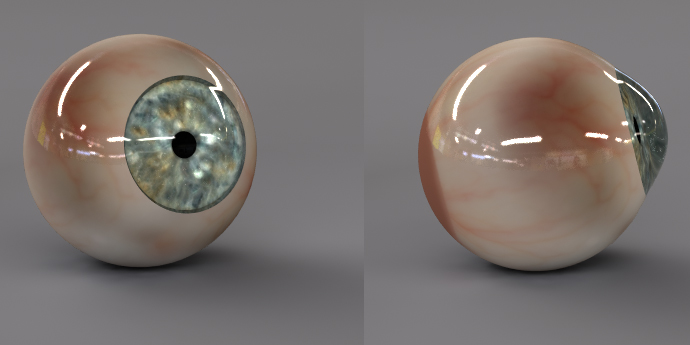
So this is that eye I was working on. I've decided that making the pupil a separate mesh and including a lens seems to be more or less pointless.
Yeah, this has that hard edge around the pupil effect. It would either need a whole lot of extra geometry in there or a trans map to get that soft edge, but I really didn't feel like making one for this test. Or an image map on the pupil, too, which could accomplish the same purpose.
Something about eyes doesn't seem to translate well to 3D...
I do seem to be getting better at making glass eyes though. ;-)
I think the sclera needs to hide a bit more of the iris by making the iris smaller. If the pupil was a bit more dilated, it might look better in inside light.
Overall, though--this will kick ass with some slight tweaking It is almost there. It looks great!
You need to stick it someone's head to see how it looks! Just unclick visible box on the properties tab for the eye and stick in Antonia's head and let us take a gander.
I cannot save the world. Only my little piece of it. If we all act
together, we can save the world.--Nelson Mandela
An inconsistent hobgoblin is
the fool of little minds
Taking "Just do it" to a whole new level!
@ cobaltdream,
Quote - lesbentley - what would you think of parented props?
Parented props are OK. If the prop eyes were parented to the real eyes, then all the ERC stuff for eyelids, moving both eyes at once, and whatever would still work. I still tend the favour geometry swapping with a geomChan, as it seems a bit neater and quicker to me, but there is nothing major wrong with using smart props for the eyes, that I can think of.
@ MikeJ,
As far as the geometry goes, I think your eyes look great. There seems to be too much specularity on the sclera, and perhaps even on the cornea, and I think that is what accounts for a lot of the "glass eye" look. As for JOELGLAINE's point "I think the sclera needs to hide a bit more of the iris by making the iris smaller." Perhaps, but I find it hard to judge without seeing the eye in a head.

Privacy Notice
This site uses cookies to deliver the best experience. Our own cookies make user accounts and other features possible. Third-party cookies are used to display relevant ads and to analyze how Renderosity is used. By using our site, you acknowledge that you have read and understood our Terms of Service, including our Cookie Policy and our Privacy Policy.
I think your solution is excellent. For all intents and purposes, real refraction causes the iris to appear to be convex.
In fact, even the diffuse lighting of it behaves as if it were convex, even if it really is flat or concave.
If you work out the caustics (bending of arriving light rays entering through the cornea), then the iris is lit exactly as if it was convex.
Go for it.
Renderosity forum reply notifications are wonky. If I read a follow-up in a thread, but I don't myself reply, then notifications no longer happen AT ALL on that thread. So if I seem to be ignoring a question, that's why. (Updated September 23, 2019)