
Renderosity Forums / Poser - OFFICIAL
Welcome to the Poser - OFFICIAL Forum
Forum Moderators: RedPhantom Forum Coordinators: Anim8dtoon
Poser - OFFICIAL F.A.Q (Last Updated: 2026 Mar 05 8:06 pm)

Subject: Oddities when Rendering in Poser


Hi Scott, thanks for the reply. I rendered in p5 with P4 render engine. I hardly ever use firefly. It can't be reflections though, because even with different lighting, the same areas are always messed up, even if the light comes from the other direction. I never changed the lighting in those images either. When I load up Poser after work, I'll see if it happens again in p4 render engine, and try it in firefly and see if I get the same results though.

It looks like the Daniella MAT pose leaves something in the nodes that Daria does not erase on applying. It can be some stray Image Node plugged into the weirdest place. I don't own them both so I speak only theoretically :) The best way to get rid of that would be to clear the MATs off with a python script before applying another MAT pose. Netherworks has one of them in the free stuff, called Poser 5 Reset MAT Script (works in Poser6 too): Poser 5 Reset MAT Script Hope this helps :) Michal 4blueyes
Thanks for the help & suggestion guys. Just got home from work, and will have to re-render that image I did last night & see if i can get those funkies to go away. As for the textures leaving something behind, I'm positive that's not it. Because I loaded V3, then loaded Daniella and rendered and got the weirdness. I had not applied any previous texture. Then I did switch over to Daria and got the same thing. It's very odd. I wish I knew what was causing it. I guess until I figure it, I'll have to do quick head renders before I set up my scene to make sure it's not happening. Because it stinks when you spend hours setting up a scene, another 45 mins rendering, and then get funky stuff, lol. As for the P4 render engine, I almost always use it. 99% of the time, even before I put in the new hard drive. And have never had this problem before. I only use P5 when i'm using volumetric lighting, and frankly, I'd rather postwork it in because it doesn't take as long, lol. Thanks again guys, I really apprecieate it! =) .:: Edit - I'll check next time I load up V3 to see if it happens with her default coloring too. I'm certain it's not the textures. Has to be something with my graphics card or something, but I have no idea what! ::.
Well, I still don't know what was causing the problems, but I think i "fixed" it. I uninstalled poser, wiped my P5 runtime (I keep most of my stuff in other runtimes on another drive, thankfully!), and reinstalled poser & my figures. So far, this seems to have fixed the problem. I finally managed to render the scene I've been trying to make for 3 days without funky artifacts on her face. Yeesh!

Privacy Notice
This site uses cookies to deliver the best experience. Our own cookies make user accounts and other features possible. Third-party cookies are used to display relevant ads and to analyze how Renderosity is used. By using our site, you acknowledge that you have read and understood our Terms of Service, including our Cookie Policy and our Privacy Policy.
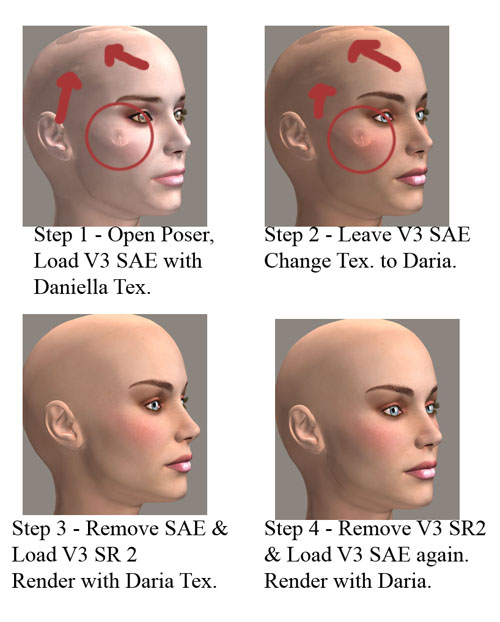
Hiya folks, Sorry if this is the wrong forum, but I wasn't sure where else to put this. I also appologise for the title, as I know it's not very descriptive, but I have no idea what's going on to give it a better title. Ok, so here's the deal... I've been having major computer problems over the last few months. I finally got around to replacing everything, and one component I had to replace was my main drive. This of course meant reinstalling everything. Once I got Poser 5 & some content back on, I decided to fiddle with it a bit to get everything the way I like it. Well, I loaded up V3 SR 2 and had some funky stuff happen when I rendered her. It didn't matter what texture I used. I no longer have those images, must have deleted them. So tonight, I spend about 2 hours setting up an image and another 45 minutes rendering. This time I used V3 SAE. The render finally completes, and there's the funky stuff on her head again! So my first thought was that I might need to update my video card drivers, so I did that, rebooted, and loaded up poser again... First I started with V3 SAE, with Daniella Texture. Got the funky stuff. Switched the texture to Daria, rendered again... more funky stuff. Then I removed SAE from the image and loaded up V3 SR2. I put the Daria texture on her, no funkies. Next, I removed V3 SR2 from the image and loaded up SAE Again, also with Daria. This time no funkies. I'm really boggled. I don't know what's causing this. As I said before, it happened to me with V3 SR2 a few days ago too. I'm hoping someone here can help me troubleshoot this. I mean, I know it's not the models... it has to be something with my PC, but I have no idea what. I've attached a picture so you can see just what's happening. Here's some info about software & my machine, just in case someone needs it: Windows XP Pro Poser 5 NVIDIA GeForce FX 5200 with up to date drivers AMD Athlon XP 1.1 gig (Same exact model I had before) 1.5 gig RAM Any help is greatly apprecieated, thanks! :D