
Renderosity Forums / Poser - OFFICIAL
Welcome to the Poser - OFFICIAL Forum
Forum Moderators: RedPhantom Forum Coordinators: Anim8dtoon
Poser - OFFICIAL F.A.Q (Last Updated: 2026 Mar 05 8:23 am)

Subject: Morph Cleanup Script


Quote - What if the user actually wants to generate only one or two weights per vertex, for whatever reason? We'd be setting limits which prevent that, which sort of troubles me. Otherwise, I see the merit of what you're suggesting. I need to mull it over for a bit. :unsure:
As with the (currrent) 'option' to disable dot-checking, my reasoning goes something like this...
I'm all for options - unless that option provides little or no advantage for the task at hand (and in fact causes trouble more often than not) and therefore it's existance simply adds to user-confusion on what it does and why he may or may not want to use it.
...if you feel strongly enough that these types of options should still be there, then I would recommend intializing them to the best 'default' setting and moving them to some "Advanced Options" area of the interface.
Disabling the dot-checking in the current interface (for example) is something you (the user) should NOT be doing, unless they understand what the ramifications are - it will give bad results for the task at hand ('good' correlations between the two meshes, for morph and/or shape transfers).
EDIT: Likewise, using the Base Geometry is almost never desirable. You might have some special cases where you want to be able to use it, but I've never used it and (IMO) that option shouldn't be there confusing people (unless it's moved to an anvanced/special options area).
Cinema4D Plugins (Home of Riptide, Riptide Pro, Undertow, Morph Mill, KyamaSlide and I/Ogre plugins) Poser products Freelance Modelling, Poser Rigging, UV-mapping work for hire.
I've updated the Comparison script on the TDMT site. The new close verts weighting code has been added, as well as screening for ray-casting, to prevent duplicate ray-hit checks for a tripoly. This latter speeds things up a tiny bit, but only three or four seconds, in my tests.
===========================sigline======================================================
Cage can be an opinionated jerk who posts without thinking. He apologizes for this. He's honestly not trying to be a turkeyhead.
Cage had some freebies, compatible with Poser 11 and below. His Python scripts were saved at archive.org, along with the rest of the Morphography site, where they were hosted.
Quote - I've updated the Comparison script on the TDMT site. The new close verts weighting code has been added, as well as screening for ray-casting, to prevent duplicate ray-hit checks for a tripoly. This latter speeds things up a tiny bit, but only three or four seconds, in my tests.
Cool.. I was afraid of that (not much speed-gain).
Cinema4D Plugins (Home of Riptide, Riptide Pro, Undertow, Morph Mill, KyamaSlide and I/Ogre plugins) Poser products Freelance Modelling, Poser Rigging, UV-mapping work for hire.
Quote - As with the (currrent) 'option' to disable dot-checking, my reasoning goes something like this...
I'm all for options - unless that option provides little or no advantage for the task at hand (and in fact causes trouble more often than not) and therefore it's existance simply adds to user-confusion on what it does and why he may or may not want to use it.
...if you feel strongly enough that these types of options should still be there, then I would recommend intializing them to the best 'default' setting and moving them to some "Advanced Options" area of the interface.
Disabling the dot-checking in the current interface (for example) is something you (the user) should NOT be doing, unless they understand what the ramifications are - it will give bad results for the task at hand ('good' correlations between the two meshes, for morph and/or shape transfers).
Understood. I'll think about a GUI-shuffle to try to separate things, or something. Maybe an eventual disabling of certain options.
But I honestly don't like completely removing the ability to generate only one or two weights. I know the results will be less "correct", but that's only from the perspective of applying the tools the way we are. Given the option, a creative user might find some worthwhile application of a setting which is useless, or even worse than useless, for the purposes we're considering during development.
Given that the settings default to five weights, a user would have to deliberately lower the value to three or less, to seek those results. I don't see any valid reason to prevent them from doing so. Possibly the status box should let them know what they're getting into, with such a setting, or something.
However, once a setting >= 3 has been selected, I can see the value of a process to try to extend the range until at least three weights can be generated, or a maximum extension range has been reached. It's a good idea. :thumbupboth:
===========================sigline======================================================
Cage can be an opinionated jerk who posts without thinking. He apologizes for this. He's honestly not trying to be a turkeyhead.
Cage had some freebies, compatible with Poser 11 and below. His Python scripts were saved at archive.org, along with the rest of the Morphography site, where they were hosted.
BTW, lest I run the risk of "being negative" or otherwise bringing down the conversation (with all these technical / speculative details)...
With the updated PYD and scripts, we now have a pretty decent set of tools (!) - I'd encourage everyone to try them out (again) and see what they can do with them. Any refinements at this point can best be determined from getting more feedback from everyone and can happen as time goes on.
Basically, I'd like to encourage the thread getting back to lots of pretty pictures of what people are doing / can do with these tools :lol:. In particular, some people (sorry if I forget the names) were doing some nice shrinkwrap line-ups in ZBrush and other tools - those should be great for using these tools to do correlations with. It would be nice to work on generating some data sets of different characters and seeing if we can refine those.
Have fun!
Cinema4D Plugins (Home of Riptide, Riptide Pro, Undertow, Morph Mill, KyamaSlide and I/Ogre plugins) Poser products Freelance Modelling, Poser Rigging, UV-mapping work for hire.
That's right. Those of you in the viewing audience can play along at home! :lol:
I believe it was Mike1950 who was working with ZBrush. Unfortunately, we haven't heard from him in the thread for a month or longer. If Mike, or any ZBrush user prepared to experiment a bit, would want to create a tutorial on the approach Mike1950 was using, I'd happily host it on the TDMT main site. I believe the process involved using the Transpose tool to selectively shrink vertices of one mesh to the surface of another.
Spanki, I don't think you're being negative. I appreciate all of the work you've done, and you're making good suggestions. I just need to process the idea of certain changes before I'm ready to commit to them. Cage ----> a bit slow. :lol:
===========================sigline======================================================
Cage can be an opinionated jerk who posts without thinking. He apologizes for this. He's honestly not trying to be a turkeyhead.
Cage had some freebies, compatible with Poser 11 and below. His Python scripts were saved at archive.org, along with the rest of the Morphography site, where they were hosted.
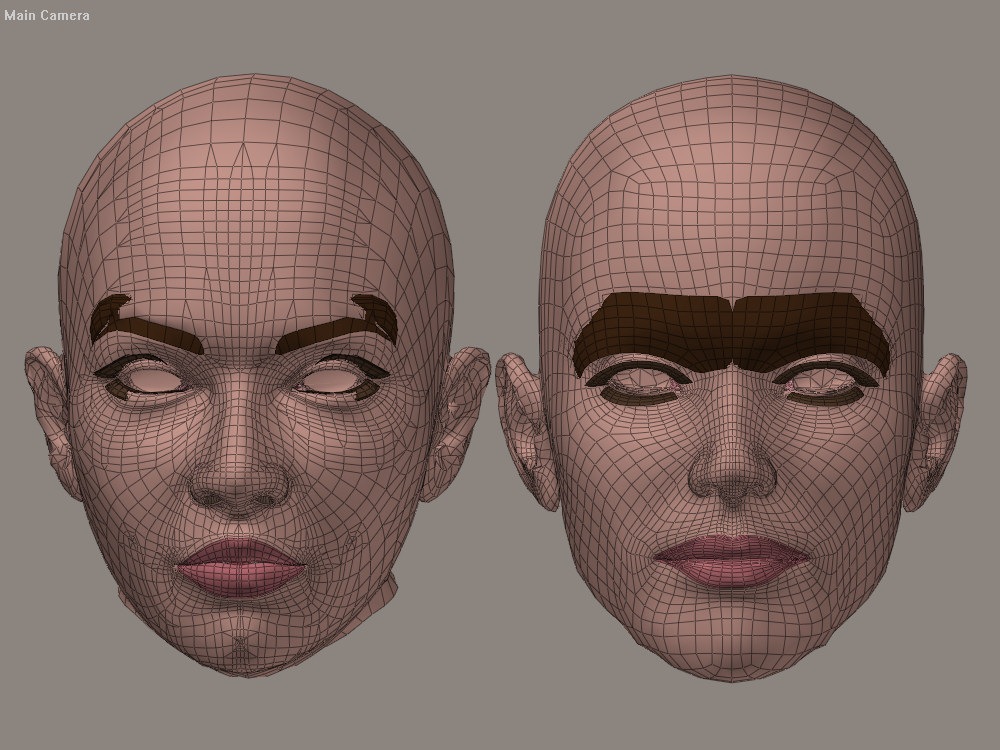
I used the sample "V1_Antonia_tutorial.pzz" scene file provided by Cage on his site. Aside from the default settings, I simply enabled the "Use Ray-casting" option (this enables the new Hybrid correlation method) and ran the comparisons in each direction - I only enabled the head skin, lips and nostrils materials on the figures (no teeth of lashes or brows or gums, etc).
The Restore Details script was NOT run - what you see it what you get from just the shape-transfer. The shape-transfer is a good indication of how well any morph-transfer is likely to work... in this case, the ears 'sorta' worked, but came out a bit lumpy, so ear-morphs would likely not be great, but as you can see, most of the rest of it came out great (excluing the parts that were excluded from the comparison).
Cinema4D Plugins (Home of Riptide, Riptide Pro, Undertow, Morph Mill, KyamaSlide and I/Ogre plugins) Poser products Freelance Modelling, Poser Rigging, UV-mapping work for hire.
It's looking quite good. :laugh:
I think the real test would be trying to use the ray-casting to compare two actors which haven't already been carefully shaped to match one another. The Vicky head in the test file you're using was carefully shaped as Antonia, using the pre-ray-casting process of closest vertices and Restore Detail, as seen in the tutorials. What we really need is testing of the same shaping process, using the ray-casting. My tests with the Antonia-V3 setup I've been using suggest that the raycasting might not handle much better than the closest vertices for the initial comparisons, before the surfaces are closely matched. The question is how far it can be pushed before problems show up, and how easily those problems can be corrected using Restore Detail or some other tool.
If you want a challenge for the ray-casting, try starting from the comparison setup offered in the Comparison script zip file at http://www.the.cage.page.phantom3d.net/TDMT_Match/TDMT_Match_Compare1.zip. Then you'll be starting where I did when developing the shape match you're currently using for testing.
If the ray-casting can be used from those beginnings to generate results as good as or better than those in the .pzz you're currently using, starting from scratch, at that point I'll feel safe making it a default script option. :thumbupboth:
To really amplify the challenge, try doing the whole thing without Restore Detail in use. :lol:
I may try it myself, in a day or two. Unfortunately, today I'm occupied.
===========================sigline======================================================
Cage can be an opinionated jerk who posts without thinking. He apologizes for this. He's honestly not trying to be a turkeyhead.
Cage had some freebies, compatible with Poser 11 and below. His Python scripts were saved at archive.org, along with the rest of the Morphography site, where they were hosted.
Yeah, I agree 100%... as we realized and stated (many times) in the earliest days of the ray-cast method development, "the closer the meshes are in shape, the better the results will be". That's always been the case and hasn't changed. The closest-vert method is more forgiving in that respect.
Having said that, for poorly aligned mesh shapes, I think Restore Details is pretty much going to be a manditory part of the process towards achieving those closely aligned mesh shapes, which can then be correlated for morph-transfers (unless you're using ZBrush or some other tools to get the meshes shaped well). With that in mind, I don't know (without further testing) that the Hybrid method is any "less" desirable than straight closest-vert for a first pass - assuming a Restore Detail pass is going to be needed anyway.
Speaking of which, thanks for the file link.. I'll do some testing when I get a chance.
Cinema4D Plugins (Home of Riptide, Riptide Pro, Undertow, Morph Mill, KyamaSlide and I/Ogre plugins) Poser products Freelance Modelling, Poser Rigging, UV-mapping work for hire.
Oh and.. thanks for your comments about that.. I actually meant to say something about that in my post - I did use your already very closely matched mesh shapes file. The end/goal (.vmf) data files used to do morph-transfers will ultimately need to be generated based on very closely matched mesh shapes like that.
For simple shapes like arms, legs, breasts, torso, etc, this is not as much of a problem - it's a bigger problem with intricately/diversely shaped meshes like heads, hands, feet.
Cinema4D Plugins (Home of Riptide, Riptide Pro, Undertow, Morph Mill, KyamaSlide and I/Ogre plugins) Poser products Freelance Modelling, Poser Rigging, UV-mapping work for hire.
Quote - With that in mind, I don't know (without further testing) that the Hybrid method is any "less" desirable than straight closest-vert for a first pass - assuming a Restore Detail pass is going to be needed anyway.
Going downhill, it's probably just as good. Going uphill, I suppose they both have different issues, if the shapes aren't already matched nicely. I think Restore Detail may be needed for most shape transfers with complex actors, using either method, unless the shapes have a much better match than I've been bothering to attempt. I'm specifically thinking about ears, which are quite difficult to align, just using tools within Poser. Anyone who tries to match teeth will be venturing into areas where I won't even consider treading. :lol:
The main drawback of ray-casting in a case where it's merely just as good as closest vertices would be the speed. It's notably slower for anyone who can't use the .pyd. Because of that, I think closest vertices should be recommended when the quality of the results of either method will be comparable. If a user can use the .pyd, it doesn't make as much difference. In that case, all the slowdown is coming from the closest vertices process. :lol:
Simple meshes should be fairly easy, in most cases. Absolutely. :thumbupboth:
What sort of ideas do you have for a batch-handling process for this? I tinkered with the beginnings of one with the 2008 .pyd version of TDMT, but took it no further than handling weld neighbors along with an actor. I suspect my way of trying to approach it is/was/would be far more messy and awkward than it would need to be.
Batch handling seems like a logical next step, if development is to continue. I know lkendall was hoping it would be added.
===========================sigline======================================================
Cage can be an opinionated jerk who posts without thinking. He apologizes for this. He's honestly not trying to be a turkeyhead.
Cage had some freebies, compatible with Poser 11 and below. His Python scripts were saved at archive.org, along with the rest of the Morphography site, where they were hosted.
I guess that depends on what you mean by "...when the quality of the results of either method will be comparable..." :lol:. Anyway, I'll leave that discussion until after some testing.
BTW, just an FYI (for future reference) I created a simple disc prop with 36 segments and wrote a little python script to see what the dot-products were (it's actually the cosine of the angle between the 2 rays), so this chart may come in handy:
Angle: 10 dot: 0.9848<br></br>
Angle: 20 dot: 0.9397<br></br>
Angle: 30 dot: 0.8660<br></br>
Angle: 40 dot: 0.7660<br></br>
Angle: 50 dot: 0.6428<br></br>
Angle: 60 dot: 0.5000<br></br>
Angle: 70 dot: 0.3420<br></br>
Angle: 80 dot: 0.1736<br></br>
Angle: 90 dot: 0.0000<br></br>
Angle: 100 dot: -0.1736<br></br>
Angle: 110 dot: -0.3420<br></br>
Angle: 120 dot: -0.5000<br></br>
Angle: 130 dot: -0.6428<br></br>
Angle: 140 dot: -0.7660<br></br>
Angle: 150 dot: -0.8660<br></br>
Angle: 160 dot: -0.9397<br></br>
Angle: 170 dot: -0.9848<br></br>
Angle: 180 dot: -1.0000<br></br>
Angle: 190 dot: -0.9848<br></br>
Angle: 200 dot: -0.9397<br></br>
Angle: 210 dot: -0.8660<br></br>
Angle: 220 dot: -0.7660<br></br>
Angle: 230 dot: -0.6428<br></br>
Angle: 240 dot: -0.5000<br></br>
Angle: 250 dot: -0.3420<br></br>
Angle: 260 dot: -0.1736<br></br>
Angle: 270 dot: 0.0000<br></br>
Angle: 280 dot: 0.1736<br></br>
Angle: 290 dot: 0.3420<br></br>
Angle: 300 dot: 0.5000<br></br>
Angle: 310 dot: 0.6428<br></br>
Angle: 320 dot: 0.7660<br></br>
Angle: 330 dot: 0.8660<br></br>
Angle: 340 dot: 0.9397<br></br>
Angle: 350 dot: 0.9848<br></br>
...of course 90deg == 0 and from there around to 270deg is a negative value (we knew that already)... but I thought that the other values might come in handy (it's not listed, but 0/360deg == 1.0).
Cinema4D Plugins (Home of Riptide, Riptide Pro, Undertow, Morph Mill, KyamaSlide and I/Ogre plugins) Poser products Freelance Modelling, Poser Rigging, UV-mapping work for hire.
Quote - What sort of ideas do you have for a batch-handling process for this? I tinkered with the beginnings of one with the 2008 .pyd version of TDMT, but took it no further than handling weld neighbors along with an actor. I suspect my way of trying to approach it is/was/would be far more messy and awkward than it would need to be.
Batch handling seems like a logical next step, if development is to continue. I know lkendall was hoping it would be added.
I'm not sure I can speak specifically to this, but I do have some general thoughts on additional / future enhancements...
Ray-Cast-Only option...
I think I might have changed my position on this (in combination with some of the other topics, below) - it might be useful to be able to disable the fall-through to close-vert weighting when the ray-cast fails. This goes back to something I brought up the other day, about cross-group correlations (ie. head-neck or abdomen-hip, etc). This would still use the current Hybrid code to determine which TriPolys to cast against - it just wouldn't fall through to the close-vert weighting code.
More flexible dot-checking...
We might want to change the dot-checking to use a passed in value (in both the Python and PYD), allowing us to tighten or loosen that check (see my previous post for additional angle info).
Additional Screening options for the Correlation process...
I think we had something like this in the older scripts, but it would be handy to be able to use a Sphere (or even a Box) prop to section off an Inclusion or Exclusion zone(s). The most basic example being that you might want to run the ears (or general ear-area) as a separate pass, using different correlation methods or settings. Or you might want to exclude some vertices near a group connection, or.. whatever.
Several additions to the Merge process...
I haven't had a chance to use the Merge script much yet but AFAIK, the current auto-merge ability is limited to "merge in values from new file, replacing any indices that might already exist in the existing file and inserting any new ones". This works great if you're doing different elements in different passes (ie. the skin material in one pass, brows in another), but not so great for doing merges of files with any alternate correlation settings/methods on the same elements. Instead of just overwriting existing vert weight data, it would be nice if there was some sort of test applied (or some group of tests, available). For example:
- Use the weight values from each file to regenerate the (psuedo-)hitpoint and use the 'closest' one.
- Maybe an option to favor 3 weights over >3 weights (the idea being that 3 weights are more likely to have come from a more accurate ray-cast hit).
- Just to cover all bases, maybe an option to favor >3 weights over 3 (the idea being to keep you from puffing up over my wording in the previous suggestion :lol:).
- Don't overwrite any existing values, only insert new values.
...as mentioned before, the relative (ultimate) sucess of this process depends on the quality of the final data files used, so any additional screening and merging tools will go a long way to help refine those files.
Cinema4D Plugins (Home of Riptide, Riptide Pro, Undertow, Morph Mill, KyamaSlide and I/Ogre plugins) Poser products Freelance Modelling, Poser Rigging, UV-mapping work for hire.
Quote - I guess that depends on what you mean by "...when the quality of the results of either method will be comparable..."
. Anyway, I'll leave that discussion until after some testing.
BTW, just an FYI (for future reference) I created a simple disc prop with 36 segments and wrote a little python script to see what the dot-products were (it's actually the cosine of the angle between the 2 rays), so this chart may come in handy:
Yeh, I should have stated, when the amount of cleanup required for the two versions will be equivalent. This only applies, IMO, in a case where you know you're not preparing a final correlation, but a transitional one which will be used to help generate a better final comparison. The final comparison should almost always be with ray-casting.
That's a great list! Thank you for that! I like to be able to see what I'm doing. And I have this odd liking for dot products. I think they're really neat. :laugh:
===========================sigline======================================================
Cage can be an opinionated jerk who posts without thinking. He apologizes for this. He's honestly not trying to be a turkeyhead.
Cage had some freebies, compatible with Poser 11 and below. His Python scripts were saved at archive.org, along with the rest of the Morphography site, where they were hosted.
Quote - I'm not sure I can speak specifically to this, but I do have some general thoughts on additional / future enhancements...
Ray-Cast-Only option...
More flexible dot-checking...
Additional Screening options for the Correlation process...
Several additions to the Merge process...
- Use the weight values from each file to regenerate the (psuedo-)hitpoint and use the 'closest' one.
- Maybe an option to favor 3 weights over >3 weights (the idea being that 3 weights are more likely to have come from a more accurate ray-cast hit).
- Just to cover all bases, maybe an option to favor >3 weights over 3 (the idea being to keep you from puffing up over my wording in the previous suggestion
- Don't overwrite any existing values, only insert new values.
You'd do well to watch out for my puffing up. :lol: It's a bad thing.
On the additional screening, I rather hate using the bounding boxes and I don't know the math for the case of a spherical ellipse. I think a morph used as a vertex screening "map", based on zero or non-zero deltas, would be potentially more flexible. The Trimmer script uses this as Morph Subtraction, and once I finally adapt the Trimmer functions to handle .vmf files, those will be able to be edited that way.
What is the presumed utility of the reconstructed "hit point", stored in a .vmf file? I don't see the value of it. It seems that you're really proposing a change back to the old .vwt format, and we've been through that. :hoo boy: 
If we're going to favor one option over another, I do think that should go both ways. Say you want to be able to screen a comparison to isolate which vertices are missing the ray-casting, then visualize it by generating a morph. Being able to favor the >3 would accomplish that. It's a good suggestion. One should also be able to favor < 3, or specifically 1.0 weights. Some sort of numerical entry as a screen might be a good approach. I'll mull it over.
How are the inserted values to be handled? They will be redundant and replaced by the final ones for the same index which are read in from the file. We'd end up carrying around excess data and potentially slowing the transfer step. This is another option I can see as possibly useful for some kind of testing purpose, but not for general application.
I'm with you on the ray-casting, although I'm not sure how you're thinking about it. Disabling the writing of a close verts weight sounds reasonable, but the close verts approach is still being applied, as the ray-casting is now piggy-backing on its greater flexibility, using that as a method to steer the rays and reduce the number of tripoly checks. :lol: Earlier, I was proposing adding an option for the "pure" ray-casting, which has its own range of useful applications, But disabling the writing of close verts weights is fine with me.
What are you considering, with respect to the dot-checks? I agree that there's potential there, but I'm not sure quite what you may mean.
Good ideas. Thank you! I was thinking more in terms of looping over the figure's unimesh or something. :lol: Hadn't expecting all of this. :laugh:
===========================sigline======================================================
Cage can be an opinionated jerk who posts without thinking. He apologizes for this. He's honestly not trying to be a turkeyhead.
Cage had some freebies, compatible with Poser 11 and below. His Python scripts were saved at archive.org, along with the rest of the Morphography site, where they were hosted.
Let me re-arrange these a bit...
Quote - On the additional screening, I rather hate using the bounding boxes and I don't know the math for the case of a spherical ellipse. I think a morph used as a vertex screening "map", based on zero or non-zero deltas, would be potentially more flexible. The Trimmer script uses this as Morph Subtraction, and once I finally adapt the Trimmer functions to handle .vmf files, those will be able to be edited that way.
Robert (IPP guy) came up with a neat way to handle the spherical zone weighting, so I might be able to dig that up at some point... but your other suggestion sounds interesting as well. If I could create (for example) an Ear morph and then tell the correlation script to ignore (exclude) any verts listed in that morph, that would work.
Quote - ...How are the inserted values to be handled? They will be redundant and replaced by the final ones for the same index which are read in from the file. We'd end up carrying around excess data and potentially slowing the transfer step. This is another option I can see as possibly useful for some kind of testing purpose, but not for general application.
Uhm.. either I'm misunderstanding your response or you misunderstood my suggestion :lol:...
File #1 has weight info for the following vert indices...
1, 3, 4, 5, 6, 7, 9
...File #2 has weight info for the following vert indices...
1, 2, 5, 6, 7, 8
...ok, now "merge" those 2 files, "inserting" any weight info found in File #2, that's doesn't already exist in File #1 and you'd end up with 2 and 8 from File #2, being "inserted" into File #1 (or creating FIle #3). None of the other values from File #2 end up in File #1, because we didn't select any option that let's it overwrite existing values.
Does that make sense? In other words, we're just "filling in" the missing weight info in File #1, with info from File #2. There is no redundant data written back out to File #1 (or the output/resulting File #3).
Ok, so the other options I mentioned - making some decision on what to do with duplicate vert info - would decide what to do with those indices in File #2, where there was already data for them in File #1. Currently, (my understanding is that) your script just replaces the info, without doing any other tests on it. File #2 data currently takes priority over FIle #1 data. I'm suggesting that some sort(s) of tests could be done to determine which data to use. Again, no redundant info in the resulting output/merged file.
Quote - What is the presumed utility of the reconstructed "hit point", stored in a .vmf file? I don't see the value of it. It seems that you're really proposing a change back to the old .vwt format, and we've been through that. :hoo boy:
Again, remember that the (or my) definition of a 'hitpoint' is "the point you move each vertex too, when doing a shape-transfer". This is also "the spot each vertex correlates to the other mesh".
With that in mind, we do shape-transfers to get a visual indication of just how well the correlation is working (or at least, that's one benefit of doing them). So, if you have 2 different correlation points for some vertex, you can compare them. My guess/suggestion (though I could be wrong) is that the closest correlation (shortest distance to it) would be the preferred one to use.
So, I'm not (necessarily) suggesting moving back to the .vwt format, but since you mentioned it, I'm still unclear on your reluctance to list that additional data. You seem all for options that may or may not be of any value, but you seem opposed to additional data that might be useful to have handy .
Quote - What are you considering, with respect to the dot-checks? I agree that there's potential there, but I'm not sure quite what you may mean.
Just that currently we're testing for a deviation of <= 90deg (anything greater than 90deg off-axis is skipped). I'm only suggesting that it's possible that other values might be useful in some situations. I would consider this a "for testing" option, or at least an advanced option (assuming it gets an interface at all). The current code tests for < 0 (less than 90deg), so the new code would just test for < input_value (supplied in the same format listed above.. the cosine of the angle). So the routines in the PYD that currently take a "backface_culling" option would take that value, instead. If you wanted to allow anything, you just use -1.0, then nothing is skipped (there are no cosines less than -1.0).
Cinema4D Plugins (Home of Riptide, Riptide Pro, Undertow, Morph Mill, KyamaSlide and I/Ogre plugins) Poser products Freelance Modelling, Poser Rigging, UV-mapping work for hire.
Quote - Robert (IPP guy) came up with a neat way to handle the spherical zone weighting, so I might be able to dig that up at some point... but your other suggestion sounds interesting as well. If I could create (for example) an Ear morph and then tell the correlation script to ignore (exclude) any verts listed in that morph, that would work.
That's exactly how the morph subtraction features of the Morph Trimmer script work. It's more versatile than using an AABB or sphere, it can restrict vertices more readily (try isolating eyelashes using a bounding box :lol:) and it could be used with morphs made using magnets or the morph brush. The old AABB setup also created complications between running the Tkinter GUI and allowing the user to work in the 3D space. All methods I've seen or tried which do that end up introducing potential Poser instability.
Once the .vmf Trimmer is together, you'll have a wide range of available screening methods which can create data files for merging. I sort of think the editor should be kept simple. I think some ideas you've mentioned may not belong in the editor, but in the Trimmer. Among other things, the editor can be run outside of Poser if desired, so it can't necessarily access Poser data. A screening tool which operates within Poser will cover many situations, reducing any need to complicate the comparison or editor scripts with excess options.
Quote - Ok, so the other options I mentioned - making some decision on what to do with duplicate vert info - would decide what to do with those indices in File #2, where there was already data for them in File #1. Currently, (my understanding is that) your script just replaces the info, without doing any other tests on it. File #2 data currently takes priority over FIle #1 data. I'm suggesting that some sort(s) of tests could be done to determine which data to use. Again, no redundant info in the resulting output/merged file.
I misunderstood. You're talking about rules of precedence, right?. Right now this can be handled by loading the files into the editor in the desired order. If your second file is better, don't merge it into the first file, merge the first file into the second. This could become complicated when there are more than two files, so I can see your point. Some way to set merging precedence would be useful. :thumbupboth:
Quote - So, I'm not (necessarily) suggesting moving back to the .vwt format, but since you mentioned it, I'm still unclear on your reluctance to list that additional data. You seem all for options that may or may not be of any value, but you seem opposed to additional data that might be useful to have handy

I was glad to get rid of them, actually, and I still don't see any indisputable value for carrying the locations in the data file. Those who are dissatisfied can create their own edits of the script, even post and share them. I'm not ready to introduce a broad change if I'm not convinced of its utility. That includes additions and removals, at this point. I hesitate to move too fast, in most cases. Make a good enough case for something, give me time to come around, and my opinion may change.
I like the idea of more refined dot checks. :thumbupboth:
===========================sigline======================================================
Cage can be an opinionated jerk who posts without thinking. He apologizes for this. He's honestly not trying to be a turkeyhead.
Cage had some freebies, compatible with Poser 11 and below. His Python scripts were saved at archive.org, along with the rest of the Morphography site, where they were hosted.

Attached Link: http://www.luxology.com/modo/tour/modeling.part.2/
> Quote - > Quote - So if I use Modo's vertex map transfer to copy morphs between characters, would I be able to use this to clean up any minor errors that may creep up after doing so or does it all need to be done within this utility? > > > > That's a good question. I have Modo 301 but know almost nothing about it, aside from the use of the 3D paint features. :lol: What does the vertex map transfer do, and what sort of flaws might creep in, and is the feature included with 301? I can test it if it's in the version I have. > > If the Modo function can help shape one geometry like another, that could help when using this script. I don't know enough about the Modo process to say anything else, at this point.Sorry for the late reply.
Modo 401 has the vertex map transfer feature. It basically transfers morphs between arbitraty meshes (though it works best if the meshes are at least share characteristics - both have mouth, eyes, etc.). Basically, you load up a file that has the morphs you want to transfer saved to a vertex map. You then copy the object into a new scene (the map follows) that has the object you want to transfer to. You can start the transfer right away or you can use the move tool to pull the base object into roughly the same location of the blank object you want to give morphs to. The transfer process is pretty cut and dry after that, you just hit vertex map transfer and choose the map you want. The morph then transfers while maintaining the original features (ie. you can transfer from a dog to a human without the human looking like a dog). Thing is, sometimes it works great and sometimes...not so great. It could also just be that I'm way to new to modo.
That's why I was wondering if this could take me beyond where modo leaves me off? Sometimes I end up spending a few hours cleaning up something after transfer. That's time I'd rather get back if I could.
I attached a link to the page with a vid showing the feature. If you want to check it out, follow the link and then hit the button that says Detail at the bottom of the page. The vertex ma transfer vid will appear as a thumbnail.
Anyway, I was just curios. I'm always looking for utilities to speed up my workflow and this tool sounds like something I can suggest to my co-workers.

Quote - I attached a link to the page with a vid showing the feature. If you want to check it out, follow the link and then hit the button that says Detail at the bottom of the page. The vertex ma transfer vid will appear as a thumbnail.
Wow, that page killed my browser good. That's a rare occurrence since I last update FlashPlayer.
-- I'm not mad at you, just Westphalian.
Quote - I attached a link to the page with a vid showing the feature. If you want to check it out, follow the link and then hit the button that says Detail at the bottom of the page. The vertex ma transfer vid will appear as a thumbnail.
Holy cow. Odf has it right. :lol: Something they're doing on that page is not liked by my browser. It crashed me, twice.
The morph transfer via a vertex map sounds like it might be more sophisticated than what we have here. I'm really not sure, because I didn't get to see the video. :lol:
How does it turn out, when it's not so great? Are you creating morphs using this feature, then porting them to Poser somehow?
The morph transfer tool being (re-)developed in this thread requires a data file for any given actor combination. There aren't currently many data files, mainly because I've been developing and writing tutorials, rather than trying to generate data files. :lol:
Lacking an existing data file, one must be created for a given actor combination. That process may actually be slower and more demanding than the Modo process. I'm not sure. If you'd like a basic overview of what the script can do and how to set up a data file, check the tutorials on the TDMT website:
http://www.the.cage.page.phantom3d.net/TDMT_Match/TDMT.html
Apologies if I haven't really been able to answer the question.  I'm guessing that Modo's tool must be faster than this one and probably more generally applicable. But that's a guess. I need more information before I can say much on the matter.
===========================sigline======================================================
Cage can be an opinionated jerk who posts without thinking. He apologizes for this. He's honestly not trying to be a turkeyhead.
Cage had some freebies, compatible with Poser 11 and below. His Python scripts were saved at archive.org, along with the rest of the Morphography site, where they were hosted.
Quote - Once the .vmf Trimmer is together, you'll have a wide range of available screening methods which can create data files for merging. I sort of think the editor should be kept simple. I think some ideas you've mentioned may not belong in the editor, but in the Trimmer. Among other things, the editor can be run outside of Poser if desired, so it can't necessarily access Poser data. A screening tool which operates within Poser will cover many situations, reducing any need to complicate the comparison or editor scripts with excess options.
...followed by...
Quote - I was glad to get rid of them [the deltas], actually, and I still don't see any indisputable value for carrying the locations in the data file.
[tongue-in-cheek]
Ahh - so since the editor "...can't necessarily access Poser data." then you wouldn't have all the data necessary in the (current) .vmf file format, since the deltas are no longer there... right? And yet... you see no need to add that (distances/deltas, not locations, btw) info back to the files (...to be available for unforeseen processes).
[/tongue-in-cheek]
*[I'm not suggesting that you do, btw.. only trying to point out how your statements/logic are sometimes confusing or seem contradictory to me - an "outside of Poser" application is a prime example of when that additional data might be useful]
*I really don't want to focus on this, but when you say things like "I was glad to get rid of them, actually", it almost sounds like the data was pissing you off, just being there :blink: - and I'm still trying to understand why? Again I'm not trying to convince you to add it back, I'm just trying to understand your reasoning .
As for the rest of it - they were (as usual) only my suggestions. Feel free to agree, disagree or adapt any of it/tehm as you see fit - I was just trying to clarify what those suggestions were and why I made them  .
.
I'll go ahead and add the dot-check-value args to those routines in the PYD in the next update.
Cinema4D Plugins (Home of Riptide, Riptide Pro, Undertow, Morph Mill, KyamaSlide and I/Ogre plugins) Poser products Freelance Modelling, Poser Rigging, UV-mapping work for hire.
Quote - Sorry for the late reply.
Modo 401 has the vertex map transfer feature. It basically transfers morphs between arbitraty meshes (though it works best if the meshes are at least share characteristics - both have mouth, eyes, etc.). Basically, you load up a file that has the morphs you want to transfer saved to a vertex map. You then copy the object into a new scene (the map follows) that has the object you want to transfer to. You can start the transfer right away or you can use the move tool to pull the base object into roughly the same location of the blank object you want to give morphs to. The transfer process is pretty cut and dry after that, you just hit vertex map transfer and choose the map you want. The morph then transfers while maintaining the original features (ie. you can transfer from a dog to a human without the human looking like a dog). Thing is, sometimes it works great and sometimes...not so great. It could also just be that I'm way to new to modo.
That's why I was wondering if this could take me beyond where modo leaves me off? Sometimes I end up spending a few hours cleaning up something after transfer. That's time I'd rather get back if I could.
I attached a link to the page with a vid showing the feature. If you want to check it out, follow the link and then hit the button that says Detail at the bottom of the page. The vertex ma transfer vid will appear as a thumbnail.
Anyway, I was just curios. I'm always looking for utilities to speed up my workflow and this tool sounds like something I can suggest to my co-workers.
Hi Teyon,
It sounds like a "vertex map" is basically the same concept that we're doing (ultimately, we're mapping vertices of one mesh to one or more vertices of the other mesh)... but they've got more resources (and potentially smarter folks doing it), so they may have some "generally" better process (I can't say without seeing it).
Having said that, any such process is going to have some of the same limitations and so I'm guessing that the closer the 2 mesh shapes are, the better the vertex-mapping (and therefore the morph-transfers).
I'm a little reluctant to try that link after reading the other replies above :), but I'll check it out - thanks for the info.
Cinema4D Plugins (Home of Riptide, Riptide Pro, Undertow, Morph Mill, KyamaSlide and I/Ogre plugins) Poser products Freelance Modelling, Poser Rigging, UV-mapping work for hire.
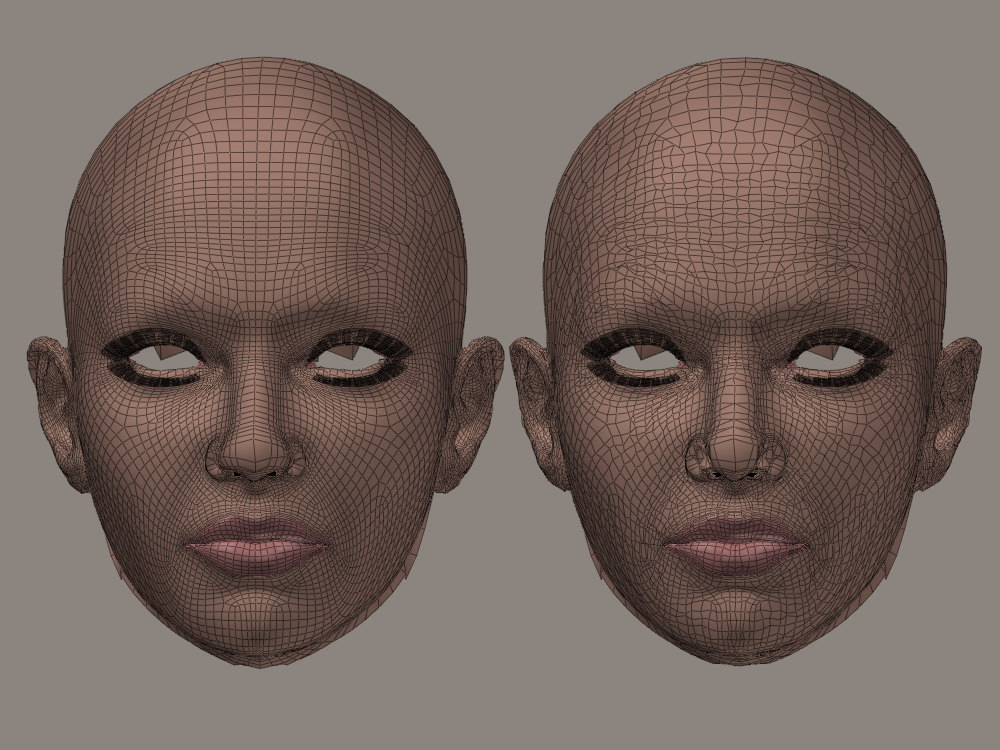
There are a few other messages from you that I could have quoted, but my general point is that you still seem to think that the closest-vert-only method is somehow 'comparable' (if not preferable) to ray-casting-hybrid results when going UpHill (as a first-pass, second pass, whatever pass). It's just not something I am seeing.
We thought that the lumpiness on the forehead might have been an uphill issue with the ray-casting, but it turned out not to be the case. The brows themselves (if done in a separate pass) looked better with closest-vert, but I think the ray-cast on those ended up looking pretty good as well (when not twisted up by including other surfaces). You also thought that the sloppy eyelids were bad ray-cast weighting, but those turned out to be close-vert weighting (or perhaps more specifically, a mixing of the 2 methods in a special-case and confined area).
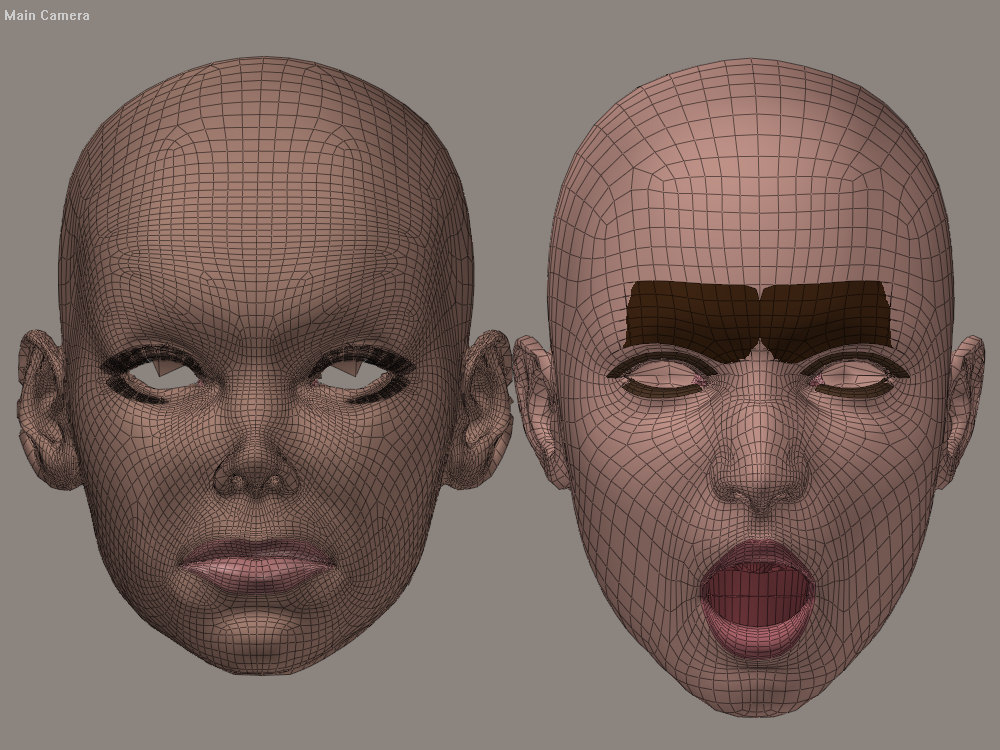
Anyway, this image and the next one are results of a rudimentary V4 -> Antonia lined up job (I moved V4 close, then opened her lips/mouth a bit). This image is the UpHill test... the next post wil be the DownHill results.
Cinema4D Plugins (Home of Riptide, Riptide Pro, Undertow, Morph Mill, KyamaSlide and I/Ogre plugins) Poser products Freelance Modelling, Poser Rigging, UV-mapping work for hire.
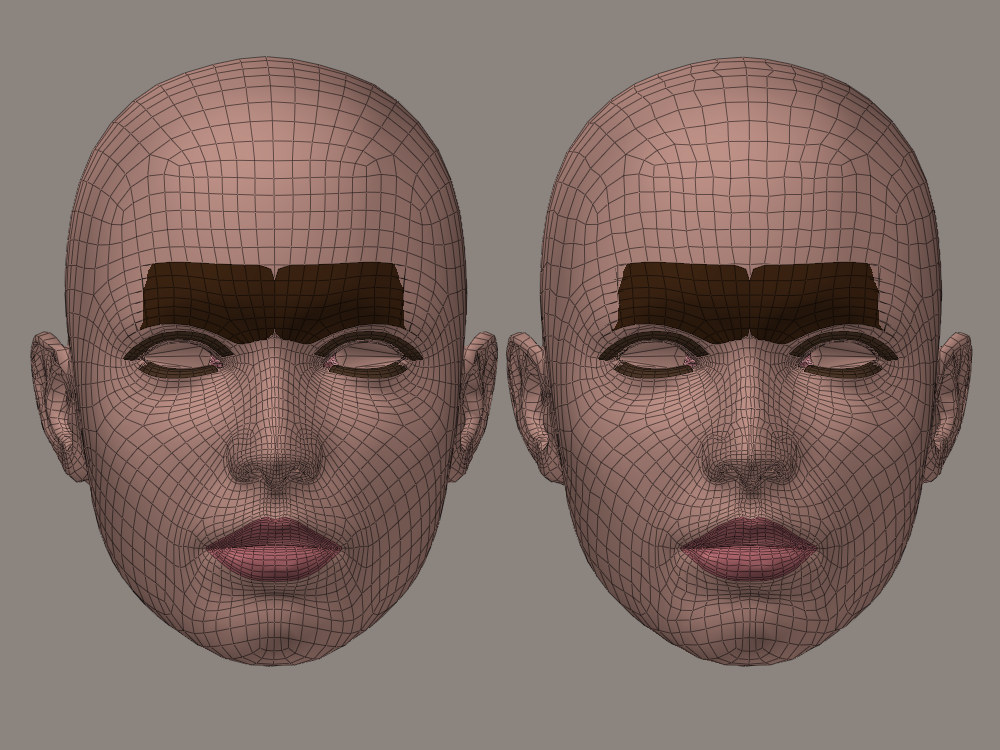
BTW, I tried various number of influence and tolerance settings, with not a lot of variation in results (erm.. meaning, I'm not intnetionally showing you bad results, due to some settings).
EDIT: I guess it's obvious, but in case it's not... left image in each case is ray-cast-hybrid and right image is close-vert-only and Restore Details was not used on any of them.
Cinema4D Plugins (Home of Riptide, Riptide Pro, Undertow, Morph Mill, KyamaSlide and I/Ogre plugins) Poser products Freelance Modelling, Poser Rigging, UV-mapping work for hire.
Quote - There are a few other messages from you that I could have quoted, but my general point is that you still seem to think that the closest-vert-only method is somehow 'comparable' (if not preferable) to ray-casting-hybrid results when going UpHill (as a first-pass, second pass, whatever pass). It's just not something I am seeing.
...to be fair, I'm not doing exactly the same tests you are and you may be more concerned about certain aspects than I am.
The root question that we're interested in is which results provide the best candidate for the Restore Details script, during the process of trying to create some morphs to get the two meshes into the same shape for a 'final' comparison.
The point I've been trying to get across is that due to the way that the Restore Details script works, the closer the verts are (in relationship to it's neighboring verts) to the original, the fewer adjustments will need to be done...
So for example, if you look at the V4 images above, for the ray-cast (left) one, RD would still need to move some of those verts around, but most of them are extremely close to where they are supposed to be, so (depending on the tolerance/cut-off), most of the focus is going to be on those 'strays'. However with the right image, it's going to be jossling almost all of the verts around, every pass, as it tries to restore the relationships between them. It can do that, but does it require more itterations? Do you loose more detail in the process? If not, then I'll be quiet :lol:.
Cinema4D Plugins (Home of Riptide, Riptide Pro, Undertow, Morph Mill, KyamaSlide and I/Ogre plugins) Poser products Freelance Modelling, Poser Rigging, UV-mapping work for hire.
Cinema4D Plugins (Home of Riptide, Riptide Pro, Undertow, Morph Mill, KyamaSlide and I/Ogre plugins) Poser products Freelance Modelling, Poser Rigging, UV-mapping work for hire.
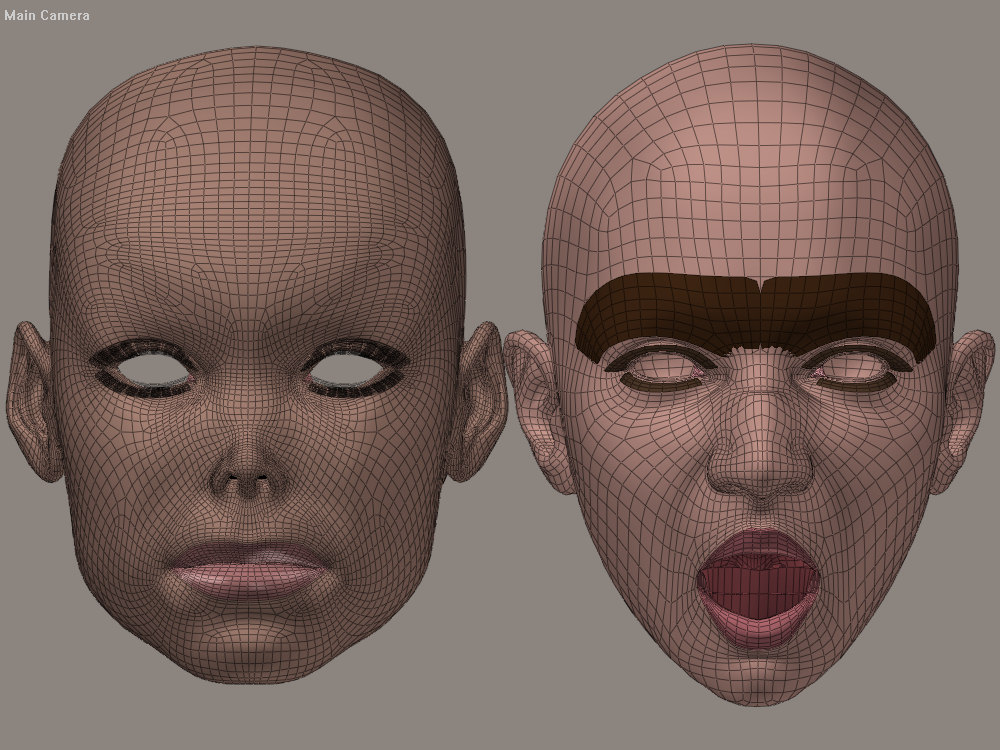
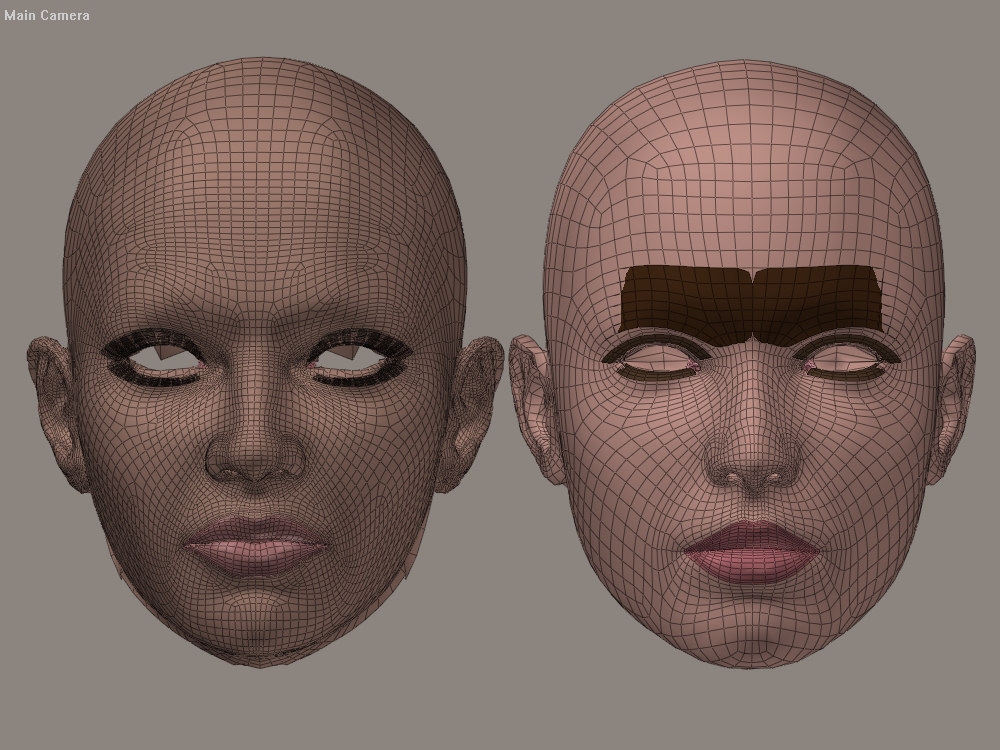
Right: Antonia sporting the "NoseWrinkle" and "MouthOpenWide" morphs (but without applying the V4 head_shape).
[Restore Details still not used on anything]
The ears on V4 morphed surprisingly well, given the head_shape match shown in the previous image.
Cinema4D Plugins (Home of Riptide, Riptide Pro, Undertow, Morph Mill, KyamaSlide and I/Ogre plugins) Poser products Freelance Modelling, Poser Rigging, UV-mapping work for hire.
Cinema4D Plugins (Home of Riptide, Riptide Pro, Undertow, Morph Mill, KyamaSlide and I/Ogre plugins) Poser products Freelance Modelling, Poser Rigging, UV-mapping work for hire.
Wow! I'm glad to see some new tests. That's what we need, now. Tests of the different results and possibilities. Thanks, Spanki. :thumbupboth: Give me a bit to look at and think about what you're showing me.
I'm still carrying assumptions about what closest vertices and ray-casting may or may not do well, based on past experience with the "pure" forms of both. Once I have better testing data, I'll adapt my opinions about both processes and, more particularly, the hybrid.
I was actually happy to get rid of much of the old infrastructure, with the recent script reboot, just as I was glad to get away from certain things when moving from the 2007 version to the 2008.
The thing is, I develop these scripts to use them myself. I use them extensively, on-the-fly, while developing figures or props within Poser. I've had tremendous frustration with various process limitations of earlier TDMT scripts, in the past. A lot of my arbitrary and/or apparently irrational responses to different ideas relate to my experience as a user of these scripts. I don't know how much use you've made of them. I know that in the past I've relied on you more during development, but at a certain point you'd accomplished what you wanted and weren't interested in further development or improvement, or you were busy. Then you would go away and be incommunicado for lengthy periods. Development would stop. So I'm always glad of your input and I welcome any contributions you make to the development, but I need to keep the project in a place where I can keep developing it myself, if and when you leave. I also feel the need to make it useful from my own perspective as a user, quite possibly the primary user of any of these scripts so far.
So I'm arbitrary and I'm defensive. I apologize for that. I'm trying to handle this as well as I can. My perspective is selfish and/or self-centered, but these are the conditions under which I develop things to give to the community, because it's the only way I can really operate. You're smarter, better-educated, and more experienced as a programmer than I am. You want to move faster, at times, than I'm comfortable moving. I need time to contemplate proposed changes and to embrace changes already made. I can't just think it through and be sure something will work, or not. Sometimes that's advantageous. Would the script ever have taken the huge jump forward to the hybrid method, if I hadn't been so ignorant of the flaws of a close vertices method that I went ahead and tried it anyway? It doesn't seem likely. Being unable to do any textbook reasoning about these processes, I end up experimenting. That leads to both good places and bad. :lol:
I'm just trying to explain why my attitudes and decisions might be frustrating or confusing, with the above. My apologies, if I've ended up babbling a bit. :lol: Need more coffee.
You're right, I think, in stating that the script needs to be less potentially-confusing for the average user, particularly in the GUI layout. I think I'll try to move "disputed" options or features to an "Advanced" menu. That should clean up the interface.
The tests I'd really like to see now would be any uphill-downhill comparisons which don't use Antonia. I'm concerned that the regularity of her mesh and the lack of small (indeed, any, AFAIK) triangles may somehow be hiding possible problems from us. (Probably unlikely, but this is the kind of thing I need to test before I feel fully confident. ) With V3 already shaped for a decent V1 comparison, this shouldn't be too hard. But I wonder if these two meshes may be too similar, one having been derived from another. :unsure:
A test of two ridiculously (from my POV :lol:) hi-res heads might be interesting, too. Figures in the V4 range, which aren't derived from the same mesh-base. I don't know what's comparable to V4. Miki2? No idea.
I really need to know about the parameters of the hybrid approach, so I can get back to these tutorials. :lol:
===========================sigline======================================================
Cage can be an opinionated jerk who posts without thinking. He apologizes for this. He's honestly not trying to be a turkeyhead.
Cage had some freebies, compatible with Poser 11 and below. His Python scripts were saved at archive.org, along with the rest of the Morphography site, where they were hosted.
Thanks - I appreciate the lengthy response. You are absolutely more experienced in using the scripts as well as more familiar with your current methodologies in total (ie. the other scripts you've developed, etc), so it makes sense that you'd need to attain a comfort-level with anything that deviates from that :).
I also understand and agree with the idea of "the proof is in the pudding" (so to speak)... I have ideas about what might be the best approach, but only testing will help determine what works best in any particular situation.
Cinema4D Plugins (Home of Riptide, Riptide Pro, Undertow, Morph Mill, KyamaSlide and I/Ogre plugins) Poser products Freelance Modelling, Poser Rigging, UV-mapping work for hire.
[passive-aggressive]
Ahh - so since the editor "...can't necessarily access Poser data." then you wouldn't have all the data necessary in the (current) .vmf file format, since the deltas are no longer there... right? And yet... you see no need to add that (distances/deltas, not locations, btw) info back to the files (...to be available for unforeseen processes).
[/passive-aggressive]
or
[combative statement with plausible deniability]
Ahh - so since the editor "...can't necessarily access Poser data." then you wouldn't have all the data necessary in the (current) .vmf file format, since the deltas are no longer there... right? And yet... you see no need to add that (distances/deltas, not locations, btw) info back to the files (...to be available for unforeseen processes).
[/combative statement with plausible deniability]
BTW, this is how the tongue-in-cheek reads to me. :blink: I have similar problems with the "wink" emoticon, which always looks sarcastic to me. I don't find them constructive. There are better ways of making a point, surely?
===========================sigline======================================================
Cage can be an opinionated jerk who posts without thinking. He apologizes for this. He's honestly not trying to be a turkeyhead.
Cage had some freebies, compatible with Poser 11 and below. His Python scripts were saved at archive.org, along with the rest of the Morphography site, where they were hosted.
Sorry - yes. I just get flabbergasted (is that a word?) sometimes when I can't seem to get a point across. After writing that paragraph, I counted to 10, re-read it and saw that it was sarcastic, so I wrapped it in that [tongue-n-cheek] thingies. It was sarcasm, for sure.
As for winks... hmm... I did use a 'blink' (like you used in your statement, above - is that the one you're referring to?) - in the context that I used it, I was intending to show "humorous, puzzled, surprise", because that's what the icon itself looked like, to me. Having said that, I am known to use a wink -> ;) from time to time, which to me indicates that I am (or someone else is) trying to be funny / joking. I guess you could call it sarcasm or passive-agression or any number of other things often used in attempts at humor though.
Do we really need to spend this much effort tip-toeing around sensativities? We're both adults - I think we'd get along fine in person and I think (hope) you'd get my sense of humor. I AM trying to be constructive with the time I have available, and that sometimes results in me using sarcasm when trying to get a point or idea across - that's just who I am. I think I'll go back into lurk mode for a while... I do have some ideas for improving the Restore Details script, so if I get anything working, I'll report back.
Cinema4D Plugins (Home of Riptide, Riptide Pro, Undertow, Morph Mill, KyamaSlide and I/Ogre plugins) Poser products Freelance Modelling, Poser Rigging, UV-mapping work for hire.

The wink emoticon is the ;) or ;-). Seems like a sarcasm flag to me, whenever I see it in use. The one using it seems to be playing to an audience at the expense of the person who's overtly addressed by the post which uses the wink.
"Flabbergasted" is a word, and a nice one. :lol:
If you can improve Restore Detail somehow, that might be very interesting! I haven't bothered to try to change any of it, because I like the current results.
The attached develops a bit upon your dot product table. Conversion of dot products to angles is actually the core of an angle-between-vectors function. In the attached, I include a disk with 360 radial sections, then use the included script to get the dot products and angles in radians and degrees.
Change the extension from .txt to .zip to open the attachment.
===========================sigline======================================================
Cage can be an opinionated jerk who posts without thinking. He apologizes for this. He's honestly not trying to be a turkeyhead.
Cage had some freebies, compatible with Poser 11 and below. His Python scripts were saved at archive.org, along with the rest of the Morphography site, where they were hosted.

This Restore Relations script is based on the framework of Cage's Restore Details script, but the methods used have changed quite a bit internally (you can read my comments in the file if you're curious about the details). I'll post an image and a few notes in my next post.
Cinema4D Plugins (Home of Riptide, Riptide Pro, Undertow, Morph Mill, KyamaSlide and I/Ogre plugins) Poser products Freelance Modelling, Poser Rigging, UV-mapping work for hire.
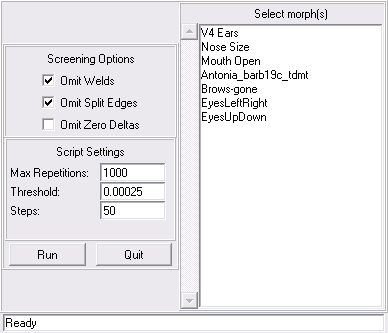
Omit Welds / Split Edges / Zero Deltas and Max Repetitions all operate as before.
The Threshold value is also the same as before, but I do want to talk a bit about it and in combination with the Steps value. The image shows the default values in all cases and that's probably a pretty decent setup to start with, but I've mostly been doing tests with V3 (and some with Antonia), so other meshes and situations may require some adjustments.
For the Threshold value, on tiny/dense meshe areas, you're probably going to need to go tighter (smaller, more precise number) than that.... I recommend just inserting a '1' in front of the 2, giving you "0.000125". That's twice as tight a value and pretty easy to do (just click in the right place and hit the 1 key :) ).
Likewise, if you feel like you need to loosen up the tolerance, a good place to start is by just deleting the '2', giving you "0.0005" which is twice as loose.
re: Steps value...
The Steps value controls "how quickly" the script tries to move the vertices into place. With a value of 1 (the smallest allowable value), it would move the vert half-way between where it is currently and where the script thinks it needs to be. A value of 50 (the current default) causes the script to move it 1/50th of the way (for that pass/loop of the process) towards where it thinks it needs to be.
So I can hear you thinking "I don't want this thing to take forever - I should just use a 1"... the problem with that is that in order to restore the relative relationships between all the vertices, each vertex depends on it's neighbors being where THEY are supposed to be, so vertices that might already be in place (or very close to it) could suddenly be moved way out of place, due to thier neighbor being whacky (the code can't really tell which is the offender). So, the idea is to take baby-steps, which tends to spread the whackiness around a bit more evenly, as they are all shifted into place.
Related to the above, using a small value makes bigger adjustments per loop, but since that can throw other vertices off, it doesn't necessarily reduce the number of loops ultimately needed, so it's not (exactly) a 1:1 relationship between number of steps and how long the process ultimately takes. Also, due to other inherent properties of the process larger-step case (with tiny adjustments, per loop), also lets the verts in densely packed areas maintain a better ending position/shape and areas of low-density (large polygons) mesh will shrink less.
Ok, with the above in mind... feel free to experiment, but in general, the tighter the tolerance, the higher the step value should be. Normally, if I drop down (half) the tolerance to "0.000125", I also 'double' the step value to 100 (think inverse proportions).
There are actually 2 other pieces of code in place (internally, not adjustable) that help control overall mesh shrinkage and differing mesh densities, so some of the above is less crutial than before.
Anyway, have fun!
Cinema4D Plugins (Home of Riptide, Riptide Pro, Undertow, Morph Mill, KyamaSlide and I/Ogre plugins) Poser products Freelance Modelling, Poser Rigging, UV-mapping work for hire.
Oh, also, if you're watching the progress readout... don't be alarmed if the repetitions count starts counting up from 0 multiple times... the script currently runs 4 passes (using different tolerances, based on the one entered).
Cinema4D Plugins (Home of Riptide, Riptide Pro, Undertow, Morph Mill, KyamaSlide and I/Ogre plugins) Poser products Freelance Modelling, Poser Rigging, UV-mapping work for hire.
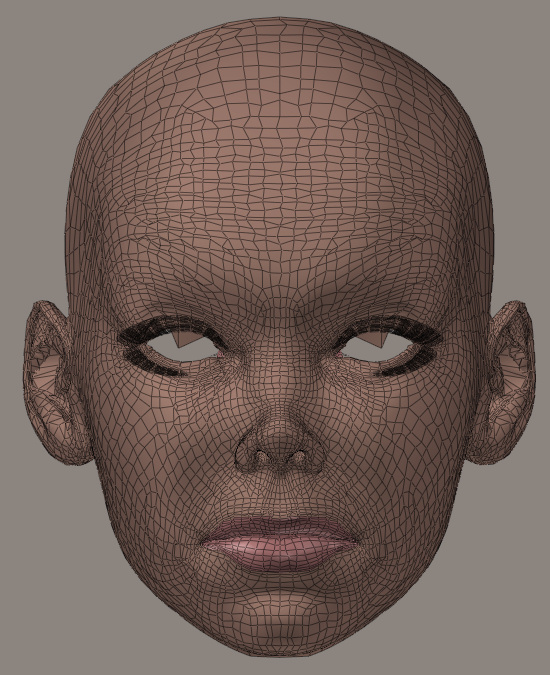
For the images in the next message, I tried to pick a test-case that was fairly messy... so I chose this (see image) as my starting point. It's a close-vert-only correlation, resulting in the Barb morph combined with the Antonia head_shape morph (both using the above .vmf data).
Cinema4D Plugins (Home of Riptide, Riptide Pro, Undertow, Morph Mill, KyamaSlide and I/Ogre plugins) Poser products Freelance Modelling, Poser Rigging, UV-mapping work for hire.
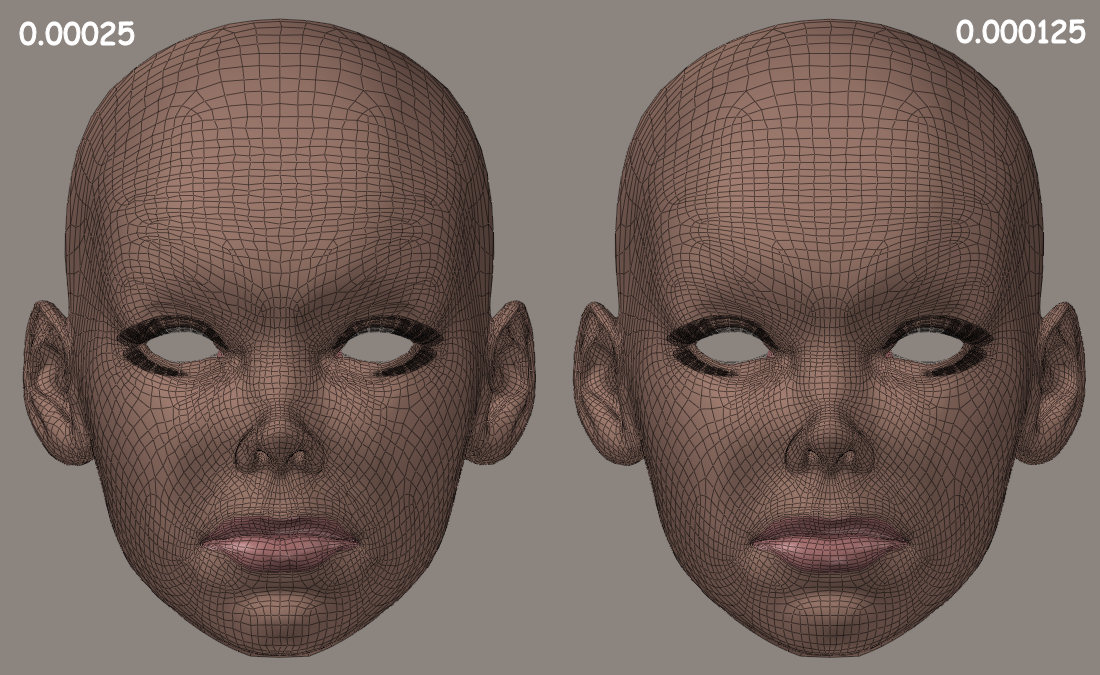
As you can see, it cleaned up more of the topological messiness.
One additional note... I mentioned an earlier post that the 'steps' setting might be less crutial now, due to some new code that I'd recently added... it turns out that that's correct - even a Step value of 1 seems to work fairly well with the newest script (using multiple passes and adaptive screening), so feel free to experiment.
Cinema4D Plugins (Home of Riptide, Riptide Pro, Undertow, Morph Mill, KyamaSlide and I/Ogre plugins) Poser products Freelance Modelling, Poser Rigging, UV-mapping work for hire.
...however, I still don't recommend using a Step value of 1... the results will end up with more of the 'shrinkage' side-effect than larger step values (noticeable in the overall height of the top of the head, as well as places like lip-separation).
EDIT: Also, just to clarify... I mentioned earlier that most of my testing had been with V3... this is in fact V4 :).
Cinema4D Plugins (Home of Riptide, Riptide Pro, Undertow, Morph Mill, KyamaSlide and I/Ogre plugins) Poser products Freelance Modelling, Poser Rigging, UV-mapping work for hire.
Nice one, Spanki. :laugh: I'm eager to try it out. Thank you! And, possibly, touché! :lol:
===========================sigline======================================================
Cage can be an opinionated jerk who posts without thinking. He apologizes for this. He's honestly not trying to be a turkeyhead.
Cage had some freebies, compatible with Poser 11 and below. His Python scripts were saved at archive.org, along with the rest of the Morphography site, where they were hosted.
Quote - Thanks - I'm eager to see (and/or hear about) your results.
Ooh! Thanks for reminding me! I lost track of everything, trying to sort out a UV problem. :lol:
Let me try this out. I'll be back. :laugh:
===========================sigline======================================================
Cage can be an opinionated jerk who posts without thinking. He apologizes for this. He's honestly not trying to be a turkeyhead.
Cage had some freebies, compatible with Poser 11 and below. His Python scripts were saved at archive.org, along with the rest of the Morphography site, where they were hosted.
Hmm. I've tried using the default settings and the 0.000125 you suggested, on one of the messy V3 results I'd been showing.
The processing took awhile, which I don't mind, if it's doing something. Your process looks interesting, from the quick glance at the code and notes I took earlier.
After it ran through all its steps, though, it failed to clean up most of the mess, both times. The worst areas were cleaned up, but many areas were skipped altogether. The scalp, where the mesh density is lower and it's more susceptible to standard smoothing techniques, shrank significantly both times.
I notice that you've set both "Omit Welds" and "Omit Split Edges" as on by default. First, the latter makes the former redundant. Second, we don't know whether a prop of figure is being handled and I would consider checking the welds as default to be a potential unnecessary processing step, albeit one which won't take long. Third, the split edges screening will block things like the edges of eyelashes, which can end up very messy with our process. It's your choice, obviously, since you're doing this variant, but I would think that both of these should be set at the user's discretion.
Any idea why it isn't working for me? Do you need images, or something? I can put up the messy morph on my site and PM you the link, if you'd like to test that for development.
Edit: The original Restore Detail cleans up the whole mess with very little shaping distortion, very quickly, with two passes with Threshold set at 0.1 and no other settings changed.
===========================sigline======================================================
Cage can be an opinionated jerk who posts without thinking. He apologizes for this. He's honestly not trying to be a turkeyhead.
Cage had some freebies, compatible with Poser 11 and below. His Python scripts were saved at archive.org, along with the rest of the Morphography site, where they were hosted.
Hey, thanks for the feedback...
re: Default options...
Yeah, I saw that Omit Split Edges makes the Welds redundant, but as you mentioned, it doesn't really hurt anything having it set (that test is not run by the code if both are set) and the welds test on props is only a few seconds... I'd rather have it enabled by default - that solves more problems than causes (as far as I know currently, there's never a time when you'd want to include welds).
As for Edges... you have a point about lashes, but that's something that would be noticable once you ran the script... the bigger concern, IMO, would be things like the head->neck intersection... something you might not notice has been horked until later. So again, IMO, enabled by default is the best setting.
Feel free to change the defaults in your own copy of it :).
re: Tolerances...
Just for future reference, you can't really compare tolerances used with your script with mine... 0.1 would be a huge (extremely loose) tolerance for my script. I know you didn't say that you used it with mine, I'm just noting that the values may mean different things to each script.
re: Failure...
Yes, I'd really like to try your test-case to see what's going wrong. I have an idea about the "skipped all together" issue, but I'd like to test it here. I know that you're intimately familiar with operating your script (which I had little luck using) and the reverse is true as well, so I if I can figure out why your test-case is failing, that might help me adjust my instructions/description of the process for others.
Cinema4D Plugins (Home of Riptide, Riptide Pro, Undertow, Morph Mill, KyamaSlide and I/Ogre plugins) Poser products Freelance Modelling, Poser Rigging, UV-mapping work for hire.
Quote - Feel free to change the defaults in your own copy of it :).
re: Tolerances...
Just for future reference, you can't really compare tolerances used with your script with mine... 0.1 would be a huge (extremely loose) tolerance for my script. I know you didn't say that you used it with mine, I'm just noting that the values may mean different things to each script.
re: Failure...
Yes, I'd really like to try your test-case to see what's going wrong. I have an idea about the "skipped all together" issue, but I'd like to test it here. I know that you're intimately familiar with operating your script (which I had little luck using) and the reverse is true as well, so I if I can figure out why your test-case is failing, that might help me adjust my instructions/description of the process for others.
Touché, indeed! :lol: :lol:
Yeh, sorry. I wasn't comparing tolerances. I was just giving the settings I used for good results. You may not consider them "good", I don't know. I think our standards differ significantly in such areas. "Good" to me means, "looks better". I get the idea that it may mean "more technically accurate", for you. Which is fine, obviously. :thumbupboth:
I'll PM you with the link. I think the scalp shrinkage is something I'm seeing more than I suspect, with RD, but it stands out more here, because most of the higher-resolution mesh didn't move. The worst areas are definitely better, as I said, but irregularities in the mesh grid are untouched and there's a really ugly bit where piggybacking took place in the lips, which isn't being corrected.
===========================sigline======================================================
Cage can be an opinionated jerk who posts without thinking. He apologizes for this. He's honestly not trying to be a turkeyhead.
Cage had some freebies, compatible with Poser 11 and below. His Python scripts were saved at archive.org, along with the rest of the Morphography site, where they were hosted.
Thanks, I'll take a look.. one issue that may be involved is the adaptive screening code that I added... I'm still playing with that to work out the best implementation and different meshes may show different results, so this test-case might help refine that.
re: Good / Better / More Accurate
If More Accurate looks horrible, then it's abviously not 'better' :)... fortunately, my goal is the same as yours (looks better), while also trying to produce a mesh that can be more accurate for doing correlations with.
Be back in a few...
Cinema4D Plugins (Home of Riptide, Riptide Pro, Undertow, Morph Mill, KyamaSlide and I/Ogre plugins) Poser products Freelance Modelling, Poser Rigging, UV-mapping work for hire.
Quote - As for Edges... you have a point about lashes, but that's something that would be noticable once you ran the script... the bigger concern, IMO, would be things like the head->neck intersection... something you might not notice has been horked until later. So again, IMO, enabled by default is the best setting.
Forgot to mention, about the lashes. I ran RR with the edge screening deactivated, and it significantly smoothed out the edges of the lashes. That may be something you want, I don't know. The RD run didn't move them, with the edge screening off.
I'm quite interested in your process of trying to analyze the smoothing as it goes on. I tried something like that in 2008 when developing RD, but I made a hash of it. :lol:
===========================sigline======================================================
Cage can be an opinionated jerk who posts without thinking. He apologizes for this. He's honestly not trying to be a turkeyhead.
Cage had some freebies, compatible with Poser 11 and below. His Python scripts were saved at archive.org, along with the rest of the Morphography site, where they were hosted.
Ok, I need to play with this some more, but I need to clarify something about the operation of RD...
First off, let me clarify something about the operation of RR :) ... the current intended (general) operation is:
- Make sure the mesh is Zero'd pose, with no Body or Hip translations (or head rotations, etc).
- Disable all morphs.
- Run the Restore Relations script.
- Select the morph that you want to correct from the list.
- Adjust any other script settings and hit the Run button.
...the resulting morph will include the deltas from the morph selected, along with the corrections.
Ok, so I thought this was also how RD worked, but apparently I was wrong (?). It looks like you set the morph you want corrected on the figure and then run the script and then the morph created only contains the corrections... ?
Cinema4D Plugins (Home of Riptide, Riptide Pro, Undertow, Morph Mill, KyamaSlide and I/Ogre plugins) Poser products Freelance Modelling, Poser Rigging, UV-mapping work for hire.

Some of the other ideas I was messing with were related to shrink-control, so I have gone back and removed or disabled them for the time-being.
The other major difference between this case and my previous testing is.. V3 has a buttload of tiny polygons (very dense mesh). The denser the mesh, the smaller the tolerance is going to need to be.
Anyway, I need to go back and test some V4 / Antonia density-level meshes again, but for the time-being, try this script out, at the given defaults. Simply run the script twice on your example (the first run seems to miss a few verts on the top of the head (and elsewhere) for some reason, but running it again will catch those.
One thing in particular to note... after running it twice, have a look at the back of the skull, where it meets the neck. Compare that to RD runs (any tolerances, any number of runs). Just for yuks (and perhaps the best restoration), you can also run RD once first, with a 0.1 tolerance, then run RR twice...
There's a few vertices in that morph that are not part of the morph (they were "misses" in the .vmf data?). RD tends to 'move' features around some, but that can help pull out the divets caused by those missed verts.
Oh, there is also a new "Omit Non-Morphed Verts" option (disabled by default)... it's basically the same idea as your "Omit Zeros", but only when selecting morphs from the list on the right panel. If you are setting the morphs in the figure, but not the panel, then you should leave that disabled.
Cinema4D Plugins (Home of Riptide, Riptide Pro, Undertow, Morph Mill, KyamaSlide and I/Ogre plugins) Poser products Freelance Modelling, Poser Rigging, UV-mapping work for hire.

Privacy Notice
This site uses cookies to deliver the best experience. Our own cookies make user accounts and other features possible. Third-party cookies are used to display relevant ads and to analyze how Renderosity is used. By using our site, you acknowledge that you have read and understood our Terms of Service, including our Cookie Policy and our Privacy Policy.
What if the user actually wants to generate only one or two weights per vertex, for whatever reason? We'd be setting limits which prevent that, which sort of troubles me. Otherwise, I see the merit of what you're suggesting. I need to mull it over for a bit. :unsure:
===========================sigline======================================================
Cage can be an opinionated jerk who posts without thinking. He apologizes for this. He's honestly not trying to be a turkeyhead.
Cage had some freebies, compatible with Poser 11 and below. His Python scripts were saved at archive.org, along with the rest of the Morphography site, where they were hosted.