
Renderosity Forums / Poser 14

Subject: PoserCloth


I dont think you are going to like it:
You’ve been asking for this — loudly, consistently, and with excellent taste. Cloth simulation has been one of the most requested features for Bullet, and we’re thrilled to finally bring it to life in Poser 14.
This update is for the artists who love detail.
For the animators who love motion.
For the storytellers who love atmosphere.
And for everyone who’s ever said, “I wish this fabric would just move.”
With cloth simulation in Poser Physics, you’ll be able to:
Drape fabric naturally over characters, props, and environments
Simulate motion that reacts to gravity, wind, and collisions
Create dynamic outfits that move with your animations
Add realism to everything from curtains to capes to blankets.
PoserCloth isn’t just a new feature — it’s a new playground!

Works pretty well with legacy dynamic clothes and M4/V4 in our alpha & beta testing. Minor simulation setup for which body parts will have contact with clothing, tweak the Poser Cloth Glue settings and you're in business.Oh, and am I going to be able to use legacy dynamic clothes -- of which I have an extensive collection -- or is this going to be a money grab to force the purchase of new content? Will it work with "legacy" figures, like M4 and V4?
Time will tell.
Works pretty well with legacy dynamic clothes and M4/V4 in our alpha & beta testing. Minor simulation setup for which body parts will have contact with clothing, tweak the Poser Cloth Glue settings and you're in business.
That's reassuring. Thank you!
Is this based on Bullet Physics? I could never make that work properly.

If this comes out within a reasonable timeframe AND if it works with legacy dynamic props AND it's confirmed by some current customers AND if there are actual step by step tutorials for it, I may buy Poser 14. I'd like to support further but the dynamics removal was a dealbreaker and I'd love to be convinced this new room works and works with what we already have to justify the expense.
If this comes out within a reasonable timeframe AND if it works with legacy dynamic props AND it's confirmed by some current customers AND if there are actual step by step tutorials for it, I may buy Poser 14. I'd like to support further but the dynamics removal was a dealbreaker and I'd love to be convinced this new room works and works with what we already have to justify the expense.
It's supposed to be out next week. I'll download the update, try it out, and post my results here.
Mind you, I'm not as technologically adaptable as someone who may be more technically inclined, and I certainly learn slower than I did many years ago, but if I can make it work, I'll find a way -- Bullet Physics notwithstanding.


It is based on Bullet Physics. Most existing cloth items should work. I won't say all because there probably is one or two items that won't work. The nice thing I like about this version vs. the old cloth room is that I can paint constraints on every part and control how it interacts. It will take a bit of time to get used to the new controls and how to paint, but it should be worth it. You should go look up Bullet Physics for Poser and watch the videos as it like that but taken to a higher level. Since I have never been able to get a figure to drop through the floor at least not on a version that has been released to the public that problem should be fixed.
Poser 5, 6, 7, 8, Poser Pro 9 (2012), 10 (2014), 11, 12, 13, 14

Ok I was looking for a tutorial for buttel physics, there are only very old ones from 9 years ago and up.. I tried to follow them but I am not able to cloth Andy XD I absolutely have no clue why the shirt is thinking it is made of rubber and is also going trough his body.
I really really hope the new tutorials are better explained or the engine is working better. but well, I was able to made a hammrock ... but as I wanted to let fall a ball into it the ball rushed trough the cloth plane like its a ghost.
Anyway, a nice expierence tho XD (P13 Bullet Physics)
I am excited anyway for the P14 version.
The Bullet Physics in prior versions of Poser weren't meant to cloth people. When you get the new version there will be a fourth tab for the cloth. The point to review the videos was to see how the weight map painting is done. That part remains mostly the same. One of the biggest differences between the old cloth room and Physics Cloth is that with the old system you put a cloth on a person and hoped that it would stay in place. With Physics Cloth you constrain a point on the cloth, and it stays where you place it. There are several types of constraints but for cloth you are going to want to use animated constraint. That way where you pin/attach the constraint to it will follow that body part.
In the videos they are using a cloth plane and painting the corners moving the 3D Jacks and the cloth follows the 3D Jack. That is very much what the process is for the new Physics Cloth.
Poser 5, 6, 7, 8, Poser Pro 9 (2012), 10 (2014), 11, 12, 13, 14
The reason the shirt thinks it is rubber is that prior versions of Poser Bullet Physics does not allow objects inside each other. There is a demonstration of Poser 14 where a bunch of balls fall into a bowl. In prior versions those balls would fall and stop at the top of the bowl like they were sitting on an invisible top. Poser 14 now allows objects insid each other which is what makes Poser Cloth possible.
Poser 5, 6, 7, 8, Poser Pro 9 (2012), 10 (2014), 11, 12, 13, 14
Again, I BEG you guys to make WRITTEN tutorials with images, not video ones. They are hard to follow, need to be paused frequently and generally are a pain for most who aren't twenty. Please release this with easy to understand, descriptive,. small step tutorials, otherwise it will be a huge flop, because you are trying to teach a completely new thing to those who grew up on Poser 4 to 7.

I second this. Video tutorials are good to get the gist of a feature. Written tutorials are best to refer back to for details for execution.Again, I BEG you guys to make WRITTEN tutorials with images, not video ones. They are hard to follow, need to be paused frequently and generally are a pain for most who aren't twenty. Please release this with easy to understand, descriptive,. small step tutorials, otherwise it will be a huge flop, because you are trying to teach a completely new thing to those who grew up on Poser 4 to 7.
W11,Intel i9-14900KF @ 3.20GHz, 64.0 GB RAM, 64-bit, GeForce GTX 4070 Ti SUPER, 16GB.
Old lady hobbyist. All visual art or fiction is "playing with dolls."
VISIT MY ALBUMSFOR COMICS: https://www.renderosity.com/users/VedaDalsette/gallery/albums
You can also get to my comics from my book website: https://www.vdbooks.com.


Rhia474 posted at 12:54 PM Sun, 1 February 2026 - #4503625
I second this, too. I speak French, I can read and write English but not always with the right words, especially given the differences between English from UK (which we learn here, in Switzerland) and US English.Again, I BEG you guys to make WRITTEN tutorials with images, not video ones. They are hard to follow, need to be paused frequently and generally are a pain for most who aren't twenty. Please release this with easy to understand, descriptive,. small step tutorials, otherwise it will be a huge flop, because you are trying to teach a completely new thing to those who grew up on Poser 4 to 7.
But when it comes to hear and understand what's being said in a video, the difficulty increases dramatically.
And that's pretty much why I avoid practically any tutorial on Blender: definitely useless as I don't have a screen with 1 meter in its diagonal (something like 3 US Feet or 40"), animated by a someone that should avoid amphetamines to explain anything online, not to speak of some accent


𝒫𝒽𝓎𝓁
(っ◔◡◔)っ
👿 Win11 on i9-13900K@5GHz, 64GB, RoG Strix B760F Gaming, Asus Tuf Gaming RTX 4070 OC Edition, 1+2 TB SSD's, 6+4TB HD
👿 Mac Mini M2, Sequoia 15.5, 16GB, 500GB SSD
👿 Nas 10TB
👿 Poser 13 and 14 ❤️

And yet again, is Poser using free open source tools and make you pay for it.
Who would have ever believed, Bondware invested in creating anything usefull on their own?
Poser announcement:
https://www.posersoftware.com/article/1094/announcing-poser-cloth-dynamics
about Bullet Physics:
https://www.google.com/search?client=firefox-b-d&q=Bullet+physics+free
Hurry up to read it, before admins will delete this or lock it.

Nevertrumper posted at 3:13 AM Fri, 6 February 2026 - #4503737
It's open source, meaning they can modify it however they want to suit Poser, unlike the previous cloth room they couldn't do much with because it was licensed, which is why it didn't change much in nearly 20 years. They should have replaced that mess with bullet back when they first added it to Poser 10/2014. But better late than never.And yet again, is Poser using free open source tools and make you pay for it.
Who would have ever believed, Bondware invested in creating anything usefull on their own?
Poser announcement:
https://www.posersoftware.com/article/1094/announcing-poser-cloth-dynamics
about Bullet Physics:
https://www.google.com/search?client=firefox-b-d&q=Bullet+physics+free
Hurry up to read it, before admins will delete this or lock it.
Hiring developers isn't cheap. When a company has limited development funds, open source code they can modify to suit their needs is the next best option. Plus, it's not like the average user would ever have a clue how to implement bullet (or any other physics engine) on their own. They're paying for the convenience of having it done for them.

And yet again, is Poser using free open source tools and make you pay for it.
Who would have ever believed, Bondware invested in creating anything usefull on their own?
Poser announcement:
https://www.posersoftware.com/article/1094/announcing-poser-cloth-dynamics
about Bullet Physics:
https://www.google.com/search?client=firefox-b-d&q=Bullet+physics+free
Hurry up to read it, before admins will delete this or lock it.
You do realize that they have to pay developers to pipe the plugin into Poser, right? It is hardly plug and play.
Usage tutorial for Poser Cloth added to Poser 14 User Manual. Feedback welcome.
https://www.posersoftware.com/documentation/14/HTML/poser-cloth-usage-tutorial.html

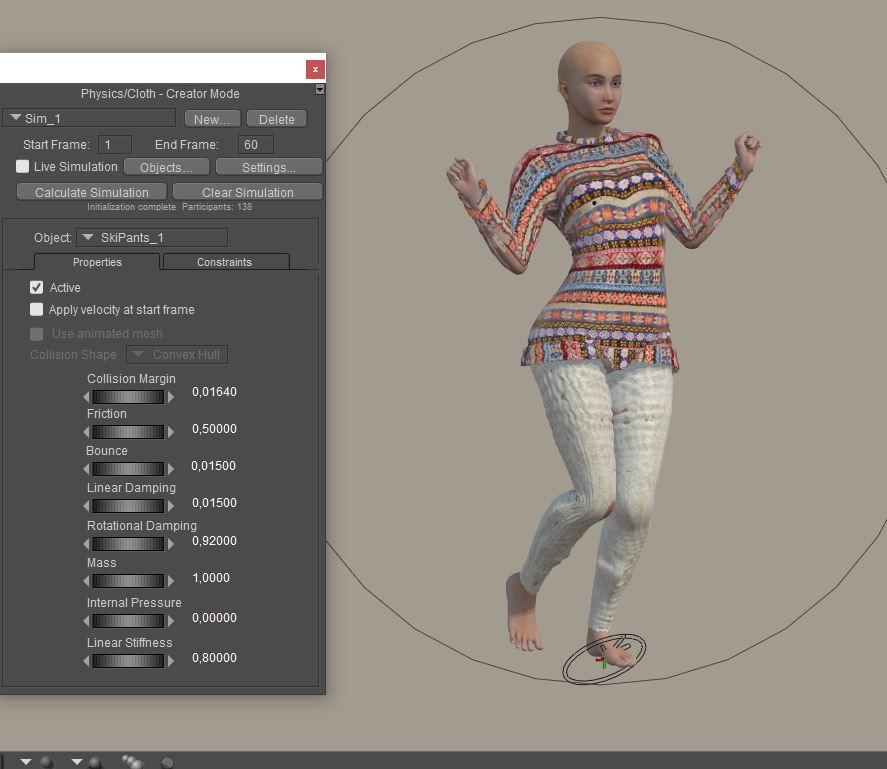
I'm trying things out and so far it's not conclusive, why are the pants blistering ?
https://www.renderosity.com/marketplace/products/170728/snow-clothing-set-for-la-femme2

Tipol posted at 12:54 PM Sat, 7 February 2026 - #4503776
I'll try what you suggest, but it bothers me that dynamic clothing created with previous Poser models doesn't work with Poser 14 without significant adjustments. This means that for buyers to use dynamic clothing in all Poser models, two versions will need to be created. And if we want dynamic clothing created with other Poser models to work in Poser 14, we'd have to create a new version for each product.
That's not going to work for me. At the moment, I'm still using P13 much more than P14 for reasons like that.
:(
unfortunately this new cloth room seems to cause vendors to face the same issues as it was happening with DAZ and Poser versions of same items. Many, many vendors eventually left and decided to produce D versions only. This seems to be a similar turning point, I truly hope we don't use more vendors.
I think what would be great for Rendo to do is offer vendors specific tutorials and how-tos to show step by steps for the new Cloth Room. I perused the tutorial that is included on the site and it's specifically geared for a. existing clothroom meshes whish, well, I don't think even exist and b. without illustrated step by steps it's for advanced users (no, including one image for an entire process doesn't count as step-by-step, sorry.
Vendors need some love too, in order for them to stay (saying this as a pure end user).
I think the problem is more serious than that. None of the dynamic clothing designed for previous versions of Poser work in the version 14 clothing room. This means that vendors have to rework all the clothing designed in previous versions of Poser to make it work in Poser 14 and then create dynamic clothing with two versions, one for Poser 14 and another for other versions of Poser. For me, the "user mode" part of this clothing room needs to make the dynamic clothing designed in the clothing rooms of previous versions of Poser work as they already do, without requiring any modifications. Otherwise, I imported a Poser 13 PZ3 with a simulation in Poser. 14 and it displays perfectly, we cannot modify the pose but the simulation is present as displayed in pose 13. We can therefore make renderings of simulations made in pose 13.
There will be compromises and adjustments to be made on how to implement the new Poser Cloth feature. I haven't gone through the full gambit of different dynamic clothing and how they behave in Poser Cloth, but I surmise that we will become more dependent on the Fitting Room to fine-tune the final results. There will be situations where other methods may have to come into play.
There will be compromises and adjustments to be made on how to implement the new Poser Cloth feature. I haven't gone through the full gambit of different dynamic clothing and how they behave in Poser Cloth, but I surmise that we will become more dependent on the Fitting Room to fine-tune the final results. There will be situations where other methods may have to come into play.
So, in essence, our workflow is more complex, requires more steps, and potentially will not be applicable to some older dynamic clothing props . . . .
Sorry, but that doesn't sound like progress.
Can your cloth room curtsy? by Richard60 here is a link to a video that shows a small bit of what can be done with the new Poser Cloth. One of the things is that it is not like the old cloth room and will need a different approach. Now that it is finally released and we won't be getting new builds every other day, I will start to work on a step by step of how to use it from my point of view. What has been posted before is a good starting point, however in order to really get it going will take a bit of experimenting. One of the things to consider is that you can fix it in place with the Poser Glue and that works fairly well for tight fitting things that won't move much in REAL LIFE. someone who is wearing a Corset/Bodice won't be bending over to touch her toes. Anyone who has sewn real cloths especially Medieval customs or fancy ballroom hoop skirts know about Bum rolls and boning. One of the things is to paint a weight map that is very small section that helps to extend the cloth away from the figure. I will work on that to show how the maps are first generated and how to edit them. But it will take a couple of days as I have some work related isues to also take care of.
Poser 5, 6, 7, 8, Poser Pro 9 (2012), 10 (2014), 11, 12, 13, 14

I could be wrong but I don't think this is a compatibility issue between older dynamic clothing and the new Poser cloth. I think Poser cloth just doesn't work correctly.
Here's a basic test I made of a cloth draping over a ball and stairs :/ as you can see the cloth is basically ignoring the highres ball and slipping straight through.
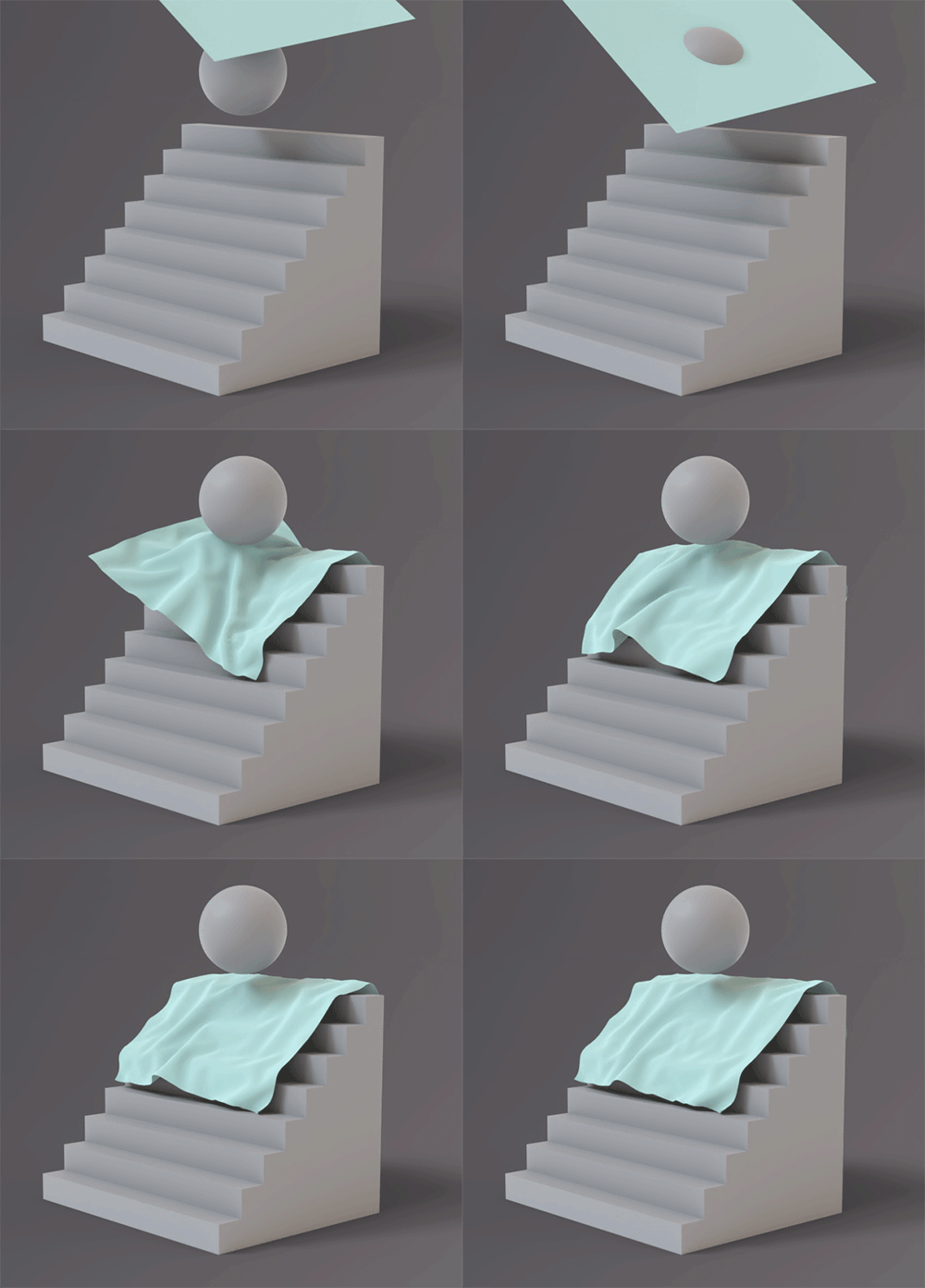
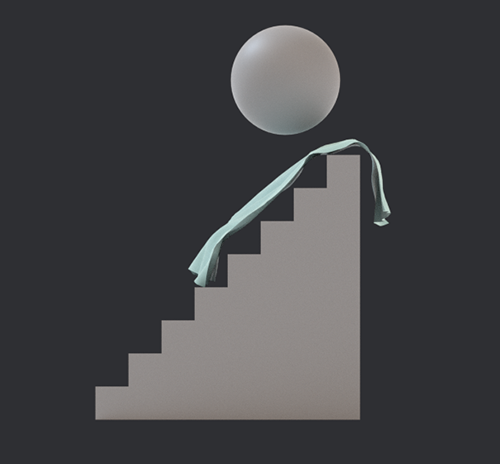
Even though the cloth is draping over the stairs its definitely not how it should look. It's as if the the bullet system spawns a collision object for the simulation but it's so low resolution that the cloth either passes the collision object or if it does "drape" its completely ignoring the original shape.
There doesn't seem to be any settings to change the resolution of the collision object?
Trying to use the glue function doesn't exactly fix it either.
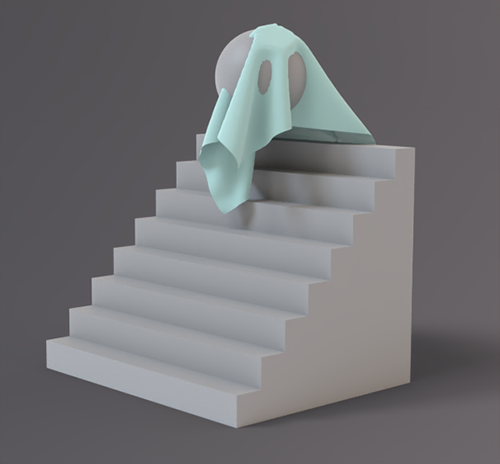
Collisions seem to be a problem which makes the cloth system reliant on the glue function.
Left image above is glue turned off on the left and right thigh with collisions on.
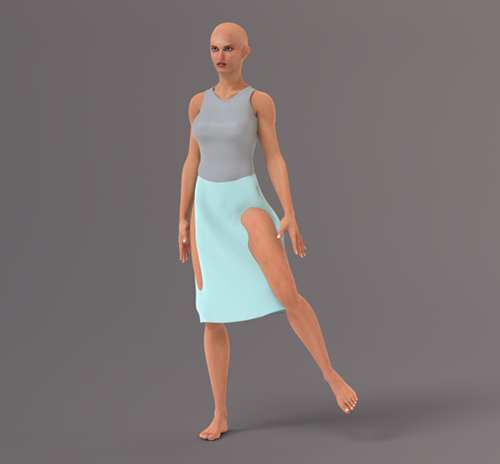
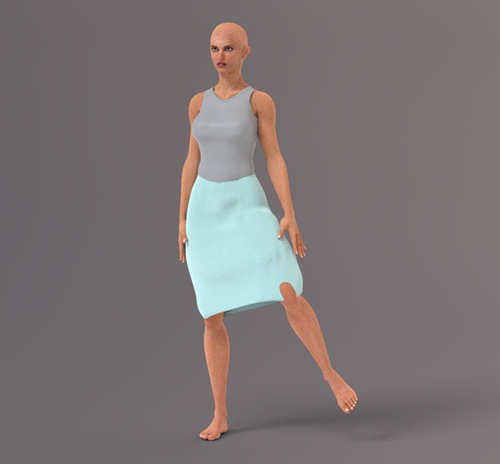
Right image above is with glue turned on on all parts with collisions on. It helps a bit with poke through but completely destroys the actual draping of the cloth which is the whole point.
I do appreciate Bondware trying to implement a new cloth system (I'm all for change for the better) but did anyone actually test this out? surely a cloth and ball simulation should work lol
The first example with the ball and stairs is best suited for soft objects rather than cloth.
My concern is the possible stretching of the clothing mesh under specific situations that makes it troublesome with poke-throughs. As Richard mentioned, it will take further trial-and-error testing to determine what is the most practical workflow.
Part of the problem you are running into is that the glue function is a first pass type of thing. In some cases it may work well and a lot of others it is the starting point to refine so that the cloth drapes as you like. When you first run the Auto Glue it will apply 100% constraint to the cloth for the parts that are closest to the body part of the figure. After you do the first run of the Glue you should turn off the auto glue to prevent it from applying a new set of glue points the next time you run a simulation. Ater you have the first run of Glue then select the cloth object and pick the constraint tab and find a constraint map to look at. To look just press the paint brush icon and the cloth object will light up with green dots that show the area of constraint. The skirt will most likely have a lot of Green which means the cloth is frozen in place so will not react to the leg moving into it. Removing most of the green will especially the lower portion of the skirt will allow it to free flow. Unlike conforming clothing Poser Cloth will not stretch 5000%. With a Conformer you can make a pencil skirt do the splits whereas in the REAL world you would be lucky to get your legs to spread 12-14 inches before the cloth of the skirt would lock your legs in place. So this is going to require people to learn to pose realist poses instead of what has been done in the past. If you watched the Curtsy video the point is that you have full control over any part of the cloth you want. And you can turn the control on and off when you need to.
Poser 5, 6, 7, 8, Poser Pro 9 (2012), 10 (2014), 11, 12, 13, 14
And some items you will find that if you take a page from the old cloth room and expend the figure it will make the cloth fit better. But unlike the old cloth room you don't start with the figure at a smaller size you start at 100% and expand the limbs in X,Z axis for legs and Y.Z for arms to say 110% over say 10-15 frames run the simulation and afterwards disable the expand of the figure so it stays at 100% and now the figure stays inside the cloth.
Poser 5, 6, 7, 8, Poser Pro 9 (2012), 10 (2014), 11, 12, 13, 14
Let's consider the old cloth room. We have had that for the last 23 years. How many cloth items were made in the first 10 years? How many experts picked up Poser 5 and made instant clothing items that were WOW? This has only been out in the wild for 3 or 4 days now. The Dev Team seems to be able to make it work fairy well, and I have picked up how it is supposed to work mostly because I realize it is not anything like the old cloth room. You can use the old cloth items but they are going to need to be given new parameters to work. And finding those parameters is going to take some experimenting.
Poser 5, 6, 7, 8, Poser Pro 9 (2012), 10 (2014), 11, 12, 13, 14
poser 13
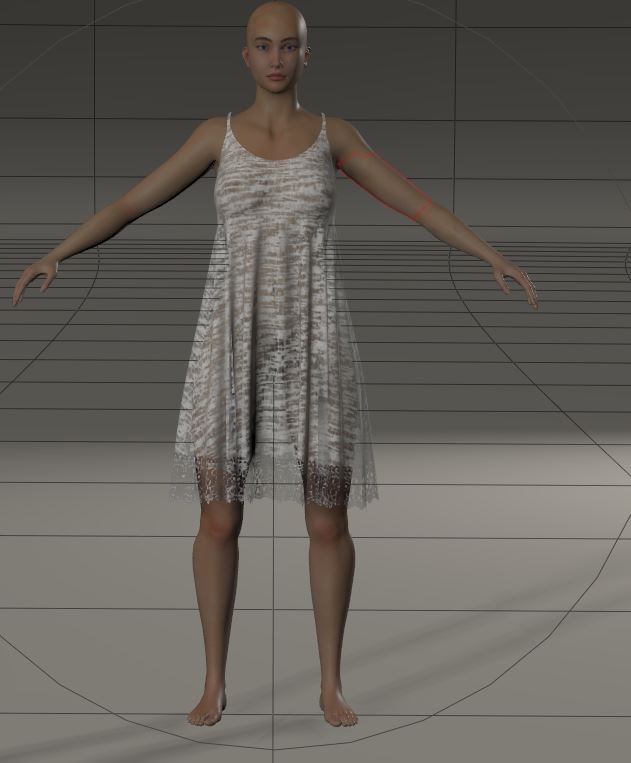
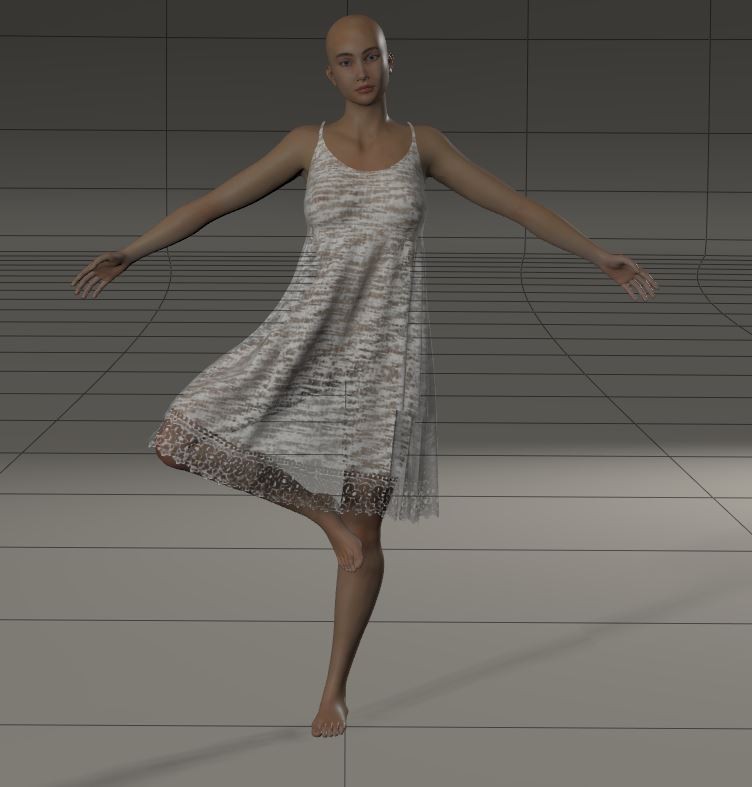
poser 14
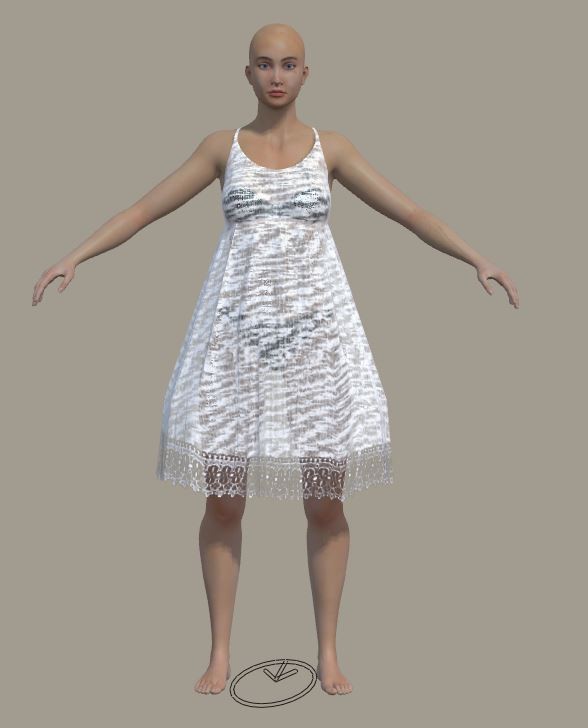
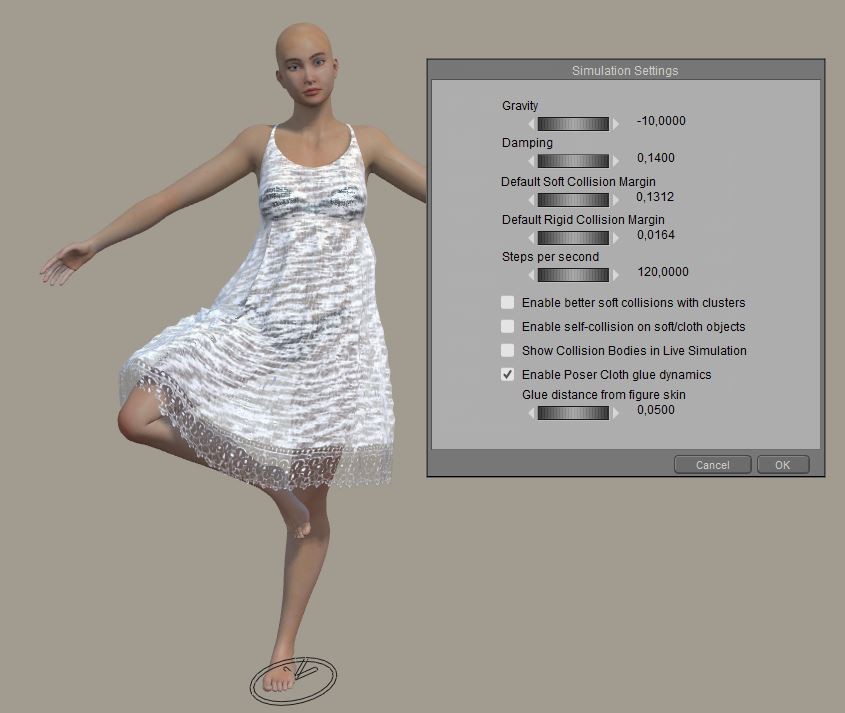
In Poser 14, the fabric doesn't react at all the way it should, as it was designed. As a seller of dynamic clothing since 2011, I have over 100 dynamic clothing items in my shop. They were designed to react in a certain way, and now they're completely unrealistic. I don't know if it's a settings issue, but to be sold on Renderosity and Poser, all dynamic clothing sold must be able to function without any adjustments from the buyer in normal use, including complex poses. This means (and I'll say it again) that dynamic clothing designed for versions prior to Poser 14 won't work in Poser 14, and dynamic clothing designed for Poser 14 won't work in earlier versions. And this problem of imperfect collision with the character is really annoying.

I tired it out with the Tipol shirt for L'homme. I chose the open shirt. The shirt followed the figure pretty well, but the pose wasn't very extreme. However, the shirt didn't open. Not sure if I forgot to do something. Or maybe I shouldn't have chosen all the upper body parts. Maybe that caused the shirt to stick to him? Or maybe the pose just didn't move enough to cause the shirt to open. Any suggestions?
When I applied a material, I did see there was some poke through in the left shoulder and the right forearm. I fixed the shoulder by scaling up a little. But that didn't work for the arm.
It seams not working for me either. Take Andy make him choregraphed, drop a high res square on him, it's going through him until it reach ground and even it will partly get through the ground. Very fast compared to the old cloth room, but not working as it was previously.
Preivously, ignoring head, i was making him a poncho in 2 secs. Now if cannot figure out how to do it.

Privacy Notice
This site uses cookies to deliver the best experience. Our own cookies make user accounts and other features possible. Third-party cookies are used to display relevant ads and to analyze how Renderosity is used. By using our site, you acknowledge that you have read and understood our Terms of Service, including our Cookie Policy and our Privacy Policy.
Any of you who bought P14 have already received this announcement:
Alongside the feature rollout, we’ll also be updating the manual, expanding the documentation, and producing new tutorial videos to help you get the most out of the system. These supporting materials will follow shortly after the initial release, ensuring you have clear guidance as you begin experimenting with PoserCloth.
Your patience and enthusiasm mean a lot as we bring this major enhancement to life. The finish line is in sight — and the results will be worth it.
Because once PoserCloth arrives, your scenes are about to get a whole lot swishier."
All I can say, is that I hope it's not an iteration of the HORRID bullet physics . . . .
We shall see.